
Bunny Ears for TV: 3 Indoor Antennas Compared

For most viewers, Philips 15-Inch Rabbit Ears SDV7114A/27 is the best fit because its 15-inch extendable dipoles and adjustable loop let you tune its position for indoor VHF and UHF reception. Choose Philips Rabbit Ears SDV8201B/27 instead if a 5-foot cable helps you place the antenna, or GE Modern Loop Rabbit Ears 33675 if you prefer a GE model with 15-inch dipoles and a claimed range of up to 30 miles.
Bunny-ear antennas use adjustable dipoles for VHF signals and a loop for UHF; reception depends on broadcast distance, obstructions and placement, not just the antenna’s advertised range.
We earn a commission if you buy through links on this page. As an Amazon Associate I earn from qualifying purchases. Products are compared on manufacturer specifications, not hands-on testing.
- Best overall: Philips 15-Inch Rabbit Ears SDV7114A/27 – Its 15-inch extendable dipoles and adjustable loop offer multiple ways to tune placement.
- Best for cable reach: Philips Rabbit Ears SDV8201B/27 – The included 5-foot coaxial cable is longer than the 4-foot cables on the other rabbit-ear models.
- Best for GE buyers: GE Modern Loop Rabbit Ears 33675 – It combines 15-inch extendable dipoles with a claimed range of up to 30 miles.
| Product | Best for | Dipole length | Coax cable | Claimed range | Shop |
|---|---|---|---|---|---|
| Philips 15-Inch Rabbit Ears SDV7114A/27 | Adjustable placement | 15 in. | 4 ft. | Up to 30 mi. | Check Price on Amazon |
| GE Modern Loop Rabbit Ears 33675 | GE model preference | 15 in. | 4 ft. | Up to 30 mi. | Check Price on Amazon |
| Philips Rabbit Ears SDV8201B/27 | Longer included cable | — | 5 ft. | — | Check Price on Amazon |
Bunny Ears for TV Compared
Compare the antennas by dipole length, included cable and the reception range each maker claims.
Philips 15-Inch Rabbit Ears SDV7114A/27
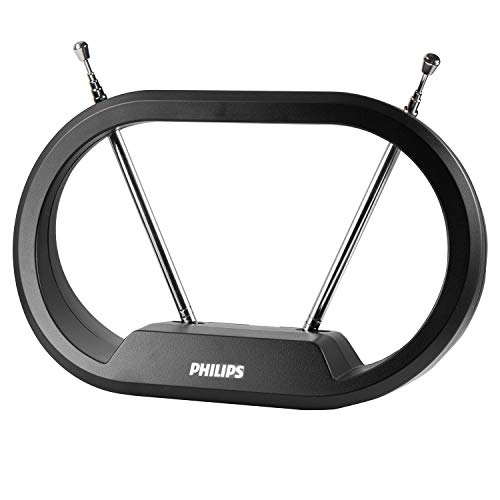
Among these rabbit-ear models, Philips 15-Inch Rabbit Ears SDV7114A/27 pairs 15-inch extendable dipoles with an adjustable loop and a claimed reception range of up to 30 miles. The included 4-foot coaxial cable suits a tabletop setup close to the TV, while the dipoles and loop give you separate elements to reposition during channel tuning. Philips says the antenna receives VHF and UHF broadcasts and is ready for 4K and 8K TVs; those resolution labels do not increase the number of channels the antenna can receive. The short cable may limit placement farther from the television.
Bottom line: Choose it if you want adjustable VHF dipoles and a loop in a compact tabletop setup.
GE Modern Loop Rabbit Ears 33675
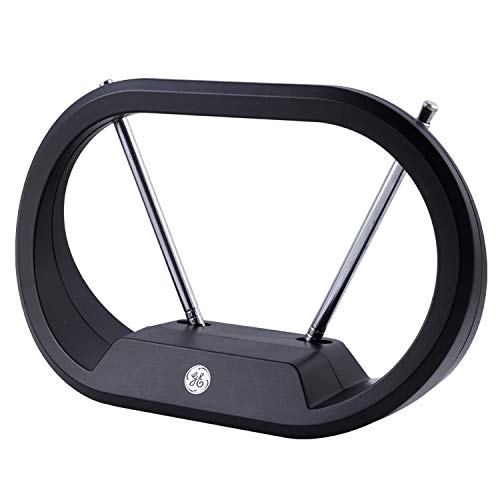
GE Modern Loop Rabbit Ears 33675 is the GE option in this group, with 15-inch extendable dipoles, a loop and an included 4-foot coaxial cable. GE claims reception up to 30 miles for VHF and UHF broadcasts, so treat that figure as a range claim rather than a guarantee for a particular room. Its 4-foot lead favors placement near the TV; a window or a higher shelf may work better for reception, but the cable can restrict where you put it. Run a channel scan again after adjusting the antenna to see whether the available channel count changes.
Bottom line: Pick it if you want a GE rabbit-ear model with extendable dipoles and a loop.
Philips Rabbit Ears SDV8201B/27

Philips Rabbit Ears SDV8201B/27 stands apart with an included 5-foot coaxial cable, one foot longer than the 4-foot leads on the other rabbit-ear choices. Its adjustable dipoles and circular UHF loop provide the familiar VHF-and-UHF antenna layout, while its tabletop format suits a shelf or stand. Philips says it is compatible with ATSC 3.0 broadcasts and modern 4K and 8K TVs; actual reception still depends on what broadcasts reach your location.
Bottom line: Choose it when the extra foot of coax cable helps with your placement.
How to choose bunny ears for TV
Start with the broadcast towers and the room, not the antenna’s resolution label. Rabbit ears use dipole rods primarily for VHF reception, while a loop is intended for UHF; many US stations broadcast in UHF, but some use VHF. For a useful local check, enter your address in the FCC’s DTV Reception Maps tool and note the direction and band of nearby stations. Aim the rods and loop toward the station area, then rescan. Indoor reception can change with walls, metal and nearby electronics, so a claimed mileage range cannot guarantee a specific channel count. If you are more than 30 miles from a tower or have dense obstructions, compare a different antenna style or an outdoor placement option rather than assuming a tabletop antenna will reach.
Where to place an indoor TV antenna
Place a rabbit-ear antenna near a window and as high as practical; height and a clearer path can matter more than small differences between tabletop designs. Try a few positions several feet apart, then rescan the TV at each one, since digital reception can change sharply with placement. Keep the antenna away from large metal objects and avoid hiding it behind the TV, which can block or reflect signals. A longer coax cable can make it easier to test a better position, but do not coil excess cable tightly beside the antenna. When a station breaks up, adjust one dipole or rotate the loop slightly before moving the entire setup, so you can tell which change helped.
VHF dipoles and UHF loops explained
Rabbit ears combine elements for two broadcast bands: adjustable rods work as a VHF dipole, and the circular loop is designed for UHF. VHF broadcast channels occupy frequencies around 54–216 MHz, while UHF television uses roughly 470–608 MHz in the current US broadcast band. Rods are generally extended and repositioned for VHF stations; the loop is rotated or shifted for UHF. A TV’s channel number may be a virtual number rather than the frequency band it uses, so consult a reception map or station data if you need to identify a station’s band. A scan stores channels the TV can decode at that moment; repeat it after meaningful changes in antenna position.
When an indoor antenna may not be enough
Indoor antennas work best when local transmitters are reasonably close and the signal path has few obstacles. Homes with hills, dense buildings, foil-backed insulation or metal siding can have weak or uneven reception, even when a product claims a range of 30 miles. Use the condition as a decision rule: if a reception map shows the desired tower beyond 30 miles, or a clear window position still produces frequent dropouts after several placements, consider a directional or outdoor antenna instead. Amplifiers can help with losses in long cable runs, but they do not create a missing broadcast signal and may worsen interference in strong-signal areas. Scan again after each placement or equipment change.
Frequently Asked Questions
Do bunny-ear antennas receive both VHF and UHF channels?
Yes, a traditional rabbit-ear design uses dipoles for VHF and a loop for UHF. Stations’ virtual channel numbers do not always reveal their broadcast band, so check a reception map or station data when tuning is difficult.
How far can an indoor rabbit-ear antenna reach?
Range depends on tower distance, terrain, buildings and antenna placement, so a mileage is not a promise of reception. For these models, the makers of Philips 15-Inch Rabbit Ears SDV7114A/27 and GE Modern Loop Rabbit Ears 33675 claim up to 30 miles; try a higher window position if nearby stations break up.
How do I scan for channels with bunny ears?
Connect the coaxial cable, open the TV’s channel setup menu and run an over-the-air or antenna scan. Rescan after moving the antenna, because digital tuners may not retain stations that become receivable after a position change.
Should rabbit-ear rods be extended for TV reception?
Extending and adjusting the dipoles can help tune VHF reception, while the loop is adjusted for UHF. Change rod position gradually and rescan or check reception after each adjustment rather than assuming one orientation works for every station.
Where should I place bunny ears for better reception?
A higher position near a window with a clearer path toward broadcast towers is a good starting point. Test several locations a few feet apart and keep the antenna away from large metal objects, which can obstruct or alter incoming signals.