
Speaker for LG Monitor: 4 Wired Options Compared

The LENRUE A39PRO suits most LG monitor setups with a 3.5mm audio output because it pairs a 12.6-inch soundbar with USB power.
Computer speakers are external speakers that take audio from a compatible monitor output or connected computer; USB may supply power, audio, or both, depending on the speaker and host.
We earn a commission if you buy through links on this page. As an Amazon Associate I earn from qualifying purchases. Products are compared on manufacturer specifications, not hands-on testing.
- Best overall: LENRUE A39PRO Soundbar – Its 3.5mm audio input and separate USB power suit monitors with a headphone output and a nearby USB port.
- Best for compact stereo: 1Mii 3.5mm Computer Speakers – The two 3W speakers use a 3.5mm audio plug and have a front rotary volume knob.
- Best for under-monitor space: LENRUE G11 Computer Speakers – Its compact speaker bar is designed to fit under a monitor and has a top volume knob.
| Product | Best for | Power connection | Width | Shop |
|---|---|---|---|---|
| LENRUE A39PRO Soundbar | Monitor soundbar | USB | 12.6 in | Check Price on Amazon |
| 1Mii 3.5mm Computer Speakers | Compact stereo | USB | 10.2 in | Check Price on Amazon |
| Amazon Basics Stereo 2.0 Speakers | Simple desktop audio | USB | 2.6 in | Check Price on Amazon |
| LENRUE G11 Computer Speakers | Under-monitor setup | USB or USB-C | 14.96 in | Check Price on Amazon |
Speakers for LG Monitors
Check the monitor’s audio output before choosing a speaker; the connection determines whether monitor audio can reach it directly.
LENRUE A39PRO Soundbar
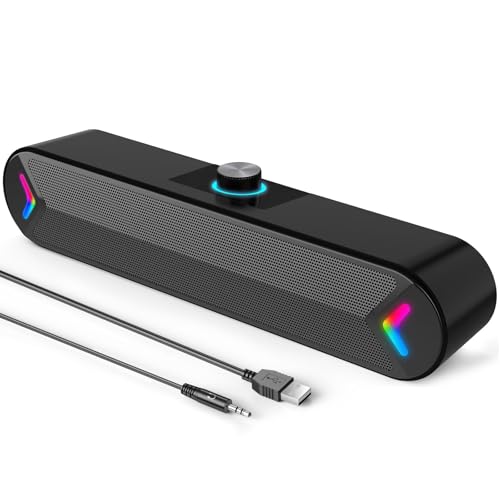
The LENRUE A39PRO is a 12.6-inch soundbar with separate 3.5mm audio and USB power cables, unlike the clip-on USB model. Its top-mounted volume knob gives quick access, and the maker says its two 5W drivers provide stereo sound. It suits an LG monitor with a 3.5mm headphone output and a nearby USB port for power. The limitation is cable routing: audio and power use separate connections, so this is less convenient if you want a single-cable setup.
Bottom line: Choose it if your monitor has a 3.5mm output and you want a soundbar with a top volume knob.
1Mii 3.5mm Computer Speakers

The 1Mii set is a pair of separate stereo speakers, while the LENRUE A39PRO is a single soundbar. It connects audio through a standard 3.5mm AUX plug and uses USB power; the maker gives each speaker a 3W rating and recommends a USB power adapter to reduce static. The front rotary knob is useful when the speakers sit on either side of an LG monitor. Its 10.2-inch width is the width for the pair’s configuration, so check desk space before placing them.
Bottom line: Pick this pair if you prefer separate stereo speakers and a front volume control.
Amazon Basics Stereo 2.0 Speakers

The Amazon Basics set adds a padded base and bottom radiator, details that distinguish it from the other compact wired options. These two speakers take power from a computer’s USB port and include in-line volume control. For direct LG monitor audio, connect the 3.5mm plug to the monitor’s headphone or audio-out jack; a USB port alone may not provide speaker audio. The set is a straightforward choice when the monitor has that analog output, but the inline control is less immediate than a knob mounted on the speaker.
Bottom line: Choose it if your monitor has analog audio out and you want a two-speaker set with inline control.
LENRUE G11 Computer Speakers

The LENRUE G11 is designed to fit beneath a monitor, with its cables joined to reduce desk clutter. It uses a 3.5mm audio cable and a USB-powered cable, and includes a top volume knob and touch-controlled lights. The maker describes four amplifier IC horns and noiseless sound. This format may suit a wide monitor stand area better than two speakers placed at the sides. Confirm that the 14.96-inch width fits your available space; the product still needs a compatible 3.5mm audio output for monitor sound.
Bottom line: Pick it if you want a wide bar beneath the monitor and have room for its 14.96-inch span.
How to connect speakers to an LG monitor
Direct monitor audio requires an audio output on the monitor, commonly a 3.5mm headphone jack; HDMI carrying audio to the monitor does not by itself guarantee a usable speaker output. A 3.5mm speaker plug carries analog audio, while USB can provide power or digital audio depending on the device. Check the monitor’s port labels and manual for headphone/audio out, then connect the speaker’s audio cable there and power it separately if required. If the monitor has no audio output, connect the speakers to the computer instead. Before buying, verify the specific LG model’s available ports rather than relying on the screen size or HDMI input.
USB power versus USB audio
USB-powered speakers need a USB connection for electrical power, but they may still require a separate audio cable. A USB audio speaker sends and receives sound digitally over USB, which requires the connected device to support USB audio output. That difference matters with monitor USB ports: a port intended for charging or data may not route sound from HDMI. For the four exact-fit choices here, the audio connection is 3.5mm AUX, so use the monitor’s analog output or connect the AUX plug to the computer. A single USB cable is not proof of direct monitor-audio compatibility.
Choose a speaker shape for your desk
Speaker placement changes the desk footprint: a soundbar sits across the monitor’s base, while a stereo pair needs space at both sides. The widths here range from 2.6 inches for the Amazon Basics speaker to 14.96 inches for the LENRUE G11; measurements reflect each product’s dimensions, not required clearance. Measure the stand area and side space before choosing. A useful rule is to pick a bar only when the clear span under the monitor exceeds the speaker width; for a pair, allow room on both sides without blocking monitor controls or vents. Keep cables clear of moving stands and desk edges.
Set up monitor speakers without audio surprises
Start with the monitor’s output volume and the speaker’s own control, then raise each gradually to avoid an abrupt loud signal. Many monitors pass sound from an HDMI or DisplayPort source only when their audio setting is enabled, and some route audio through a headphone jack rather than built-in speakers. When there is no sound, check the computer’s selected output device first, then the monitor audio setting and cable seating. If USB power causes static on an AUX speaker, a separate USB power adapter can help; the 1Mii maker specifically recommends that arrangement. Keep analog audio cables away from power bricks where practical to reduce interference.
Frequently Asked Questions
Can I connect speakers directly to an LG monitor?
Yes, if the monitor has a 3.5mm headphone or audio-out jack compatible with the speaker input. Speakers that need USB power still need that separate power connection.
Does a monitor USB port carry speaker audio?
Not necessarily; USB ports may supply power or data without sending audio. USB audio requires the monitor or connected computer to support it as an audio output.
Why is there no sound from my monitor speakers?
The selected computer audio output may still be the monitor, or the monitor may have audio muted or disabled. Check the output selection, monitor volume, and whether the source sends audio over HDMI or DisplayPort.
Do these speakers need a headphone jack?
The exact-fit options here use a 3.5mm AUX audio connection, so direct monitor connection requires a compatible audio output. Without one, connect the AUX cable to the computer’s audio output instead.