
SSD Connector to USB: 5 Adapters Compared by Drive Fit

For most people connecting a standard 2.5-inch SATA SSD, SABRENT USB 3.0 SATA Adapter Cable is the simplest choice because it is a USB-A adapter cable that powers most such drives without an external adapter. Choose FIDECO M.2 NVMe Enclosure instead for an M.2 NVMe SSD; the drive’s form factor and protocol determine which connector works.
A SATA-to-USB adapter bridges a SATA drive to a computer’s USB port, while an enclosure surrounds the drive and a dock holds it upright. If your computer has only USB-C ports, favor a product with a USB-C connection or confirm that a compatible adapter is available.
We earn a commission if you buy through links on this page. As an Amazon Associate I earn from qualifying purchases. Products are compared on manufacturer specifications, not hands-on testing.
- Best overall: SABRENT USB 3.0 SATA Adapter Cable – Connects 2.5-inch SATA SSDs directly by USB-A and powers most drives from USB.
- Best for M.2 NVMe: FIDECO M.2 NVMe Enclosure – Supports M.2 NVMe drives in four listed lengths and a USB 3.2 Gen 2 connection.
- Best for enclosed SATA storage: BENFEI 2.5-Inch SATA Enclosure – Encloses a 2.5-inch SATA drive and offers both USB-C and USB-A connection options.
- Best for 3.5-inch SATA drives: SABRENT SATA Docking Station – Accepts both 2.5-inch and 3.5-inch SATA drives in a docking station.
| Product | Best for | Drive type and size | USB connection | Maximum data rate | Shop |
|---|---|---|---|---|---|
| SABRENT USB 3.0 SATA Adapter Cable | 2.5-inch SATA SSDs | 2.5-inch SATA | USB-A | 5 Gbps | Check Price on Amazon |
| BENFEI 2.5-Inch SATA Enclosure | Protected SATA storage | 2.5-inch SATA | USB-C / USB-A | 5 Gbps | Check Price on Amazon |
| FIDECO M.2 NVMe Enclosure | M.2 NVMe SSDs | M.2 NVMe, 2230–2280 | USB 3.2 Gen 2 | 10 Gbps | Check Price on Amazon |
| BENFEI 2-in-1 SATA Adapter Cable | USB-C or USB-A | 2.5-inch SATA | USB-C / USB-A | 5 Gbps | Check Price on Amazon |
| SABRENT SATA Docking Station | 2.5- and 3.5-inch SATA | 2.5- and 3.5-inch SATA | USB-A | — | Check Price on Amazon |
SSD Connector to USB Adapters
Match the drive’s connector and protocol first, then compare the USB connection and adapter style.
SABRENT USB 3.0 SATA Adapter Cable

For a bare 2.5-inch SATA SSD, this adapter is the most direct option: connect the drive to its SATA plug and the cable to a USB-A port. It supports SATA I, II, and III drives and uses USB power for most 2.5-inch SSDs and laptop hard drives. The maker says the USB 3.0 connection supports 5 Gbps and UASP. The cable does not fit M.2 drives or 3.5-inch desktop drives, so it suits simple transfers from a compatible laptop SSD, not a mixed-size drive collection.
Bottom line: Choose this for straightforward USB access to a 2.5-inch SATA SSD.
BENFEI 2.5-Inch SATA Enclosure

Unlike a bare adapter cable, this tool-free enclosure surrounds a 2.5-inch SATA drive, making it the more contained option for a drive used as external storage. It accepts SATA I, II, and III drives and has USB-C and USB-A plug options. The maker gives a maximum transfer rate of 5 Gbps and says UASP is supported; the enclosure is also described as plug-and-play and hot-swappable. Its size limits it to 2.5-inch SATA drives, so it is not the right fit for M.2 or 3.5-inch drives.
Bottom line: Pick this when you want a 2.5-inch SATA drive housed for repeat use.
FIDECO M.2 NVMe Enclosure

For an M.2 NVMe SSD, this enclosure serves a different drive type from the SATA adapters: it supports M and M+B keys in sizes 2230, 2242, 2260, and 2280. Its sandwich-style, tool-free design is intended to make installation easier across those lengths. The maker says its USB 3.2 Gen 2 connection supports up to 10 Gbps, along with UASP and TRIM. It does not support M.2 SATA drives, so check the SSD’s protocol rather than relying on the M.2 shape alone.
Bottom line: Choose this for a supported M.2 NVMe drive, not an M.2 SATA SSD.
BENFEI 2-in-1 SATA Adapter Cable

This cable stands out for its 2-in-1 USB-C and USB 3.0 connection options, useful when connecting a bare 2.5-inch SATA drive to computers with different port types. It supports 2.5-inch SATA SSDs and hard drives, with backward compatibility for USB 2.0 and 1.1. The maker advertises up to 5 Gbps over USB 3.0 and says UASP can improve transfer performance. Its drive fit is limited to 2.5-inch SATA; it cannot connect M.2 or 3.5-inch drives.
Bottom line: Pick this if the USB-C and USB-A plug choices suit your host devices.
SABRENT SATA Docking Station
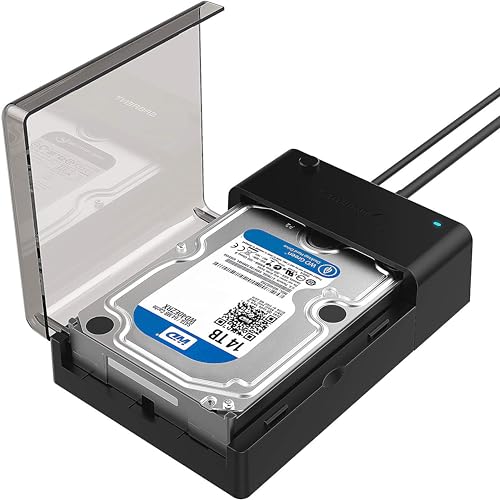
For someone who needs to connect a 3.5-inch SATA SSD or hard drive as well as a 2.5-inch drive, this docking station has broader drive-size compatibility than the cable-style adapters. It supports SATA I, II, and III drives in either stated size and holds the drive in a dock rather than enclosing it. Its host cable uses USB-A, so a USB-C-only computer needs a compatible adapter. A 3.5-inch drive requires the included 12-volt power adapter, making this less convenient than a USB-powered 2.5-inch adapter.
Bottom line: Choose this for the flexibility to dock either 2.5- or 3.5-inch SATA drives.
How to Choose an SSD Connector to USB Adapter
Match the drive protocol before choosing a USB plug: SATA and NVMe are not interchangeable, even when both drives are called SSDs. A 2.5-inch SATA SSD has a wide L-shaped SATA edge connector; M.2 SSDs are slim cards and may use either SATA or NVMe, so the card’s protocol and keying matter. USB 3.0 has a theoretical 5 Gbps signaling rate, while USB 3.2 Gen 2 reaches 10 Gbps; actual file transfers are lower and depend on the drive, host port, and bridge. If the drive is M.2, confirm that it is NVMe before selecting an NVMe-only enclosure. If it is a 2.5-inch SATA model, a cable is compact, while an enclosure adds a case.
A useful rule: choose a product that explicitly names your drive’s protocol and physical size before comparing speed claims.
SATA Cables, Enclosures, and Docks Compared
A cable is the simplest way to connect a bare 2.5-inch SATA drive temporarily; an enclosure holds the drive inside a case for repeated external use. A docking station can accommodate bare drives of more than one size, but larger desktop drives need their own power. An M.2 NVMe enclosure is a separate category, not a faster version of a SATA adapter. M.2 describes a physical form factor, while SATA and NVMe describe different storage interfaces. This distinction prevents a common mismatch: an M.2 SATA SSD will not work in an NVMe-only enclosure just because its card fits physically.
Use this guide to narrow the connection style after confirming drive compatibility.
| Drive | Adapter style to seek | Fit check |
|---|---|---|
| 2.5-inch SATA SSD | SATA cable or enclosure | Match SATA connector |
| M.2 NVMe SSD | NVMe enclosure | Match protocol, key, and length |
| 3.5-inch SATA drive | Powered dock | Confirm external power |
Check Drive Size, Protocol, and Power
Drive size and protocol determine fit; the USB port alone does not. The M.2 format commonly uses card lengths such as 2230, 2242, 2260, and 2280, so an enclosure must support the SSD’s length as well as its NVMe or SATA protocol. A 2.5-inch laptop SATA drive uses a different connector from an M.2 card. Power is another practical difference: small 2.5-inch SSDs can often run from USB, whereas a 3.5-inch desktop drive needs separate power. Some older or high-capacity 2.5-inch mechanical drives may also draw more current than one USB port supplies.
Before connecting a bare drive, identify its size and interface from the drive label or original device specifications; when a drive does not spin up, check its power requirement rather than assuming the USB connection is faulty.
USB Speed and Transfer Expectations
USB speed labels describe the connection’s theoretical ceiling, not guaranteed file-copy performance. USB 3.0 is commonly specified at 5 Gbps, and USB 3.2 Gen 2 at 10 Gbps; protocol overhead, the SSD, the bridge chip, and the host port all affect the result. A drive connected through a USB 2.0 port will not reach USB 3.x rates, even if the adapter supports them. UASP can improve command handling compared with older USB mass-storage operation, but both the adapter and computer need compatible support to use it. A faster enclosure cannot make a slower SSD transfer faster than its own capability.
For large transfers, connect directly to a compatible high-speed host port and avoid judging the adapter by its maximum label alone.
Frequently Asked Questions
Can an M.2 SSD plug into a SATA USB adapter?
No, an M.2 SSD does not connect to a standard 2.5-inch SATA adapter. M.2 drives may use SATA or NVMe, so select an enclosure that supports the drive’s actual protocol and card length.
How can I tell whether my M.2 SSD is NVMe?
Check the SSD’s model specifications or label for NVMe or PCIe versus SATA. The M.2 card shape alone does not identify the protocol, and an NVMe-only enclosure will not accept an M.2 SATA drive electrically.
Does a 3.5-inch SATA SSD need external power?
A 3.5-inch SATA drive needs external power rather than relying on a USB-powered adapter cable. Use a dock or adapter that provides the required power connection and verify the drive’s power needs.
Will USB 3.0 deliver 5 Gbps file transfers?
No, 5 Gbps is the theoretical USB 3.0 signaling rate, not a promise of file-copy speed. The SSD, adapter, host port, and protocol overhead reduce real transfer rates; a USB 2.0 port is slower still.
What does UASP do for an SSD adapter?
UASP is a USB storage protocol that can handle commands more efficiently than older mass-storage operation. The host computer and adapter both need compatible support, and it cannot overcome a slower drive or port.