
UnionSine External Hard Drives: Compare 4 Models

For a compact drive, choose the UnionSine 500GB portable HDD; for a desk-based library, the UnionSine 14TB desktop drive offers far more capacity. External hard drives store files outside a computer and connect over USB, but the desktop model is not the pocketable choice.
Seagate’s 1TB and 2TB portable drives are alternatives if you want a different capacity from UnionSine.
We earn a commission if you buy through links on this page. As an Amazon Associate I earn from qualifying purchases. Products are compared on manufacturer specifications, not hands-on testing.
- Best overall: UnionSine 500GB Portable HDD – The 500GB portable design is the clearest fit for carrying files alongside a laptop.
- Best for desktop storage: UnionSine HD3513 14TB Desktop Drive – Its 14TB capacity suits larger libraries and stationary setups.
- Best for 2TB portable storage: Seagate Portable Drive 2TB – The Seagate portable drive pairs 2TB capacity with an included 18-inch USB 3.0 cable.
| Product | Best for | Capacity | Design | Connection | Shop |
|---|---|---|---|---|---|
| UnionSine 500GB Portable HDD | Portable file storage | 500GB | Portable HDD | USB 3.0 / USB 2.0 | Check Price on Amazon |
| UnionSine HD3513 14TB Desktop Drive | Large desktop library | 14TB | 3.5-inch desktop | USB 3.0 | Check Price on Amazon |
| Seagate Portable Drive 2TB | More portable capacity | 2TB | Portable HDD | USB 3.0 | Check Price on Amazon |
| Seagate Portable Drive 1TB | Portable everyday storage | 1TB | Portable HDD | USB 3.0 | Check Price on Amazon |
UnionSine External Hard Drives and Alternatives
Compare capacity and form factor first, then choose the drive that matches where you plan to keep it.
UnionSine 500GB Portable HDD

The UnionSine 500GB portable HDD is the pocket-sized option in this group, with USB 3.0 and USB 2.0 interfaces. Its case measures 4.56 by 3.15 by 0.5 inches, and the maker says the JMicron 578 solution has theoretical read speeds up to 125 MB/s. Rounded corners and a striped surface are intended to make the casing easier to grip. This suits carrying a smaller collection of files with a computer. Its 500GB capacity is much lower than the desktop UnionSine model, so it is a poor match for a large video or backup archive.
Bottom line: Choose this for pocketable storage when 500GB is enough.
UnionSine HD3513 14TB Desktop Drive
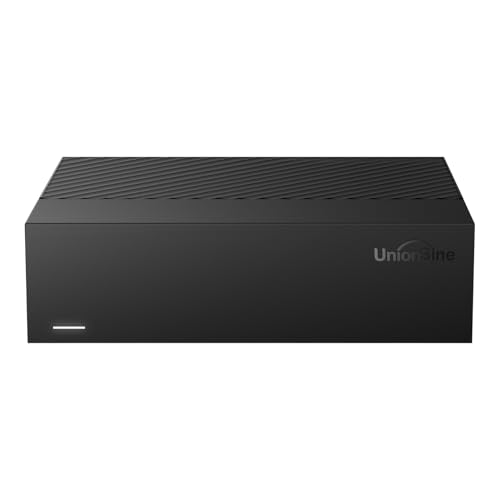
The UnionSine HD3513 is the only desktop-format drive here, combining 14TB capacity with a 3.5-inch horizontal enclosure. It uses USB 3.0 Micro-B and has a 12V/3A power supply, so it is intended for a stationary setup rather than a pocket. The maker gives theoretical read/write speeds of up to 130–270 MB/s and describes compatibility with Windows, Mac, Linux, Android, TVs, DVD players and Xbox. This is suited to a large media or work archive. Its desktop form and separate power supply make it less convenient to carry than the portable drives.
Bottom line: Pick this for a large, mostly stationary storage library.
Seagate Portable Drive 2TB

The Seagate Portable Drive offers 2TB in a portable format, four times the capacity of the UnionSine 500GB drive while remaining a carryable HDD. It is designed for Windows or Mac computers, and Seagate says setup is plug-and-play with drag-and-drop backup; an 18-inch USB 3.0 cable is included. The drive measures 4.6 by 3.15 by 0.58 inches. It suits a user who wants more room for files on the move. The description focuses on computer use, so check console compatibility if gaming storage is the deciding requirement.
Bottom line: Choose it for portable 2TB capacity and included USB cable.
Seagate Portable Drive 1TB
The Seagate Portable Drive 1TB provides a middle capacity between the UnionSine 500GB portable and Seagate 2TB options. It connects by USB 3.0, includes an 18-inch cable, and is designed for Windows or Mac computers; Mac may require reformatting. The drive measures about 4.61 by 3.15 by 0.58 inches and weighs about 0.42 pounds. Its plug-and-play setup and drag-and-drop backup suit basic computer storage. The 1TB limit leaves less room for a growing media archive than the 2TB portable drive or UnionSine desktop model.
Bottom line: Pick this for a portable 1TB computer drive.
How to choose an external hard drive
Choose capacity by estimating the files you expect to keep and leaving room for growth; the options here range from 500GB to 14TB. A portable 2.5-inch-style drive can travel with a laptop, while a 3.5-inch desktop drive is meant to stay put and commonly needs its own power adapter. USB 3.0 drives can connect to USB 2.0 ports, but the older port can constrain transfer speed. The maker’s theoretical speed figures are not a guarantee of real-world copying rates; file size, computer port, and drive workload all affect results. As a practical rule, if you need more than 2TB in this selection, choose the 14TB desktop model and plan for a fixed location and outlet.
Portable and desktop drive differences
Portable drives prioritize a smaller enclosure, while desktop external HDDs trade portability for higher capacities. HDDs store data on spinning magnetic platters; unlike solid-state drives, they have moving parts, so avoid drops and jolts while a drive is operating. The 14TB UnionSine is explicitly a 3.5-inch desktop design with a separate 12V/3A supply, unlike the portable products. A USB cable carries data, but desktop drives may also need wall power; do not assume a computer port alone can power every model. For a laptop bag, compare the dimensions and weight, not capacity alone. For a media archive kept at a desk, capacity and a stable, ventilated placement matter more than pocketability.
USB compatibility and file formats
USB 3.0 devices can generally plug into older USB ports, but transfer speed then follows the slower connection. USB connector shape matters too: the desktop UnionSine specifies USB 3.0 Micro-B, while the portable drives simply identify USB 3.0. Windows and macOS may use different default file systems; reformatting for one can affect access from another operating system. Seagate specifically notes that its 1TB model may require reformatting for Mac, so consider cross-platform sharing before changing formats. A drive formatted for a TV or game console may not remain readable by a computer in the same way. If the drive will move among devices, verify each device’s supported capacity and file system before transferring an archive.
Protecting files on an external HDD
An external HDD is one copy, not a complete backup plan: keep a second copy of irreplaceable files on another device or in a separate location. Disconnect the drive using the computer’s eject command before unplugging it, which reduces the chance of interrupting an active write. Keep HDDs away from impacts, liquids, and excessive heat because spinning mechanisms and electronics can be damaged. For a desktop drive, leave airflow around the enclosure rather than stacking it under heat-producing equipment. Portable drives are easier to carry but are also exposed to bumps in transit; use a padded pocket and unplug before moving. A backup is useful only if files can be restored, so periodically open a few copied files and confirm that the backup remains readable.
Frequently Asked Questions
Can a USB 3.0 hard drive work with USB 2.0?
Usually, a USB 3.0 drive can connect to a USB 2.0 port with a compatible cable, but transfer speed is limited by the older port. The UnionSine 500GB model lists both USB 3.0 and USB 2.0 interfaces.
Is a 14TB external drive portable?
The UnionSine 14TB model is a 3.5-inch desktop drive with a 12V/3A power supply, so it is better suited to a fixed desk setup. Pick a portable drive if you need storage that travels with a laptop.
Does an external hard drive need its own power supply?
Portable drives are designed for a compact setup, while many 3.5-inch desktop HDDs use a separate power adapter. The UnionSine 14TB desktop model specifies a 12V/3A supply; plan for an outlet near its setup.
Can one external drive be shared between Mac and Windows?
A drive can be used across both systems when its file system is supported by each, but formatting choices affect compatibility. Seagate notes that its 1TB portable model may need reformatting for Mac, so confirm the intended device support before formatting.
How should I protect an external hard drive while traveling?
Keep a portable HDD unplugged while moving it and protect it from drops, liquid, and heat because its magnetic platters spin during operation. A padded compartment helps reduce bumps, and a second backup copy protects files if the drive is damaged.