
USB Mic for Raspberry Pi: 5 Options Compared

SuziePi USB Mini Microphones (2-Pack) is the closest match for most Raspberry Pi users because it is a compact USB 2.0 microphone with explicit support for several Pi models. Choose SunFounder USB Mini Microphone if you need a single mic rather than a two-piece set, or consider a lavalier for a clip-on setup.
A USB microphone captures sound through a computer’s USB port; a USB sound card with an onboard mic adds audio input alongside playback. Confirm that your Pi model and operating system recognize the microphone as an input device before relying on it for a project.
We earn a commission if you buy through links on this page. As an Amazon Associate I earn from qualifying purchases. Products are compared on manufacturer specifications, not hands-on testing.
- Best overall: SuziePi USB Mini Microphones (2-Pack) – The two USB 2.0 mini mics explicitly support Raspberry Pi models from Pi 1 B+ through Pi 5.
- Best for one mic: SunFounder USB Mini Microphone – A compact mini microphone with explicit Raspberry Pi 5, 4B, 3B+, and 3B compatibility.
- Best for audio input and output: USB Sound Card with Onboard Mic – Combines an onboard microphone with a speaker header and stereo playback.
| Product | Best for | Connection | Pickup or audio format | Raspberry Pi fit | Shop |
|---|---|---|---|---|---|
| SuziePi USB Mini Microphones (2-Pack) | Two-mic setups | USB 2.0 | Omnidirectional; noise-canceling | Pi 1 B+ through Pi 5 | Check Price on Amazon |
| SunFounder USB Mini Microphone | Single-mic projects | USB 2.0 | — | Pi 3B through Pi 5 | Check Price on Amazon |
| USB Sound Card with Onboard Mic | Input and playback | USB 2.0 | Stereo codec; 8–48 kHz | Raspberry Pi / Jetson Nano | Check Price on Amazon |
| MAONO UL10 USB Lavalier Microphone | Clip-on recording | USB | Omnidirectional; 192 kHz/24-bit | — | Check Price on Amazon |
| Estiq Super Mini USB Microphone | Compact spare mic | USB | Noise-canceling; pattern — | — | Check Price on Amazon |
USB Mic for Raspberry Pi Options
Compare the microphone type and stated Pi compatibility to find a practical match for your setup.
SuziePi USB Mini Microphones (2-Pack)

SuziePi USB Mini Microphones (2-Pack) stands apart by including two USB mini microphones and naming a broad range of Raspberry Pi models, including Pi 5, Pi 4B, Pi 3B+, and older boards. The microphones are small, measuring 0.9 inches long and 0.8 inches wide, and the maker says they need no driver. Their omnidirectional pickup is intended to capture sound from multiple directions, with background-noise filtering. This set suits a project needing a spare or two microphone units. The feature claims do not identify separate controls or a mounting method, so it may not suit a setup that needs either.
Bottom line: Choose this set when explicit compatibility across several Pi generations and a spare mic matter.
SunFounder USB Mini Microphone

SunFounder USB Mini Microphone is a single mini microphone option with compatibility for Raspberry Pi 5, 4B, 3B+, and 3B, plus SunFounder Pironman cases. The maker also names Raspberry Pi OS, Linux, and Ubuntu support and says the mic is plug-and-play without driver installation. That OS range is useful for projects that move between Pi builds and other Linux machines.
Bottom line: Pick this for a one-microphone build using one of its explicitly named Pi models.
USB Sound Card with Onboard Mic

USB Sound Card with Onboard Mic differs from standalone USB microphones because it is a USB sound card with an onboard microphone and a speaker header; an 8-ohm, 5-watt speaker is included. It supports recording and playback, and the maker lists sampling rates from 8 kHz to 48 kHz, including 44.1 kHz. The board is suited to embedded projects that need both audio capture and output rather than only a mic plugged into a Pi. Its speaker and sound-card features make it a different form factor from the mini microphones, so it is not the simplest choice when the goal is only voice input.
Bottom line: Choose this when the Pi project needs audio input and speaker playback together.
MAONO UL10 USB Lavalier Microphone
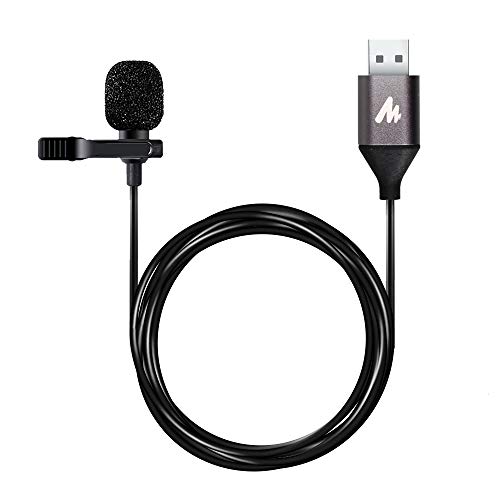
MAONO UL10 USB Lavalier Microphone is a USB lavalier rather than a mini plug-in mic, with an omnidirectional pickup and a metal clip for attaching the mic near the speaker. The maker gives a 192 kHz/24-bit recording specification and lists uses such as interviews, meetings, and video recording, alongside PC, Mac, and laptop compatibility. A lavalier can be useful when the speaker moves and needs a wearable mic position. Raspberry Pi compatibility is not among the named supported systems, so this is a conditional option: verify USB audio recognition on the intended Pi and operating system first.
Bottom line: Consider it for a wearable mic position only after confirming your Pi recognizes it.
Estiq Super Mini USB Microphone

Estiq Super Mini USB Microphone is a compact general-purpose USB microphone aimed at laptop and desktop use, with plug-and-play support described for Windows and Mac. The maker says its noise-canceling microphone filters background sound, and its small dimensions are 4.3 inches long by 3.8 inches wide by 0.3 inches high. Treat it as a possible general USB input device, not a guaranteed Pi-specific choice, and confirm recognition before planning around it.
Bottom line: Choose it only if you can confirm compatibility with your Pi configuration.
How to choose a USB mic for Raspberry Pi
Start with explicit Pi and operating-system compatibility, then decide whether you need only capture or both capture and playback. A standalone USB microphone keeps the setup simple; a sound card module can add a microphone input and speaker output on one board. USB audio devices commonly use the USB Audio Class standard, which Linux systems handle through ALSA, but the product claims do not prove every model or OS combination will enumerate correctly. For a headless project, check that the device appears as a capture input before building software around it. If the project needs a wearable mic position, choose a lavalier form factor, but confirm Pi recognition first.
Check Raspberry Pi USB audio compatibility
Verify compatibility on the exact Pi model and OS release, because USB recognition and application setup are separate steps. On Raspberry Pi OS, ALSA command-line tools such as arecord -l can show capture devices after connection; an empty capture list means the mic is not ready for recording. Also consider available USB ports: a powered USB hub may help when the project has multiple peripherals drawing power, though it does not resolve a driver or format mismatch. For a voice-input project, test a short recording and playback loop before final installation. Avoid assuming that a claim of computer compatibility automatically confirms Pi support.
Microphone type and pickup pattern
Pickup pattern determines where a mic is most sensitive: omnidirectional microphones capture sound from around the capsule, while a lavalier’s clip helps keep that capsule near the speaker. A noise-canceling claim does not guarantee clean results in every room; distance, reflections, fan noise, and mic placement still affect intelligibility. As a practical rule, place a voice mic within about 6 to 12 inches of the speaker when possible, and keep it away from a Pi’s fan or other continuous noise source. A mic intended for several people around a table may need a different placement than a single-speaker voice-control project.
USB microphone setup mistakes to avoid
Do not choose a microphone by its maximum sample-rate figure alone: application support, operating-system recognition, and the recording format all matter. Many speech and conferencing workflows use 16 kHz or 48 kHz audio, while higher rates increase data without automatically improving spoken-word clarity. Keep the microphone stable and avoid blocking its capsule; for an omnidirectional mic, placing it close to a noisy fan can make that noise prominent. Test at the distance and in the room where the Pi will operate, then adjust input level in the recording software to prevent clipping. If a mic fails to appear, check device recognition before changing application settings.
Frequently Asked Questions
How do I check whether a USB mic works on Raspberry Pi?
Connect the microphone and check whether ALSA lists a capture device; arecord -l is a common command-line check on Raspberry Pi OS. Then make a short recording and play it back, since detection alone does not confirm the chosen application is configured correctly.
Is an omnidirectional mic good for Raspberry Pi voice input?
An omnidirectional mic can capture speech from multiple directions, which helps when the speaker position changes. For one-speaker recognition, keeping the mic within about 6 to 12 inches and away from fans usually matters more than choosing a high sample rate.
What sample rate should I use for Pi speech recording?
A 16 kHz or 48 kHz setting is common for speech and conferencing workflows. Choose a rate supported by both the microphone and recording application, and make a short test recording before deploying the setup.
Can a USB sound card record and play audio?
A USB sound card with capture and playback support can handle microphone input and speaker output, provided the Pi recognizes both audio paths. Check capture and playback separately, since seeing one device does not confirm that the other works.
Does plug-and-play mean a microphone works with every Pi?
No; plug-and-play claims do not establish compatibility with every Pi model, OS release, or application. Confirm that the exact setup exposes a capture device and records a test clip before relying on it.