
Galaxy Buds 2 Accessories: 5 Fit Options Compared

IiEXCEL Galaxy Buds 2 Ear Tips is the closest match for Galaxy Buds 2 because its six pairs of silicone tips are compatible with that model and come in three sizes. Choose another option only if you have a Buds FE or Buds 2 Pro; those accessories are model-specific and are not interchangeable with standard Buds 2.
We earn a commission if you buy through links on this page. As an Amazon Associate I earn from qualifying purchases. Products are compared on manufacturer specifications, not hands-on testing.
- Best overall: IiEXCEL Galaxy Buds 2 Ear Tips – Compatible with Galaxy Buds 2 and includes six pairs of tips in S, M and L.
- Best for Buds FE: BLLQ Galaxy Buds FE Tips and Wing Tips – Includes replacement ear tips and wing tips made for Galaxy Buds FE.
- Best for a neck strap: IiEXCEL Buds 2 Pro Strap and Ear Tips – Combines six pairs of tips with a silicone strap kit for Galaxy Buds 2 Pro.
| Product | Best for | Compatible model | Included pieces | Shop |
|---|---|---|---|---|
| IiEXCEL Galaxy Buds 2 Ear Tips | Standard Buds 2 | Buds 2, Buds Plus, Buds | 6 pairs, S/M/L | Check Price on Amazon |
| BLLQ Galaxy Buds FE Tips and Wing Tips | Buds FE fit | Galaxy Buds FE | 6 ear tips, 4 wing tips | Check Price on Amazon |
| IiEXCEL Buds 2 Pro Strap and Ear Tips | Buds 2 Pro tether | Galaxy Buds 2 Pro SM-R510 | Strap, box, 6 pairs tips | Check Price on Amazon |
| Luckvan Buds 2 Pro Anti-Lost Strap | Buds 2 Pro sports | Galaxy Buds 2 Pro | 2 straps | Check Price on Amazon |
| IiEXCEL Galaxy Buds 2 Pro Ear Tips | Buds 2 Pro tips | Galaxy Buds 2 Pro | 6 pairs, S/M/L | Check Price on Amazon |
Galaxy Buds 2 Accessories
Match the accessory to your exact Galaxy Buds model before comparing tip sizes and add-ons.
IiEXCEL Galaxy Buds 2 Ear Tips
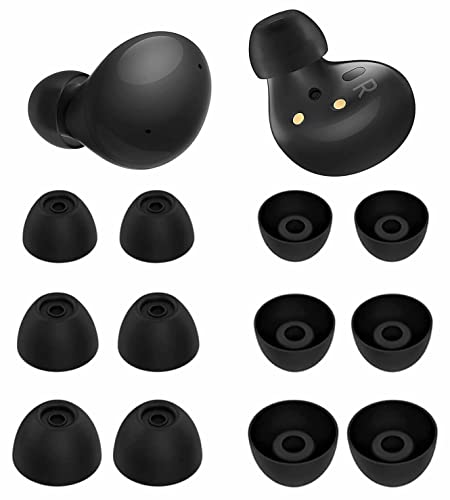
For standard Galaxy Buds 2, this set is the only option here that names that model as compatible. It includes six pairs of flexible silicone tips in small, medium and large, and the maker says they fit in the charging case without removal. The maker also claims the tips can improve noise isolation and in-ear stability when they form a good seal. This is a replacement-tip set, not a strap or wing-tip kit, so choose another accessory type if keeping the earbuds tethered is your priority.
Bottom line: Pick this set for replacement tips explicitly compatible with standard Galaxy Buds 2.
BLLQ Galaxy Buds FE Tips and Wing Tips

Unlike the standard Buds 2 options, this set is made specifically for Galaxy Buds FE and combines ear tips with wing tips. The package has three ear-tip sizes—S, M and L—and two wing-tip sizes, S and L; the silicone pieces are described as water-washable and replaceable. The maker says the pieces fit in the charging case without removal. This is not a match for standard Galaxy Buds 2, so choose it only if your earbuds are the FE model and you need both types of replacement pieces.
Bottom line: Choose this set only for Galaxy Buds FE that need ear tips and wing tips.
IiEXCEL Buds 2 Pro Strap and Ear Tips

For Galaxy Buds 2 Pro owners who want both replacement tips and a tether, this kit combines six pairs of S/M/L silicone tips with a neck strap and storage box. Its maker identifies the compatible model as Galaxy Buds 2 Pro SM-R510 and says the strap is designed to help keep the earbuds from being lost. The fit is explicitly limited to that Pro model, so it is not an alternative for standard Galaxy Buds 2. Choose it over a tip-only kit when the strap is the deciding extra.
Bottom line: Pick this kit for compatible Buds 2 Pro earbuds when a tether matters.
Luckvan Buds 2 Pro Anti-Lost Strap

For a strap-focused Buds 2 Pro accessory, this option comes with two silicone anti-loss straps rather than a multi-size set of replacement tips. The maker says replacement ear-tip sleeves are built into the strap and describes the adjustable cord as wearable around the neck or on a bag. Black and purple styles are included. Compatibility is limited to Galaxy Buds 2 Pro, so standard Buds 2 owners should not choose it; it also suits buyers seeking a tether more than a selection of spare tips.
Bottom line: Choose this two-strap set for Buds 2 Pro if tethering is the main need.
IiEXCEL Galaxy Buds 2 Pro Ear Tips

Unlike the strap kits, this is a tip-only replacement set for Galaxy Buds 2 Pro, with six pairs in S, M and L plus a storage box. The maker says the washable silicone tips are flexible and replaceable, and claims a good seal can help reduce outside noise. Its purple color is a visual distinction from the black tip options in this group. Compatibility is limited to the 2022-release Buds 2 Pro, so it is not a fit for standard Galaxy Buds 2.
Bottom line: Pick these purple replacement tips for compatible Buds 2 Pro earbuds.
How to choose Galaxy Buds 2 accessories
Start with the exact earbud model, then choose the accessory function: replacement tips, wing tips or a tether. Standard Galaxy Buds 2 and Galaxy Buds 2 Pro are separate model names, and the options here specify different compatibility, so do not assume that a Pro or FE accessory fits standard Buds 2. For tips, match the size to a secure, comfortable seal; a tip that loosens during ordinary movement is too large or poorly seated, while pressure or soreness is a sign to try another size. A strap is a different solution: it connects the earbuds but does not make an incompatible tip fit. Check the model designation on your earbuds or case before ordering an accessory.
Ear tip sizing and seal
Most replacement-tip sets use small, medium and large sizes, but the best size can differ between ears. Try each size on both sides, then check that the tip stays attached when gently tugged and seals without painful pressure. A poor seal can let sound escape and may make earbuds feel unstable; a tip that is too large can be uncomfortable. Change one side at a time if your ears need different sizes. Check that each tip is fully seated on the earbud nozzle before use, since a loose tip can detach in the ear. Avoid forcing a tip that does not attach securely.
Galaxy Buds 2 tips, wing tips and straps compared
Replacement ear tips cover the earbud nozzle and are the direct choice when a tip is lost, worn or the fit needs adjustment. Wing tips add an external support piece, while an anti-loss strap links the earbuds so they can hang together when removed. These accessory types solve different problems and are not interchangeable.
| Accessory type | Choose it for | Check first |
|---|---|---|
| Ear tips | Replacement or fit adjustment | Exact Buds model and size |
| Wing tips | Additional ear support | Model-specific shape |
| Strap | Keeping earbuds tethered | Pro or standard model compatibility |
A measurable rule helps narrow the choice: if the main need is a tether, select a strap kit; if there is no need for a tether, a tip-only set avoids buying that extra accessory.
Cleaning and replacing silicone tips
Silicone ear tips can usually be cleaned with lukewarm water and mild soap; remove them from the earbuds first and dry them completely before reattaching. Moisture left on the earbud nozzle can cause problems, so keep the earbuds themselves out of water. Inspect tips regularly for tears, stretching or a loose fit, and replace damaged pieces rather than continuing to use them. Do not use sharp tools to clear debris from the nozzle or stretch tips into place. If a tip is difficult to remove, grip the silicone close to its base and pull gently rather than yanking on the earbud.
Frequently Asked Questions
How do I know which Galaxy Buds model I have?
Check the model name shown for your earbuds or charging case in the Galaxy Wearable app or device settings. Match that name to the accessory compatibility before selecting tips or a strap; standard Buds 2 and Buds 2 Pro accessories should not be treated as interchangeable.
Can I use Galaxy Buds 2 Pro tips on Buds 2?
Do not assume they fit: replacement tips are model-specific, and the Pro tip sets here name Galaxy Buds 2 Pro compatibility while a separate set names standard Buds 2. Confirm the precise model before choosing replacement tips.
How should Galaxy Buds ear tips fit?
A well-fitting tip should stay attached and create a seal without painful pressure. Try S, M and L on each ear, since the two ears may need different sizes.
How often should silicone ear tips be cleaned?
Clean silicone tips regularly, especially after workouts or when debris is visible. Remove them from the earbuds, wash with mild soap and water, and let them dry fully before reinstalling.
Are anti-loss straps useful for exercise?
A strap can keep compatible earbuds connected when they are removed, but it does not replace a secure ear-tip fit. Confirm the strap is made for your exact Buds model, and check that it is attached securely before activity.