
STGAubron Gaming Desktop PC: 4 Configurations Compared

STGAubron Core i7 / RX 590 is the strongest all-around fit among these STGAubron gaming desktop PCs if you want 32GB of RAM and a 1TB SSD in one configuration. Choose another option if you prioritize a different listed graphics card or want a different balance of processor, memory and storage.
A gaming desktop is a tower computer with a dedicated graphics card; game performance depends on the GPU, resolution and graphics settings, not the processor name alone.
We earn a commission if you buy through links on this page. As an Amazon Associate I earn from qualifying purchases. Products are compared on manufacturer specifications, not hands-on testing.
- Best overall: STGAubron Core i7 / RX 590 – It combines 32GB RAM and a 1TB SSD with an Intel Core i7 and RX 590 8GB.
- Best for RTX 2060: STGAubron Ryzen 5 2600 / RTX 2060 – Its RTX 2060 6GB is the only graphics card in this group with that model name.
- Best for RTX 3050: STGAubron 8th Gen Core i7 / RTX 3050 – Its RTX 3050 6GB pairs with an 8th-generation Core i7 and 16GB RAM.
| Product | Best for | Processor | Graphics card | Memory and storage | Shop |
|---|---|---|---|---|---|
| STGAubron Core i7 / RX 590 | More memory | Core i7, up to 3.9GHz | RX 590, 8GB | 32GB RAM; 1TB SSD | Check Price on Amazon |
| STGAubron Ryzen 5 2600 / RTX 2060 | RTX 2060 GPU | Ryzen 5 2600, up to 3.9GHz | RTX 2060, 6GB | 16GB DDR4; 512GB SSD | Check Price on Amazon |
| STGAubron 8th Gen Core i7 / RTX 3050 | RTX 3050 GPU | Core i7 8th Gen, up to 4.1GHz | RTX 3050, 6GB | 16GB DDR4; 512GB SSD | Check Price on Amazon |
| STGAubron Core i5 / R9 370 | R9 370 GPU | Core i5, up to 3.7GHz | R9 370, 4GB | 16GB RAM; 512GB SSD | Check Price on Amazon |
STGAubron Gaming Desktop PC Configurations
Compare the processor, graphics card, memory and SSD capacity to find the configuration that suits your games and other workloads.
STGAubron Core i7 / RX 590
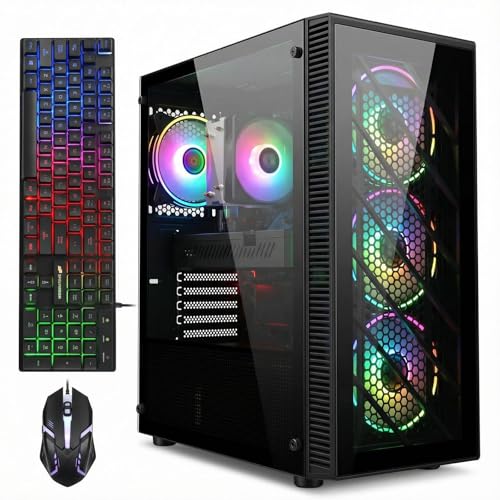
The 32GB of RAM and 1TB SSD set this configuration apart from the other options, which each have 16GB RAM and 512GB SSDs. It pairs those capacities with an Intel Core i7 listed up to 3.9GHz and an RX 590 8GB graphics card. Choose it if memory and storage capacity matter most; consider another configuration if you specifically want an RTX card.
Bottom line: Pick this if you want the largest memory and SSD capacities.
STGAubron Ryzen 5 2600 / RTX 2060

The RTX 2060 6GB makes this the option to consider if you want that specific graphics card rather than an RX 590, RTX 3050 or R9 370. It uses a Ryzen 5 2600 processor up to 3.9GHz, 16GB DDR4 memory and a 512GB SSD. The maker says the desktop can run a range of games at 60+ FPS, without tying that figure to a resolution or graphics preset. Its SSD is half the capacity of STGAubron Core i7 / RX 590, so buyers with a large game library should account for managing installed games.
Bottom line: Choose this if the RTX 2060 is your priority.
STGAubron 8th Gen Core i7 / RTX 3050

The RTX 3050 6GB distinguishes this configuration, while its 8th-generation Intel Core i7 is listed up to 4.1GHz. It has 16GB DDR4 memory and a 512GB SSD, matching STGAubron Ryzen 5 2600 / RTX 2060 on those capacities but using a different processor and graphics card. This is a fit for a buyer set on an RTX 3050; the 512GB drive offers less room for installed games than the 1TB SSD in STGAubron Core i7 / RX 590.
Bottom line: Pick this if you want the RTX 3050 configuration.
STGAubron Core i5 / R9 370

The Core i5 and R9 370 4GB separate this configuration from the three Core i7 or Ryzen 5 systems and their 6GB or 8GB graphics cards. It includes 16GB RAM and a 512GB SSD. The maker describes the desktop as suitable for gaming and creative work, and claims 60+ FPS across a range of games; actual results depend on settings and resolution. Choose it if you specifically want this processor and graphics combination. Buyers targeting a different GPU should compare the RTX 2060, RTX 3050 and RX 590 options instead.
Bottom line: Choose this if the Core i5 and R9 370 combination fits your needs.
How to choose a gaming desktop configuration
Start with the graphics card and the resolution you plan to play at, because the GPU does most of the work rendering game frames. A GPU that is adequate at 1080p may need lower graphics settings to maintain the same frame rate at 1440p or 4K. Next, consider memory and storage: 16GB RAM is a common baseline for gaming, while 32GB gives more headroom for multitasking and demanding applications. An SSD stores games and helps them load faster than a hard drive, but capacity determines how many large games you can keep installed. For this group, select the graphics card you want first, then weigh the 512GB drives against the 1TB option.
Matching graphics cards to resolution and settings
Graphics performance changes with game, resolution and visual settings, so a single frame-rate claim cannot predict results across every setup. Increasing resolution raises the number of pixels the GPU must render; demanding effects such as ray tracing can add further load where supported. The four systems list different GPUs—RX 590, RTX 2060, RTX 3050 and R9 370—so compare the exact card against the games and monitor resolution you use. The maker’s 60+ FPS claim does not specify a test resolution or preset. Before choosing, make sure your monitor’s input matches a port on the computer; the product names mention HDMI and DisplayPort on some configurations, but not every one lists the same outputs.
How much RAM and SSD capacity to choose
For many current games, 16GB of RAM is a practical starting point, while 32GB is useful when gaming alongside streaming, editing or other memory-heavy tasks. RAM and SSD storage do different jobs: memory holds active data while programs run, and the SSD stores files and installed games. A 512GB SSD can fill quickly because modern games often require tens of gigabytes each, with some exceeding 100GB. If you keep many games installed or work with large video files, the 1TB capacity in STGAubron Core i7 / RX 590 leaves more room than the 512GB drives in the other configurations. Keep free space available for updates and temporary files rather than filling a drive completely.
What to check before expanding a desktop
Before adding a graphics card or other power-hungry component, confirm the power supply’s wattage, connectors and physical clearance; those specifications determine whether an upgrade will work safely. A graphics card must fit the case and have compatible power leads, and a replacement may require more cooling capacity. Desktop memory upgrades also require compatible DDR generation and available motherboard slots, so check the installed module arrangement before buying RAM. These configurations include Wi-Fi and Bluetooth in their names, but wireless performance depends on router distance, interference and network conditions. Make a short upgrade plan before purchase: check the power supply and case dimensions first, then verify motherboard compatibility for any memory or storage change.
Frequently Asked Questions
Is 16GB of RAM enough for gaming?
For many games, 16GB is a practical baseline, though running a game with streaming or editing software can use more memory. Choose 32GB if you regularly multitask or work with demanding creative applications.
How much SSD space do gaming PCs need?
A 512GB SSD can hold several games, but large titles may use more than 100GB apiece. A 1TB drive offers more room for a larger installed library and updates.
Does a gaming PC guarantee 60 frames per second?
No; frame rate varies with the game, resolution, graphics preset and hardware load. A claim of 60+ FPS without a specified resolution or preset cannot guarantee that result for every setup.
Will these desktops run games at 4K?
A 4K video output does not establish that a graphics card can run demanding games smoothly at 4K. Higher resolution increases GPU workload, so check performance for the specific game and settings you plan to use.
What should I check before upgrading the graphics card?
Confirm the power supply wattage and connectors, case clearance and the new card’s power requirements before ordering an upgrade. A card that does not fit or lacks adequate power connections cannot be installed as intended.