
30-Pin Lightning Adapters: Charging and Audio Compared

INCORIC Lightning-to-30-Pin Adapter suits most people who need a Lightning device to connect with a 30-pin accessory, because it supports charging, syncing, and audio output. Choose Lightning-to-30-Pin Charging Adapter if you only need charging and data; choose a Bluetooth dock receiver if your goal is wireless music rather than a cable connection.
Lightning-to-30-pin adapters bridge newer Lightning devices to older 30-pin accessories, but their supported functions differ by model.
We earn a commission if you buy through links on this page. As an Amazon Associate I earn from qualifying purchases. Products are compared on manufacturer specifications, not hands-on testing.
- Best overall: INCORIC Lightning-to-30-Pin Adapter – Supports charging, syncing, and analog and USB audio output.
- Best for charging and sync: Lightning-to-30-Pin Charging Adapter – Supports charging and data transfer without audio output.
- Best for wireless dock audio: INVERY DockLinQ Bluetooth Receiver – Adds Bluetooth audio to compatible 30-pin speaker docks.
| Product | Best for | Connector direction | Charging and sync | Audio support | Shop |
|---|---|---|---|---|---|
| INCORIC Lightning-to-30-Pin Adapter | Audio and syncing | Lightning male to 30-pin female | Charging and sync | Analog and USB audio | Check Price on Amazon |
| Lightning-to-30-Pin Charging Adapter | Charging and sync | Lightning male to 30-pin female | Charging and sync | No audio | Check Price on Amazon |
| Fanxoo DockPro Bluetooth 5.3 Receiver | Bluetooth dock audio | 30-pin receiver to Bluetooth | — | Bluetooth audio | Check Price on Amazon |
| INVERY DockLinQ Bluetooth Receiver | Bose dock streaming | 30-pin receiver to Bluetooth | — | Bluetooth audio | Check Price on Amazon |
| ClipGrip 30-Pin-to-8-Pin Adapter | Legacy-device charging | 30-pin male to 8-pin female | Charging and data | No audio or video | Check Price on Amazon |
30 pin lightning adapters compared
Choose by connector direction first, then confirm that the adapter supports the audio or data function you need.
INCORIC Lightning-to-30-Pin Adapter

Unlike charging-and-sync-only converters, this cable-style adapter also supports analog and USB audio output. Its 0.2-meter length gives the connector some reach between a Lightning device and a 30-pin accessory, and the cable uses TPE with a copper core. The maker says it is MFi certified and rates the cable for more than 15,000 bends. This suits buyers who need multiple functions from one adapter. Its short cable may be awkward when the device and dock are farther apart, so measure the gap first.
Bottom line: Pick this if you need audio output as well as charging and syncing.
Lightning-to-30-Pin Charging Adapter

This converter is the simpler choice for charging and data transfer: unlike INCORIC Lightning-to-30-Pin Adapter, it does not support audio output. Its Lightning male and 30-pin female connectors let a newer Lightning device connect to an older charging dock or charger with a 30-pin connection. The maker says the adapter is MFi certified. It fits buyers who only need power or synchronization, but it will not play music through dock speakers or provide audio/video output. Check the accessory’s connector orientation before choosing it.
Bottom line: Choose this for charging or data sync when dock audio is not needed.
Fanxoo DockPro Bluetooth 5.3 Receiver

Rather than connecting a Lightning device directly to a 30-pin accessory, this receiver adds Bluetooth audio to a compatible 30-pin speaker dock. It is designed for Bose SoundDock and other 30-pin docking stations, and the maker identifies Bluetooth 5.3. Pair a Bluetooth-enabled source device to stream audio without a cable connection. This is the better match for wireless playback from a modern phone, not for charging or synchronizing through a Lightning-to-30-pin adapter. Confirm that the dock has the 30-pin receiver connection before choosing it.
Bottom line: Pick this to stream Bluetooth audio to a compatible 30-pin dock.
INVERY DockLinQ Bluetooth Receiver
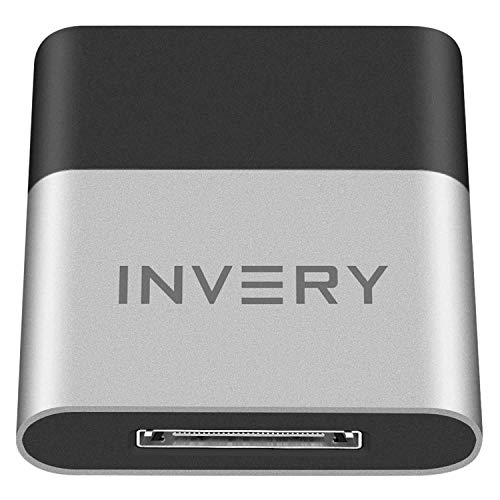
This receiver focuses on Bluetooth streaming to 30-pin speaker docks, including several Bose SoundDock models and other music docking stations. Unlike a Lightning-to-30-pin cable adapter, it creates a wireless audio link and does not serve as a charging or sync converter. The maker says it supports pairing with two devices and gives a 70-foot open-air range. It suits buyers reviving a compatible dock for wireless listening; its compatibility excludes cars and motorcycles, so keep its use to supported speaker docks.
Bottom line: Choose this for wireless audio on a compatible Bose or other 30-pin speaker dock.
ClipGrip 30-Pin-to-8-Pin Adapter

This adapter runs in the opposite direction from a Lightning-to-30-pin converter: its 30-pin male plug accepts a legacy-device cable, while its 8-pin female port connects to a Lightning cable. It supports charging and data transfer, but not AUX audio or video output. Its compact, bottle-cap-sized design is easy to carry, though the tiny form factor can be easier to misplace than a cable-style adapter. Choose it only when you need to connect a 30-pin cable to a Lightning cable, not the other way around.
Bottom line: Choose this for charging or data when adapting a 30-pin cable to a Lightning cable.
Choose an adapter by connector direction
Start by matching the plug and port on each device; a 30-pin-to-Lightning converter does not do the same job as a Lightning-to-30-pin converter. Lightning is Apple’s smaller 8-pin connector, while the older 30-pin connector is wider and appears on earlier Apple accessories. A female port receives a plug, and a male plug inserts into a port. For a newer Lightning device connecting to an older dock, look for Lightning male to 30-pin female. For a 30-pin cable connecting to a Lightning cable, the converter direction is reversed. If the main goal is streaming music without a cable, choose a 30-pin Bluetooth receiver instead of a charging adapter.
Match functions to the accessory
Charging, data sync, and audio are separate functions; a converter that charges may not carry sound. Apple’s older 30-pin dock ecosystem includes accessories with different audio and video capabilities, and a connector shape alone does not establish compatibility. Check whether the adapter specifically supports analog audio or USB audio when you plan to play through speakers. Charging-and-sync-only models will not provide music playback, and the ClipGrip also excludes video output. Use this decision rule: if audio is required, reject any adapter whose functions omit audio; if you want wireless playback, select a dock receiver with Bluetooth rather than a passive cable converter.
| Need | Choose this type | Check |
|---|---|---|
| Charge or sync a Lightning device with a 30-pin dock | Lightning male to 30-pin female | Whether audio is also required |
| Connect an old 30-pin cable to a Lightning cable | 30-pin male to Lightning female | Direction and cable ends |
| Stream wirelessly to a 30-pin speaker dock | 30-pin Bluetooth receiver | Dock compatibility |
Check audio and video compatibility
Audio support varies by adapter, so verify the exact output type rather than assuming that a dock-shaped connector passes sound. Some older accessories use analog audio, while others interact with a device through USB; an adapter may support one or both. The distinction matters most when a speaker dock is the destination: a charging-only converter can power a device and still fail to play music. Video is another separate capability, and a charging-and-sync adapter does not imply video output. Before choosing, identify whether you need analog audio, USB audio, video, or only power and data, then match that need to the adapter’s supported functions.
Use Bluetooth receivers with compatible docks
A Bluetooth receiver turns a compatible 30-pin speaker dock into a wireless audio destination; it is not a substitute for a Lightning charging adapter. The phone or other source pairs wirelessly with the receiver, while the receiver plugs into the dock. Receiver features such as Bluetooth version, multi-device pairing, and range can differ, and an open-air range is not a guarantee through walls or interference. Confirm the exact dock family before ordering, particularly for specialty installations: one receiver here explicitly rules out cars and motorcycles. For charging or file synchronization, use a cable adapter designed for that function instead of a Bluetooth audio receiver.
Frequently Asked Questions
Will a 30-pin adapter play music through a dock?
Only an adapter that supports audio output can send music to a dock. A charging-and-sync-only converter will not play music through dock speakers.
Can I use a 30-pin adapter in reverse?
No; connector direction matters. A Lightning male to 30-pin female adapter connects a Lightning device to a 30-pin accessory, while a 30-pin male to Lightning female adapter accepts a 30-pin cable and a Lightning cable.
Does charging support mean audio works too?
No, charging and audio are separate functions. Check for explicit analog or USB audio support if you need speaker playback.
Do Bluetooth dock adapters charge my phone?
A Bluetooth dock receiver provides wireless audio rather than Lightning charging or data sync. Use a charging adapter or cable when power is the goal.