
IR Blaster With Alexa: 5 Models Compared by Fit

For an Alexa-compatible IR blaster, BroadLink RM4 mini with Sensor Cable stands out for its sensor cable and support for more than 50,000 infrared devices. Choose BroadLink RM4 mini, No Sensor Cable if you do not need the cable, or MOES WiFi Smart IR Remote if you want a MOES controller with an included adapter and USB cable.
An IR blaster sends infrared commands to devices such as TVs and air conditioners; it cannot control Bluetooth or RF equipment, and its signal needs a clear path to the device.
We earn a commission if you buy through links on this page. As an Amazon Associate I earn from qualifying purchases. Products are compared on manufacturer specifications, not hands-on testing.
- Best overall: BroadLink RM4 mini with Sensor Cable – Includes a sensor cable and supports more than 50,000 IR-controlled devices.
- Best for included power accessories: MOES WiFi Smart IR Remote – Comes with a UL-certified adapter and USB 2.0 cable.
- Best for custom learning: BroadLink RM4 Mini Universal Remote – Can learn commands from an original remote when a cloud template is unavailable.
| Product | Best for | IR device support | Wi-Fi | Sensor cable | Shop |
|---|---|---|---|---|---|
| BroadLink RM4 mini with Sensor Cable | Sensor cable setup | 50,000+ devices | 2.4 GHz | Included | Check Price on Amazon |
| BroadLink RM4 mini, No Sensor Cable | No cable needed | 50,000+ devices | 2.4 GHz | Not included | Check Price on Amazon |
| BroadLink RM4 Mini Universal Remote | Remote learning | 50,000+ devices | 2.4 GHz | — | Check Price on Amazon |
| MOES WiFi Smart IR Remote | Power accessories | IR devices; 38 kHz | 2.4 GHz | — | Check Price on Amazon |
| Frankever R4 IR Hub | Programmable commands | 50,000+ devices | — | Included | Check Price on Amazon |
IR blasters with Alexa
Compare device support, wireless requirements and included accessories before choosing an infrared hub.
BroadLink RM4 mini with Sensor Cable

BroadLink RM4 mini with Sensor Cable is the BroadLink option here that includes a sensor cable, a useful distinction if that accessory is part of your setup. Its 38 kHz IR hub supports more than 50,000 controlled devices, including TVs, air conditioners, streaming players, projectors and fans. The manufacturer says its cloud library is updated and that users can program or learn buttons when a matching command is unavailable. It works with Alexa, Google Home and IFTTT. Wi-Fi is limited to 2.4 GHz, so this is not a fit for a setup that depends only on 5 GHz Wi-Fi.
Bottom line: Pick this if you want a sensor cable and broad IR device support.
BroadLink RM4 mini, No Sensor Cable

BroadLink RM4 mini, No Sensor Cable provides BroadLink’s RM4 mini IR hub without the sensor cable, making it the straightforward choice when that accessory is unnecessary. The manufacturer says it supports more than 50,000 38 kHz IR-controlled devices and offers cloud-library updates plus programming and button learning when no library match is available. The app can control IR devices remotely, and the hub works with Alexa and Google Assistant. Its 2.4 GHz Wi-Fi requirement is the key setup constraint; confirm your router can provide that band if your network is configured for 5 GHz only.
Bottom line: Choose this if you want the RM4 mini without a sensor cable.
BroadLink RM4 Mini Universal Remote

BroadLink RM4 Mini Universal Remote makes custom command learning a central option: if a cloud template is unavailable, the hub can learn from your original infrared remote. Its library supports more than 50,000 IR devices, including TVs, air conditioners, set-top boxes and fans, and the manufacturer says the library is continuously updated. It works with Alexa, Google Home and IFTTT, but does not support Bluetooth or RF devices. IR also needs line of sight, so place the hub where its signal is not blocked from the equipment you want to control.
Bottom line: Pick this if teaching commands from an original remote matters.
MOES WiFi Smart IR Remote

MOES WiFi Smart IR Remote differs from the BroadLink choices by including a UL-certified adapter and USB 2.0 cable for power. The manufacturer says its single IR controller can operate infrared appliances such as air conditioners, TVs, fans, DVD players and set-top boxes, and works with Alexa and Google Assistant. It supports 38 kHz IR only, not RF, and uses 2.4 GHz Wi-Fi. The manufacturer recommends one unit per room because infrared cannot pass through walls, so this is less suited to controlling equipment in multiple separated rooms.
Bottom line: Choose this if you want the included adapter and USB cable.
Frankever R4 IR Hub
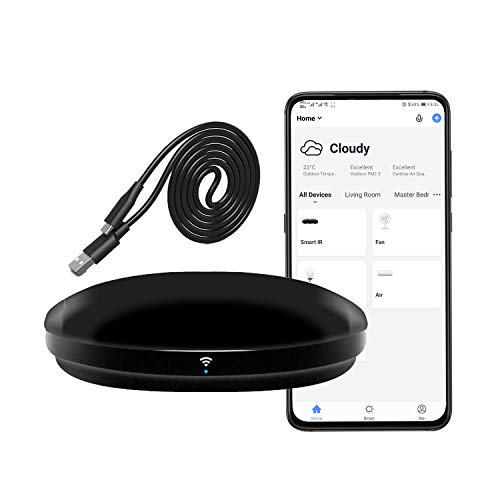
Frankever R4 IR Hub is the Frankever-branded option and includes a sensor cable. Its manufacturer says the Wi-Fi hub supports more than 50,000 infrared-controlled devices and allows programming or button learning when cloud data does not match. The feature set covers TVs, set-top boxes, video recorders, DVDs, home theater equipment, air conditioners and fans. Unlike the BroadLink and MOES choices here, the maker does not give a Wi-Fi band, so verify that requirement before ordering if your network setup is restrictive.
Bottom line: Pick this if you want the Frankever hub with a sensor cable.
How to choose an IR blaster with Alexa
Choose an IR blaster by matching the target device type, Wi-Fi band and command support before considering extras. IR hubs transmit the same kind of infrared commands used by many handheld remotes; they do not replace a Bluetooth or RF remote. Several options here specify 2.4 GHz Wi-Fi, so check whether your home network provides that band. A large device library can simplify setup, but a library count does not guarantee a match for every model. When no template is available, custom learning can help if you still have the original remote. Compare the specific target device and command needs, not just the headline count.
A practical rule: if you need to operate devices on opposite sides of a wall, plan on one IR hub per room rather than expecting the signal to pass through it.
IR line of sight and room placement
Place an IR blaster where its signal has a clear path to the receiver on each appliance. Infrared is blocked by walls and solid cabinet doors, so a hub hidden behind furniture may fail to reach the device even when Wi-Fi connectivity is strong. Keep the hub and target equipment in the same room, and avoid placing the emitter where a screen, shelf or other object blocks the path. A sensor cable may offer added placement flexibility for compatible setups, but check how it connects and where it must sit before choosing a model. For several appliances, test that the chosen position can reach each device without obstruction.
What 38 kHz and device libraries mean
A 38 kHz specification refers to the infrared carrier frequency used by many remote-control systems; it does not mean that every device operating at that frequency will automatically match a hub’s commands. Device libraries contain command sets, while learning features capture commands from an existing remote when a match is missing. The hub still controls only equipment that receives compatible infrared signals. It will not send commands to Bluetooth or RF devices. For air conditioners, make sure the selected commands cover the controls you actually need, since operation may involve more than a simple power toggle.
The useful choice is broad library support plus learning capability when available, rather than relying on a device count alone.
Set up Alexa voice control reliably
Alexa control requires the IR hub and the target appliance to be configured so the voice assistant can call the right IR command. Begin with working commands in the hub’s own app, then connect its supported Alexa integration and use clear device names. Keep names distinct, such as “living room TV” and “bedroom TV,” to reduce ambiguity when several devices share a room. Use a 2.4 GHz network for models that require it, and keep the hub where it can reach the appliance. Voice control cannot overcome a blocked infrared path or an unsupported device command.
For routines, use commands that the IR hub has already learned or matched, and confirm each target device responds before combining commands.
Frequently Asked Questions
Can an IR blaster control devices through a wall?
No, infrared signals do not pass through walls. Plan for a separate hub in each room where you need control, and keep a clear path from hub to appliance.
Will an IR blaster work with Bluetooth devices?
No, an infrared blaster sends IR commands rather than Bluetooth signals. Check the device’s remote type before choosing an IR hub; some BroadLink models here also explicitly exclude RF control.
Does a 2.4 GHz IR hub need 5 GHz Wi-Fi?
A hub specified for 2.4 GHz needs a 2.4 GHz Wi-Fi connection, not a 5 GHz-only connection. Check your router settings if both bands use one network name.
Can I teach an IR hub commands from my remote?
Some hubs support learning when a cloud command template is unavailable. Keep the original IR remote, since custom learning depends on having its commands to capture.
What does a 38 kHz IR specification mean?
It identifies the carrier frequency used to transmit infrared commands, not a guarantee that every appliance will be compatible. Confirm the device is IR-controlled and look for a matching command set or learning support.