
Xbox One X Cooling Fan Options Compared by Fit

For an Xbox One X cooling fan, the FASTSNAIL stand suits buyers who want a vertical stand with three fans and three USB ports. Choose a different option if you want a compact fan that plugs directly into the console, or a stand with selectable fan modes.
We earn a commission if you buy through links on this page. As an Amazon Associate I earn from qualifying purchases. Products are compared on manufacturer specifications, not hands-on testing.
- Best overall: FASTSNAIL Xbox One X Cooling Stand – Combines a vertical stand, three cooling fans and three USB 2.0 ports.
- Best for fan modes: Mcbazel Xbox One X Cooling Stand – The stand offers high, low and off settings for its three fans.
- Best for direct USB connection: Xbox One X USB Cooling Fan – The compact fan plugs into the console and includes on, auto and off modes.
| Product | Best for | Setup | Fan controls | USB ports | Shop |
|---|---|---|---|---|---|
| FASTSNAIL Xbox One X Cooling Stand | Stand and ports | Vertical stand | — | 3 USB 2.0 | Check Price on Amazon |
| Mcbazel Xbox One X Cooling Stand | Selectable fan speeds | Vertical stand | High, low, off | 3 USB 2.0 | Check Price on Amazon |
| Xbox One X USB Cooling Fan | Direct USB setup | Plug-in fan | On, auto, off | 1 USB 2.0 | Check Price on Amazon |
Xbox One X cooling fan options
Match the accessory to your preferred setup: a vertical stand or a fan that connects directly to the console.
FASTSNAIL Xbox One X Cooling Stand
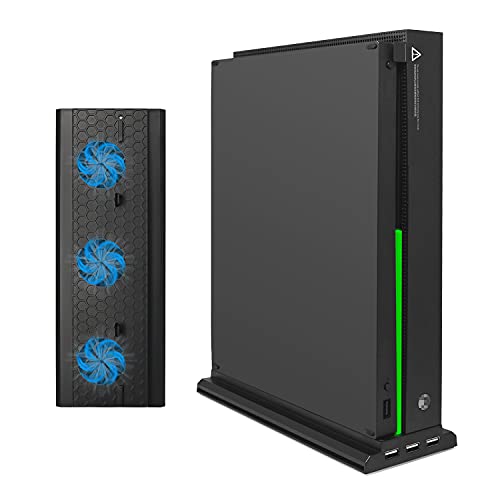
Unlike the plug-in fans, this accessory combines a vertical stand with three cooling fans and three USB 2.0 ports. The maker says the fans help keep the console cool during long gaming sessions. The ports can charge controllers and connect devices such as keyboards and phones, but the maker warns against connecting an external hard drive. Choose this stand if you want the console supported vertically and extra USB connections in one accessory. Its larger, stand-based format is less suited to buyers who only want a small fan attached to the console.
Bottom line: Pick this if you want a vertical stand and extra USB ports together.
Mcbazel Xbox One X Cooling Stand

The Mcbazel stand distinguishes itself with selectable high, low and off fan settings. It has three cooling fans, three USB 2.0 ports and a light bar, and includes a lock and non-slip pad to secure the console. The maker says the fans are intended to help prevent overheating during long play sessions. This is a fit for buyers who want a vertical stand but prefer to choose a fan setting rather than rely on an automatic mode. The USB hubs do not support external hard drives, so that limitation matters if you planned to connect one through the stand.
Bottom line: Choose this if selectable fan modes and a secured vertical setup matter.
Xbox One X USB Cooling Fan

Unlike the stands, this three-fan accessory plugs directly into an Xbox One X USB port and does not add a vertical base. It offers on, auto and off modes; the maker says auto mode starts the fan above 40°C and stops it below 40°C. Its single additional USB 2.0 port is intended for charging a controller or connecting a USB disk. Choose it if you want a compact attachment with temperature-triggered operation. The maker notes that fan noise is normal, so buyers seeking silent operation should consider that before choosing this model.
Bottom line: Pick this for a direct USB connection and automatic fan mode.
How to choose an Xbox One X cooling fan
Choose by installation style first: stands add a base, while a plug-in fan connects to the console’s USB port. The three matching choices here include two stand designs and one direct-connection fan. Stand fans can be useful if you also want a vertical console position; a plug-in unit avoids adding a stand. Compare fan controls next: some accessories use selectable settings, while the direct USB fan offers an automatic mode with a 40°C threshold. A fan accessory does not replace keeping the console’s own air vents unobstructed. Leave about 4 inches of open space around the console, avoid enclosed shelves, and place it on a stable, hard surface. If the console is already shutting down or unusually hot, address its placement and ventilation rather than relying on an add-on fan alone.
Cooling stand versus plug-in fan
A stand combines console support with accessory features, while a plug-in fan focuses on adding airflow without a vertical base. The two stands in this comparison each have three fans and three USB 2.0 ports; one offers selectable high, low and off settings. The plug-in fan has three fans, one additional USB 2.0 port, and on, auto and off modes. Use this table to match the setup to your needs.
| Need | Choose |
|---|---|
| Vertical base and three USB ports | Either stand |
| Selectable high, low or off setting | Mcbazel stand |
| Direct attachment with temperature-triggered mode | USB cooling fan |
USB ports on a cooling accessory are not necessarily suitable for every peripheral. The FASTSNAIL and Mcbazel stands warn against external hard drives, so connect storage directly to the console instead. Consider cable reach and access to the console’s USB ports before settling on a placement.
Placement and ventilation for Xbox One X
Clearance around the console matters more than adding a fan to a blocked setup. Keep roughly 4 inches of open space around the console, especially near its air openings, and do not run it inside a closed cabinet. A hard, level surface helps keep the console stable; a stand should also be positioned so it cannot be bumped or tipped. Dust can collect around vents and restrict airflow, so power the console down and disconnect it before cleaning the exterior. Avoid placing the console near a heater or in direct sunlight, where surrounding heat makes cooling harder. If a fan attachment makes the setup crowded or blocks access to a vent, reposition the console rather than compromising airflow.
Using USB cooling fan modes safely
Use automatic mode when you want the fan to respond to temperature, and manual settings when you want to choose a speed yourself. The direct USB fan described here switches at 40°C according to its maker, while the Mcbazel stand uses high, low and off settings. Fan accessories draw power through a USB connection, so avoid routing cables where they can snag or pull the console. Keep liquids away from the console and any powered accessory, and disconnect accessories before moving the setup. If the fan’s sound changes suddenly or the console remains hot despite clear vents, shut down the console and check its placement instead of assuming a fan accessory will solve the issue.
Frequently Asked Questions
How much space should an Xbox One X have around it?
Leave roughly 4 inches of open space around the console so air can circulate. Avoid closed cabinets and keep the console on a stable, hard surface.
Can I connect an external hard drive to a cooling stand?
The FASTSNAIL and Mcbazel stands warn against connecting external hard drives through their USB ports. Connect storage directly to the console instead.
When does the USB fan switch on automatically?
The maker says the direct USB fan’s auto mode starts above 40°C and stops below 40°C. Its other modes are on and off.
Should I leave a cooling fan running all the time?
The direct USB fan offers on, auto and off modes, so automatic operation is an option rather than a requirement. Whichever mode you use, keep the console’s vents clear and its surroundings open.