
Hisense 58-Inch TVs: Models Compared by Size and Features

Hisense R6E5 58-Inch 4K TV is the direct match for a Hisense 58-inch TV search, with 4K resolution and Dolby Vision HDR and HDR10 support as its deciding features. Choose Hisense R6G 50-Inch Roku TV or Hisense E6SR 55-Inch Roku TV instead if a smaller 50- or 55-inch screen better fits your space; Horion 58-Inch QLED Roku TV is 58 inches but is a Horion, not a Hisense.
A 58-inch TV measures diagonally, not across its width, so check the available stand or wall space as well as the screen size.
We earn a commission if you buy through links on this page. As an Amazon Associate I earn from qualifying purchases. Products are compared on manufacturer specifications, not hands-on testing.
- Best overall: Hisense R6E5 58-Inch 4K TV – The only Hisense model with a 58-inch screen and 4K resolution.
- Best for Roku at 58 inches: Horion 58-Inch QLED Roku TV – This 58-inch 4K set uses Roku OS, but it is a Horion rather than a Hisense.
- Best for a 50-inch fit: Hisense R6G 50-Inch Roku TV – A smaller Hisense 4K Roku option for rooms that cannot accommodate a 58-inch screen.
| Product | Best for | Screen size | Smart platform | Shop |
|---|---|---|---|---|
| Hisense R6E5 58-Inch 4K TV | 58-inch Hisense match | 58 in | — | Check Price on Amazon |
| Horion 58-Inch QLED Roku TV | Roku at 58 inches | 58 in | Roku OS | Check Price on Amazon |
| Hisense R6G 50-Inch Roku TV | Smaller Hisense screen | 50 in | Roku OS | Check Price on Amazon |
| Hisense E6SR 55-Inch Roku TV | 55-inch feature set | 55 in | Roku OS | Check Price on Amazon |
Hisense 58-Inch TV Options
Compare the direct 58-inch match with related-size alternatives and one similarly sized non-Hisense set.
Hisense R6E5 58-Inch 4K TV

Hisense R6E5 58-Inch 4K TV is the direct Hisense 58-inch match in this group, pairing 3,840 × 2,160 resolution with Dolby Vision HDR and HDR10 support. Its feature set also names a full-array LED backlight, Game Mode, DTS Studio Sound and Motion Rate 120. The package is identified as renewed and includes a free wall mount, making the condition and mounting arrangement important considerations. Choose it when the exact brand and screen size matter more than having a confirmed smart-TV platform in the comparison.
Bottom line: Pick this if you want the 58-inch Hisense with 4K and HDR format support.
Horion 58-Inch QLED Roku TV

Unlike the Hisense options, Horion 58-Inch QLED Roku TV is a Horion, but it shares the 58-inch size and 4K UHD resolution. Its QLED panel, Roku OS, 60Hz refresh rate and 250 cd/m² brightness give buyers more platform and display specifics to compare. The feature set also names three HDMI inputs, Ethernet, Wi-Fi, voice control compatibility and more than 500 free channels. Choose it if Roku is a priority and brand match is not. The 60Hz refresh rate is a meaningful limit for shoppers seeking higher refresh rates for fast-motion gaming.
Bottom line: Pick this if you want a 58-inch Roku QLED and do not require a Hisense.
Hisense R6G 50-Inch Roku TV
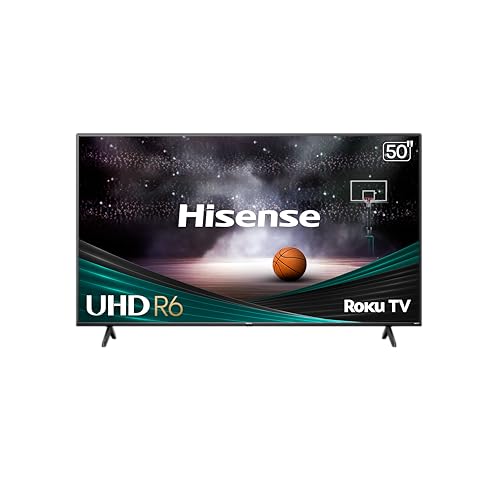
Hisense R6G 50-Inch Roku TV keeps the Hisense and 4K combination but has a 50-inch screen rather than 58 inches. Its Roku TV operating system provides access to streaming channels, and the named features include Dolby Vision HDR, DTS Studio Sound, Game Mode and Alexa compatibility. This is the size alternative for a room or console that cannot take a 58-inch set comfortably. Its shorter diagonal means a visibly smaller screen, so it is not a substitute when the requested 58-inch size is essential. The model name identifies it as the R6G, distinct from the 58-inch R6E5.
Bottom line: Pick this if you want a smaller Hisense 4K Roku set rather than a 58-inch screen.
Hisense E6SR 55-Inch Roku TV

Hisense E6SR 55-Inch Roku TV is the closest-size smaller Hisense alternative here, at 55 inches, and its features emphasize Hi-QLED color and a Roku smart platform. The named gaming features include Game Mode Plus, variable refresh rate (VRR) and auto low latency mode (ALLM); Dolby Vision and DTS Virtual:X are also included. Apple AirPlay and compatibility with Alexa and Google Assistant are noted. It suits buyers willing to give up three inches of screen size for those stated platform and gaming capabilities. It is a 2026 model according to its product name, not a 58-inch set.
Bottom line: Pick this if a 55-inch Hisense with Roku and listed VRR/ALLM features fits better.
How to Choose a 58-Inch TV
Start with screen size, then compare resolution, display features and smart platform. A 58-inch screen is measured diagonally; for a 16:9 display, the visible panel is about 50.6 inches wide and 28.5 inches tall, before its bezel or stand. Measure the furniture or wall area separately, since a TV’s overall dimensions exceed its panel dimensions. A 4K UHD set has 3,840 × 2,160 pixels, four times the pixel count of 1080p. HDR format support names compatibility, not a guaranteed brightness level or picture quality. If the screen will be viewed from around 6 to 8 feet away, a 58-inch 4K TV is a common fit; room layout and personal preference still matter.
Hisense 58-Inch TV Fit and Room Size
A 58-inch 16:9 screen is roughly 50.6 inches across, so plan for more than 51 inches of horizontal clearance once the frame is included. A practical viewing-distance starting point for 4K is about 1 to 1.5 times the screen’s diagonal, or roughly 4.8 to 7.3 feet; sitting farther away makes fine 4K detail less noticeable. Measure from the seated eye position to the screen, not from the wall to the couch. For wall mounting, verify the TV’s mounting pattern, weight limit for the mount and stud or anchor requirements before installation. Choose the 50- or 55-inch Hisense alternatives if the available width cannot accommodate a 58-inch set with breathing room.
4K, HDR, and Refresh Rate Differences
4K resolution describes pixel count, while HDR formats such as Dolby Vision and HDR10 describe supported ways of encoding expanded contrast and color. HDR support alone does not guarantee a bright or high-contrast image; panel brightness, local dimming and source content also affect results. Refresh rate is another separate specification: a 60Hz panel refreshes up to 60 times each second, while motion-rate branding is not directly interchangeable with a native refresh rate. For console gaming, check both the TV’s refresh rate and the console’s output needs; features such as VRR and ALLM are distinct capabilities. Compare those figures and feature names rather than treating “4K,” “HDR” or a motion-rate label as a single picture-quality score.
| Need | What to prioritize |
|---|---|
| Exact 58-inch Hisense fit | Screen size and brand match |
| Streaming interface | Named smart TV platform |
| Fast-motion gaming | Refresh rate, VRR and ALLM |
| HDR viewing | Supported format plus panel performance |
Smart TV and Connection Checks
A smart TV platform determines how you open streaming apps and manage the home screen, so compare the named platform with the services you actually use. Roku OS is explicitly named for several options here, while the direct 58-inch Hisense match does not identify a platform in its features. HDMI input count matters when connecting a game console, soundbar or cable box: count devices that need a dedicated port, then leave room for an additional source if possible. Ethernet can provide a wired network connection when Wi-Fi coverage is weak. Before setup, confirm that the TV’s port count and voice-control compatibility match your equipment; a compatible voice assistant may require a separate device or setup.
Frequently Asked Questions
How wide is a 58-inch TV screen?
A 58-inch 16:9 screen is about 50.6 inches wide and 28.5 inches tall, measured across the visible panel. Allow extra room for the bezel, stand, cables and ventilation when measuring furniture or a wall.
How far away should I sit from a 58-inch 4K TV?
A useful 4K viewing-distance starting range is about 4.8 to 7.3 feet for a 58-inch screen. The best seat also depends on room layout and whether you prefer a more immersive or relaxed view.
Does Dolby Vision mean a TV has a brighter screen?
No; Dolby Vision support identifies an HDR format, not a guaranteed brightness level. Panel brightness and contrast capabilities affect how strongly HDR content appears.
Is 60Hz enough for console gaming?
A 60Hz panel can display up to 60 frames per second, which suits many standard console games. Buyers seeking higher frame rates should verify native refresh rate and specific support for VRR or ALLM.
What should I check before wall mounting a TV?
Confirm that the mount supports the TV’s size and weight and that its mounting pattern matches the TV. Locate suitable studs or use anchors rated for the load; do not rely on drywall alone for a heavy TV.