
ABS Cyclone Aqua Gaming PC: 4 Desktops Compared

ABS Cyclone Aqua i7-14700F / RTX 5060 is the closest fit for a gaming desktop with an RTX 5060, 32GB of DDR5 and a 1TB NVMe SSD. Choose a different system if you specifically want an RTX 5060 Ti, a lower-memory configuration, or a desktop built around an RTX 3050.
A gaming PC combines a processor, graphics card, memory and storage in one desktop; the graphics card is usually the key part for game visuals, while memory and storage affect multitasking and load times.
We earn a commission if you buy through links on this page. As an Amazon Associate I earn from qualifying purchases. Products are compared on manufacturer specifications, not hands-on testing.
- Best overall: ABS Cyclone Aqua i7-14700F / RTX 5060 – The RTX 5060 8GB, 32GB DDR5 and 1TB NVMe SSD make this the most balanced exact-match configuration.
- Best for stronger GPU tier: CyberPowerPC Gamer Master RTX 5060 Ti – Its RTX 5060 Ti is the strongest named graphics-card tier among these options.
- Best for 6-core AMD: ZYNEEX Ryzen 5 5500 / RTX 3050 – Its Ryzen 5 5500 pairs six cores with 16GB DDR4 and a 1TB NVMe SSD.
| Product | Best for | Graphics | Memory | Storage | Shop |
|---|---|---|---|---|---|
| ABS Cyclone Aqua i7-14700F / RTX 5060 | Balanced gaming | RTX 5060 8GB | 32GB DDR5-6000 | 1TB NVMe PCIe 4.0 | Check Price on Amazon |
| BYTE DEPOT Gamer Xtreme RTX 3050 | Windows 11 Pro | RTX 3050 | 32GB | 1TB SATA SSD | Check Price on Amazon |
| ZYNEEX Ryzen 5 5500 / RTX 3050 | AMD six-core setup | RTX 3050 6GB | 16GB DDR4-3200 | 1TB NVMe SSD | Check Price on Amazon |
| CyberPowerPC Gamer Master RTX 5060 Ti | RTX 5060 Ti | RTX 5060 Ti 8GB | 16GB DDR5 | 1TB NVMe PCIe 4.0 | Check Price on Amazon |
ABS Cyclone Aqua gaming PC and alternatives
Compare graphics, memory and storage first, then match the remaining features to your setup.
ABS Cyclone Aqua i7-14700F / RTX 5060

The combination of an Intel Core i7-14700F and RTX 5060 8GB sets this desktop apart from the RTX 3050 alternatives. It includes 32GB of dual-channel DDR5-6000 memory and a 1TB PCIe 4.0 NVMe SSD, plus Wi-Fi 6E and Bluetooth 5.2. The 650W 80 PLUS Gold power supply and Cooler Master Hyper 212 cooler are specified components. This configuration suits buyers seeking a newer graphics card with more memory for multitasking. Its 8GB graphics memory may be a limitation for workloads that require more VRAM.
Bottom line: Choose this if you want an RTX 5060 system with 32GB of DDR5.
BYTE DEPOT Gamer Xtreme RTX 3050

Windows 11 Pro and 32GB of memory distinguish this RTX 3050 desktop from the other alternatives. It pairs a 3.4GHz quad-core Intel Core i7 processor, with turbo up to 3.9GHz, with a 1TB SATA SSD and Wi-Fi 6. The connections include HDMI, DisplayPort and Gigabit LAN, and a keyboard and mouse are included. This option fits someone who values the Pro edition of Windows and a 32GB memory capacity. The RTX 3050 and SATA storage are different from the featured system’s RTX 5060 and NVMe drive.
Bottom line: Choose this if Windows 11 Pro and 32GB memory matter more than the newer GPU tier.
ZYNEEX Ryzen 5 5500 / RTX 3050

A six-core, 12-thread AMD Ryzen 5 5500 makes this desktop the AMD-based alternative in the group. It combines an RTX 3050 with 6GB GDDR6, 16GB DDR4-3200 and a 1TB NVMe SSD; built-in Wi-Fi and ARGB air cooling are also specified. The configuration suits buyers who prefer an AMD processor and want NVMe storage. Its 16GB of memory is half the capacity of the 32GB systems here, so buyers who routinely keep many applications open may prefer more memory.
Bottom line: Choose this if an AMD six-core processor and NVMe storage fit your priorities.
CyberPowerPC Gamer Master RTX 5060 Ti
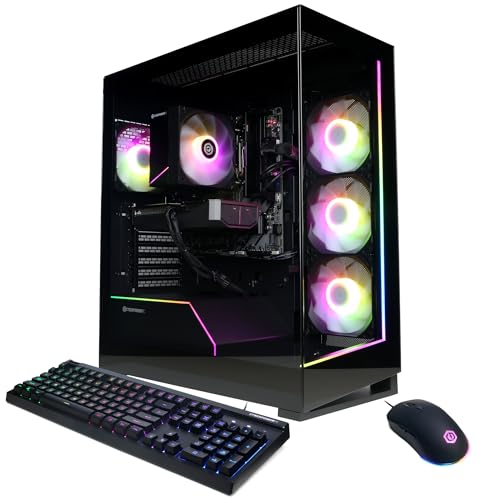
The RTX 5060 Ti 8GB is the distinct feature of this desktop, alongside an AMD Ryzen 7 8700F with eight cores. It includes 16GB DDR5, a 1TB PCIe 4.0 NVMe SSD, Wi-Fi 6 and Bluetooth 5.3. Its port mix includes HDMI, two DisplayPort connections, USB-C and USB-A; a keyboard and mouse are included. This configuration suits a buyer prioritizing the named Ti graphics card and AMD eight-core processor. Its 16GB of memory is lower than the 32GB in the featured desktop, which can matter for heavy multitasking.
Bottom line: Choose this if the RTX 5060 Ti and Ryzen 7 configuration are your priorities.
How to choose a gaming PC by graphics card
For gaming, compare the graphics card before the processor because the GPU renders each frame and often determines how demanding a game can be at a chosen resolution. These desktops range from RTX 3050 models to RTX 5060 and RTX 5060 Ti models; the specifications do not provide frame-rate benchmarks, so those names alone cannot guarantee a particular frame rate. Match the GPU to your monitor: 1080p screens have fewer pixels than 1440p or 4K displays, and higher resolutions generally raise graphics workload. A practical decision rule is to favor the RTX 5060 or RTX 5060 Ti options when choosing among these four for newer GPU hardware, and compare the exact game and resolution requirements before buying. VRAM capacity also matters for games using large textures.
How much RAM and storage a gaming PC needs
Memory capacity and storage type are separate considerations: RAM holds active game and application data, while an SSD stores files and game installations. The options here include 16GB and 32GB of memory; for a system used with a game plus streaming, chat or browser tabs, choose a 32GB configuration if that multitasking headroom is important. NVMe SSDs connect over PCIe and generally offer higher transfer bandwidth than SATA SSDs, though actual load times also depend on the game and system. All four systems have 1TB storage, but two specify NVMe PCIe 4.0, one specifies NVMe without a generation, and one specifies SATA. Check the size of your game library before deciding whether 1TB is enough.
Desktop fit, wireless and connections
Wireless labels differ: the featured system specifies Wi-Fi 6E and Bluetooth 5.2, the BYTE DEPOT system lists Wi-Fi 6 and Bluetooth 5.2, and the CyberPowerPC lists Wi-Fi 6 and Bluetooth 5.3. Wi-Fi 6E can use the 6GHz band when the router and local rules support it, while Wi-Fi 6 uses 2.4GHz and 5GHz bands. For lower network latency, a wired Ethernet connection is commonly preferred; Gigabit LAN is explicitly listed on one alternative. Check monitor inputs against the graphics outputs before setup.
How to compare gaming PC specifications fairly
Compare complete configurations rather than relying on a processor label or a single core-count figure. The systems differ in GPU tier, memory generation and capacity, and SSD interface, so treat each as a bundle. An RTX 3050 is not the same model as an RTX 5060, and an RTX 5060 Ti is a distinct variant; avoid assuming a precise performance gap without independent game benchmarks for the resolution you use. DDR4 and DDR5 are different memory generations and cannot be interchanged in a motherboard slot. The specifications identify some platform components, but not every motherboard or case dimension. Confirm the monitor resolution, available desk space and any needed ports before settling on a configuration.
Frequently Asked Questions
Is 16GB of RAM enough for a gaming desktop?
Sixteen gigabytes can suit gaming with a modest number of other applications open, while 32GB offers more room for multitasking. Choose 32GB if you regularly stream or keep browsers and chat apps running alongside games.
What is the difference between an NVMe and SATA SSD?
NVMe SSDs use PCIe communication, while SATA SSDs use the SATA interface. NVMe drives typically provide higher transfer bandwidth, but game load times also depend on the game and the rest of the system.
Can Wi-Fi 6E connect to an older Wi-Fi router?
A Wi-Fi 6E PC can connect through compatible older Wi-Fi networks, but the 6GHz band requires a Wi-Fi 6E-capable router.
Does an RTX 5060 Ti mean the PC is faster in every game?
No graphics card guarantees the same advantage in every game, since frame rates also depend on resolution, settings, CPU and game optimization. Compare benchmarks for the specific games and monitor resolution you use.
How much desk space does a gaming tower need?
Measure the width, depth and height available, then leave room around the case for airflow and cable access.