
Aftermarket CD Players for Cars: 5 Options Compared

For most cars without a built-in CD player, POSSPO Jupiter USB CD Player is the straightforward choice if the stereo has a USB data port, because it is designed to connect through USB and browse tracks on the stereo. Choose another option if your stereo relies on AUX, needs USB-C, or requires specific format support.
We earn a commission if you buy through links on this page. As an Amazon Associate I earn from qualifying purchases. Products are compared on manufacturer specifications, not hands-on testing.
- Best overall: POSSPO Jupiter USB CD Player – Uses a USB connection and is described as plug-and-play with a compatible car stereo.
- Best for format flexibility: USB/AUX Car CD Player with Remote – Supports CD, CD-R, CD-RW, MP3, WMA and WAV playback.
- Best for a compact footprint: ENVYCLOUD Portable Car CD Player – Measures 4.5 by 4.5 inches and is 0.85 inches high.
| Product | Best for | Connection | Supported formats | Dimensions | Shop |
|---|---|---|---|---|---|
| POSSPO Jupiter USB CD Player | USB data ports | USB; AUX | — | 6.3 × 6.1 × 2.0 in | Check Price on Amazon |
| USB/USB-C External Car CD Player | USB-C connections | USB; USB-C | WAV | 6.6 × 6.0 × 1.5 in | Check Price on Amazon |
| USB/AUX Car CD Player with Remote | Format flexibility | USB; AUX | CD, CD-R, CD-RW, MP3, WMA, WAV | — | Check Price on Amazon |
| ENVYCLOUD Portable Car CD Player | Tight spaces | USB; AUX | — | 4.5 × 4.5 × 0.85 in | Check Price on Amazon |
| DDup USB-C Car CD Player | Bumpy-road stability | USB; AUX; USB-C adapter | CD, CD-R/RW, MP3, WMA, WAV | — | Check Price on Amazon |
Aftermarket CD players for cars
Compare connection requirements, format support and size before choosing an external player for your stereo.
POSSPO Jupiter USB CD Player

Unlike the AUX- and USB-C-focused alternatives, this player is centered on a USB connection to the car stereo. The maker says a compatible stereo recognizes it as a USB drive and displays CD tracks; an extension cable lets you position the player away from the port. The dimensions are 6.3 by 6.1 by 2.0 inches. Choose it when the stereo has a USB data port and you want track selection through its screen. The key limitation is that a USB port alone is not enough if it only supplies power.
Bottom line: Pick this if your stereo has a USB data port and enough room for its footprint.
USB/USB-C External Car CD Player

This option stands out for offering both USB and USB-C plugs, rather than only a USB connection or USB/AUX combination. The maker says it works with compatible Android and factory stereos that support WAV playback, and includes anti-skip protection and playback resume. At 6.6 by 6.0 by 1.5 inches, it is relatively shallow among these choices. Its compatibility condition matters: confirm the stereo supports WAV playback and has a compatible data port; connector shape alone does not establish audio compatibility.
Bottom line: Choose this for a compatible stereo with USB-C or USB and WAV playback support.
USB/AUX Car CD Player with Remote

Format support is the main distinction here: the maker lists standard CDs, CD-R, CD-RW, MP3, WMA and WAV, while explicitly excluding DVD discs. USB and AUX connections give two hookup paths, and the maker says touchscreen and steering-wheel controls are supported when connected. This is a good match for a mixed collection of pressed CDs and recordable discs, provided the car stereo supports the chosen connection. No dimensions are supplied, so buyers with a tight console or glove-box space should measure the available area before choosing.
Bottom line: Pick this if your collection includes recordable CDs or multiple listed audio formats.
ENVYCLOUD Portable Car CD Player
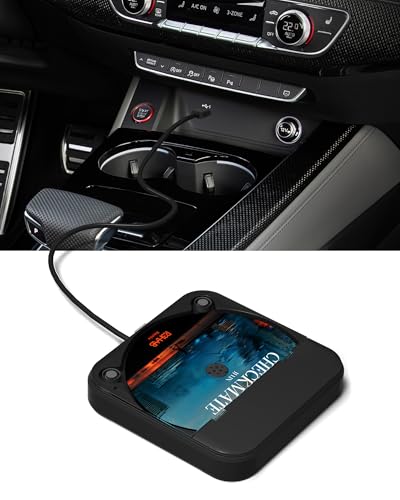
Its compact stated size sets this model apart: 4.5 by 4.5 inches across and 0.85 inches high, smaller in each dimension than the other players with measurements. The maker describes USB and AUX hookups, plus control through compatible touchscreen and steering-wheel systems. That compact footprint can suit a limited storage area, but it does not remove the need to match the connection to the stereo.
Bottom line: Choose this when the available placement area is limited and USB or AUX fits your setup.
DDup USB-C Car CD Player

Road movement and included connection accessories distinguish this choice: it has four anti-slip rubber feet, a magnetic cover and an internal locking mechanism, along with a USB-C adapter and extension cable. The maker lists playback for CD, CD-R/RW, MP3, WMA and WAV, and says DVD discs are not compatible. Its USB and AUX options offer flexibility for stereos that support one of those inputs.
Bottom line: Pick this if you want the USB-C adapter and anti-slip features.
How to choose a car CD player connection
Match the player’s connection to an audio input your stereo can actually use; a USB socket may provide power without reading audio data. A data-capable USB port is needed for players that present CD tracks to the stereo as a drive, while AUX sends analog audio to an AUX input. USB-C describes the plug shape, not a guarantee that the stereo can decode CD audio over that port. Check the stereo manual for USB audio playback or AUX input support, and check that the player’s cable reaches a stable mounting spot. If the stereo has no compatible input, an external player may not work with it.
| Connection | What must match | Useful when |
|---|---|---|
| USB | Car stereo supports audio data | Stereo can browse tracks |
| AUX | Stereo has an AUX input | Analog audio input is available |
| USB-C | Compatible port and playback support | Stereo accepts audio through USB-C |
Check disc and audio-file compatibility
Standard audio CDs are 4.7 inches across, but the disc’s format still matters more than its physical fit. CD-R and CD-RW are recordable formats, and compatibility can differ from pressed audio CDs; MP3, WMA and WAV are file formats rather than disc types. Use the format list for the player and stereo together: the player may read a format that the stereo cannot handle through its connection. DVD compatibility is separate from CD support, and some players explicitly exclude DVDs. If your collection includes burned discs or compressed files, confirm those formats are supported before purchase rather than assuming every CD player handles them.
Plan the mounting spot and cable route
Measure the intended location before choosing an external CD player: include room for the player body, cable bend and access to the disc slot. A glove box or console can keep a player out of the way, but a closed compartment may make track changes awkward and can restrict cable routing. Secure the unit so it cannot slide into pedals or obstruct the driver’s view; never handle or reposition a player while driving. A decision rule: if the measured clearance is smaller than the player’s height, length or width, choose a smaller model or a different mounting location. Leave enough reach to connect without straining the port.
Frequently Asked Questions
Will a USB car port play audio from an external CD player?
Only when the stereo supports audio data through that port; some USB ports provide power only. Check the stereo’s manual for USB audio playback before relying on a USB-connected player.
Can an external car CD player play CD-R discs?
It can only if the player supports CD-R playback, and the stereo connection must also pass the audio format. CD-R is a recordable disc format, so do not assume support from standard CD compatibility alone.
Does a USB-C plug guarantee car stereo compatibility?
No; USB-C identifies the connector, not the stereo’s playback capability. Confirm that the stereo accepts audio over USB-C and that the player supports that connection.
Can I operate a CD player while driving?
Set up the player and select a track before moving, since handling a disc or controls diverts attention from the road. Mount the unit and route its cable away from the steering wheel, pedals and driver’s sightline.