
DisplayPort Splitter Dual Monitor Options Compared

DisplayPort Dual-Output MST Hub is the best fit for most dual-monitor setups because it has two DisplayPort outputs and supports dual 4K at 60Hz.
We earn a commission if you buy through links on this page. As an Amazon Associate I earn from qualifying purchases. Products are compared on manufacturer specifications, not hands-on testing.
- Best overall: DisplayPort Dual-Output MST Hub – Two DisplayPort outputs support dual 4K at 60Hz, with single-display 4K at up to 120Hz or 144Hz.
- Best for Windows MST: DisplayPort MST Hub, Dual 4K – Supports extended and mirror modes on Windows, while Mac is limited to SST mirroring.
- Best for USB-C power: USB-C-Powered DisplayPort 1.4 MST Hub – Requires a separate 5V/2A USB-C power connection for operation.
| Product | Best for | Single-display maximum | Shop |
|---|---|---|---|
| DisplayPort Dual-Output MST Hub | Dual DP monitors | 4K at 120Hz/144Hz | Check Price on Amazon |
| DisplayPort MST Hub, Dual 4K | Windows extension | 4K at 120Hz/144Hz | Check Price on Amazon |
| USB-C-Powered DisplayPort 1.4 MST Hub | Powered DP hub | 4K at 120Hz | Check Price on Amazon |
DisplayPort splitter dual monitor options
Compare port type, resolution ceilings, and operating-system fit before choosing a hub.
DisplayPort Dual-Output MST Hub

DisplayPort Dual-Output MST Hub combines two DisplayPort outputs with a higher single-screen refresh ceiling than a basic 4K60 setup. The maker says one connected display can run at 4K 120Hz or 144Hz with a DP 1.4 cable; two displays can run at 4K 60Hz with a DP 1.2 cable. Windows supports extended and mirror modes. The hub is suited to a desktop or laptop with a DisplayPort output and two DisplayPort monitors. Its limitation is host compatibility: it does not work with docking stations, USB hubs, or KVM switches.
Bottom line: Pick this if your source has DisplayPort and both monitors use DisplayPort.
DisplayPort MST Hub, Dual 4K
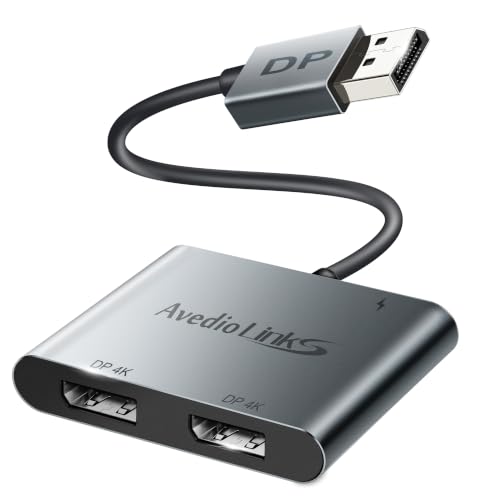
DisplayPort MST Hub, Dual 4K is a direct match for Windows users who want extended desktop mode across two DisplayPort monitors. The maker says it supports single-display 4K at 120Hz or 144Hz with a DP 1.4-or-newer cable, and dual 4K at 60Hz with DP 1.2-or-newer cabling. It also supports mirror mode, while Mac use is limited to SST mirroring rather than two independent extended screens. Choose it when Windows extension is the priority; skip it if the computer lacks a DisplayPort output.
Bottom line: Choose this for a Windows PC that needs two extended DisplayPort screens.
USB-C-Powered DisplayPort 1.4 MST Hub

USB-C-Powered DisplayPort 1.4 MST Hub stands apart by requiring a separate USB-C power connection, rated at 5V/2A, rather than relying on the DisplayPort connection for power. The maker says the hub supports one display at up to 4K 120Hz and two displays at 4K 60Hz. It is intended for a desktop PC or graphics card with DisplayPort and suits a desk where USB-C power is available. That extra power connection is a drawback for a minimal-cable setup, and the features do not establish operating-system mode support.
Bottom line: Pick this if you can provide the required USB-C power at the desk.
How to choose a DisplayPort splitter for two monitors
These products are MST hubs, which divide a DisplayPort stream into multiple display streams; they are not simple passive splitters that duplicate a signal. Check whether your source computer and operating system support MST before expecting two independent desktops. For this group, 4K 60Hz on both screens is the relevant advertised ceiling, while some models advertise higher refresh rates with only one screen connected. Choose a dual-DisplayPort model when both monitors have DP inputs, and verify cable versions against the resolution mode you want.
Understand MST, SST, and Mac display modes
MST means Multi-Stream Transport, which can carry separate display streams through one DisplayPort connection when the source supports it; SST means Single-Stream Transport, commonly used for mirroring. Extended mode gives each monitor a separate desktop, while mirror mode shows the same desktop on both. The maker specifies Windows MST and SST support for some hubs, but Mac support is more limited: the Mac mode is SST mirroring, not extended use of two different monitors. A decision rule is simple: if you need separate workspaces on a Mac, do not choose a hub based only on its Windows MST feature; confirm your computer supports the exact multi-display arrangement.
Resolution and cable limits for dual displays
For dual 4K displays, look for an explicit 4K 60Hz dual-output claim and match the cable requirement stated for that mode. The products distinguish dual-screen output from single-screen output: the 4K 120Hz or 144Hz claim applies with one output in use, not both. DisplayPort 1.2 commonly supports 4K at 60Hz for a single stream, while higher refresh rates require more link bandwidth and compatible source, cable, and display. A useful rule is to prioritize the dual-output mode in the hub’s specifications if both monitors must run at once. A high refresh number for one monitor does not establish that same rate for a pair.
| Need | What to verify |
|---|---|
| Two 4K monitors | Explicit dual 4K at 60Hz support and compatible source |
| One high-refresh monitor | Single-output 4K refresh limit and cable version |
| Separate desktops | Host MST and operating-system support |
Common setup mistakes to avoid
The most common mistake is treating a splitter as a way to bypass the computer’s display limits. A hub cannot add MST support that the graphics hardware or operating system lacks, and a mirrored desktop is not the same as an extended desktop. Also check power requirements: one hub here requires USB-C power at 5V/2A. Before setting up, confirm the source port, monitor inputs, number of independent displays supported by the computer, cable version, and whether your goal is mirroring or extension.
Frequently Asked Questions
Can a DisplayPort splitter show different content on two monitors?
Yes, when the hub, graphics hardware, and operating system support MST extended mode. SST mirror mode instead shows the same desktop on both displays.
Will a DP 1.2 source run two 4K monitors?
The products describe dual 4K at 60Hz with at least DP 1.2 cabling, but the computer’s source port and MST support must also permit two displays. Verify the complete source-and-display setup rather than relying on cable version alone.
Can a Mac extend two monitors through an MST hub?
The maker specifies Mac SST mirroring, not extended desktops on two different monitors. If separate Mac desktops are required, confirm support for that exact configuration before choosing an MST hub.
Does 4K 120Hz work on both outputs at once?
No; the 4K 120Hz or 144Hz ceilings apply to single-display use. Dual-display operation is specified at up to 4K 60Hz on the models that give a dual-screen limit.
Do DisplayPort MST hubs need external power?
Power needs differ by hub; one model here requires USB-C power at 5V/2A. Check whether the chosen hub requires a separate power connection before planning cable placement.