
NVMe BC711 SK Hynix 256GB SSDs Compared by Fit

The 256GB BC711 in M.2 2230 is the closest match to an NVMe BC711 SK hynix 256GB search because its model is HFM256GD3GX013N. Choose a different option only if your system needs another capacity, physical length, or SSD model.
M.2 describes the drive’s shape, while NVMe describes its storage protocol; matching both the model and the system’s supported size matters.
We earn a commission if you buy through links on this page. As an Amazon Associate I earn from qualifying purchases. Products are compared on manufacturer specifications, not hands-on testing.
- Best overall: SK hynix BC711 256GB 2230 – It is the 256GB BC711 in M.2 2230 format, model HFM256GD3GX013N.
- Best for 128GB: SK hynix BC711 128GB 2230 – It is a BC711 with 128GB capacity and M.2 2230 size.
- Best for 512GB: SK hynix BC711 512GB 2230 – It is a BC711 with 512GB capacity and M.2 2230 size.
| Product | Best for | Capacity | M.2 size | Model | Shop |
|---|---|---|---|---|---|
| SK hynix BC711 256GB 2230 | Exact model match | 256GB | 2230 | HFM256GD3GX013N | Check Price on Amazon |
| SK hynix BC711 128GB 2230 | Lower capacity | 128GB | 2230 | HFM128GD3GX013N | Check Price on Amazon |
| SK hynix BC711 512GB 2230 | More capacity | 512GB | 2230 | HFM512GD3GX013N | Check Price on Amazon |
| SK hynix 256GB M.2 NVMe | Alternate model | 256GB | M.2 | HFS256GD9MND-5510A-BA | Check Price on Amazon |
| Dell SK hynix PC711 256GB 2280 | Dell 2280 systems | 256GB | 2280 | HFS256GDE9X080N | Check Price on Amazon |
NVMe BC711 SK hynix 256GB SSD options
Compare the exact-capacity BC711 with related SK hynix drives by model, capacity, and physical fit.
SK hynix BC711 256GB 2230

This is the direct match for a 256GB BC711 search: the model is HFM256GD3GX013N, and the drive is an M.2 2230 NVMe PCIe Gen3 x4 SSD. Its 2230 format measures 22 mm wide and 30 mm long, so it suits a system with a compatible 2230 slot and mounting point. The main limitation is physical fit: a laptop designed only for an 80 mm M.2 2280 drive may not secure this shorter SSD. Confirm that your device accepts a 2230 NVMe drive before choosing it.
Bottom line: Choose this if your system supports the BC711 256GB 2230 model.
SK hynix BC711 128GB 2230
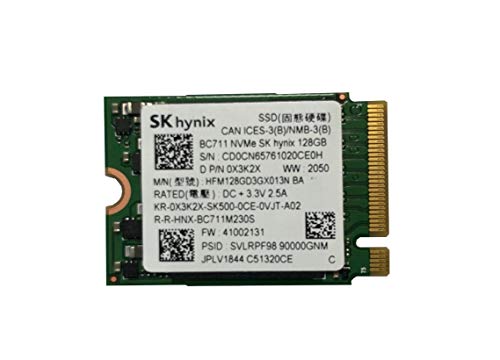
The 128GB BC711 is the closest capacity alternative, retaining the same M.2 2230 form factor as the 256GB target. It uses model HFM128GD3GX013N and a PCI Express interface, making it relevant when the system needs a short BC711 drive but 128GB is sufficient. The tradeoff is storage space: 128GB is half the target capacity, so it is a poorer fit for a large operating-system installation or sizable local file collection. Check that the machine supports M.2 NVMe storage as well as the 2230 length.
Bottom line: Choose this when 128GB is enough and you need a 2230 BC711.
SK hynix BC711 512GB 2230
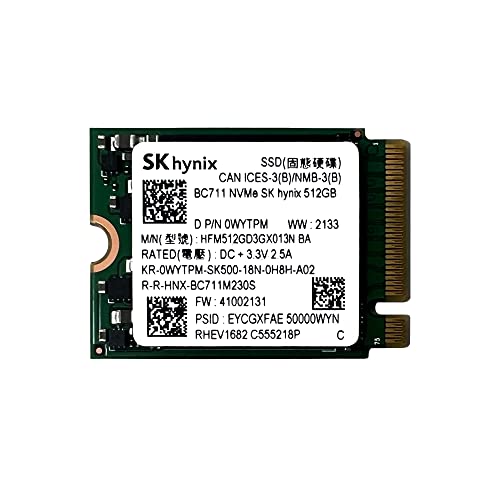
The 512GB BC711 offers twice the target capacity in the same M.2 2230 format. Its model is HFM512GD3GX013N, which distinguishes it from the 256GB version despite the shared BC711 family and length. This option fits buyers seeking more room for applications and files, provided the computer accepts the 2230 NVMe format. Capacity alone does not establish compatibility: confirm the exact model and interface supported by the system, and make sure a 30 mm drive can be fastened at its mounting point.
Bottom line: Choose this if you want a 2230 BC711 with 512GB capacity.
SK hynix 256GB M.2 NVMe

This SK hynix drive matches the target capacity and M.2 NVMe type, but its HFS256GD9MND-5510A-BA model differs from the BC711 model HFM256GD3GX013N. That makes it a related 256GB option rather than the exact BC711 match. M.2 drives come in several lengths, so the M.2 label alone does not establish whether this drive fits a 2230 or 2280 mounting position. Buyers replacing an existing SSD should match the full part number and physical length, not capacity alone.
Bottom line: Choose this only when its distinct model and physical size suit your system.
Dell SK hynix PC711 256GB 2280
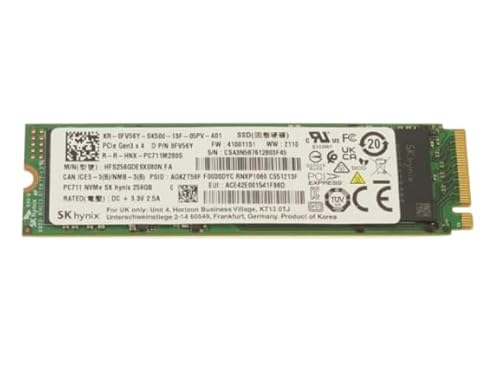
The Dell PC711 is a 256GB SK hynix NVMe drive, but it is a different product line and a longer M.2 2280 format than the BC711 2230 target. Its model is HFS256GDE9X080N, and the maker identifies PCIe Gen3 x4. The 80 mm length can suit a system built for 2280 drives, but it will not match a 2230 mounting point without compatible mounting provisions. Treat it as an alternative only when the system accepts this model and length; it is not the BC711.
Bottom line: Choose this for a compatible Dell system that takes a 2280 PC711.
How to choose an NVMe BC711 256GB SSD
Match the complete model number before comparing capacity or brand: HFM256GD3GX013N identifies the 256GB BC711 target here. An M.2 SSD must also match the system’s supported protocol and physical length; M.2 is a form factor, not a guarantee that every M.2 drive works in every slot. For example, a 2230 drive is 30 mm long, while a 2280 drive is 80 mm long. Check the computer’s service manual or the old drive’s label for the supported size and interface. If you need the specific BC711 model, choose by model number rather than assuming another SK hynix NVMe drive is interchangeable.
M.2 2230 and 2280 fit differences
M.2 size codes give the drive’s width and length in millimeters: 2230 means 22 by 30 mm, and 2280 means 22 by 80 mm. The shorter 2230 format is common in compact systems, while 2280 has a longer board and needs its own mounting position. A drive can fit the connector yet fail to secure properly if the system lacks a screw point at its length. Use this guide before choosing:
| Format | Physical size | Choose when |
|---|---|---|
| M.2 2230 | 22 × 30 mm | System supports a 30 mm NVMe drive |
| M.2 2280 | 22 × 80 mm | System supports an 80 mm NVMe drive |
Do not assume that an adapter or spare mounting point solves every mismatch; confirm that the system supports the drive’s protocol and installation method.
BC711 and related SK hynix SSD models
BC711 and PC711 are different model families, so matching the SK hynix name and 256GB capacity does not make them equivalent. The 256GB BC711 is identified by HFM256GD3GX013N, while the Dell PC711 in this comparison uses HFS256GDE9X080N and a 2280 format. The BC711 128GB and 512GB options retain the 2230 family format but change storage capacity and model number. For a replacement, compare the model printed on the old SSD, its M.2 length, and the system’s supported interface. Avoid selecting by capacity alone when the goal is an exact part replacement.
Safe SSD replacement and setup
Turn off the computer and disconnect its power source before opening the case; an installed SSD and its connector can be damaged by handling while powered. Static electricity can also harm exposed electronics, so use an antistatic wrist strap or touch grounded bare metal before handling the drive. M.2 screws are small and easy to lose, and overtightening can damage the board or mounting point. After installation, check that the SSD sits flat and is held at the correct screw position. If the system does not detect a new drive, verify seating and BIOS/UEFI storage support before assuming the SSD is defective.
Frequently Asked Questions
What does the 2230 size mean on an M.2 SSD?
2230 means the drive is 22 mm wide and 30 mm long. The system needs a compatible 30 mm mounting position as well as support for the drive’s interface.
Will a 2280 SSD fit where a 2230 drive was installed?
Not necessarily: 2280 is 80 mm long, while 2230 is 30 mm long. The computer needs a compatible 80 mm mounting point and NVMe support for the longer drive.
Does every M.2 slot support NVMe drives?
No; M.2 describes a physical form factor, and slots can support different storage protocols. Check the computer’s specifications or service manual for NVMe support before replacing a drive.
How can I identify the BC711 256GB model?
Look for model HFM256GD3GX013N and 256GB capacity. Matching the full model number is more reliable than choosing a drive solely because it is an SK hynix M.2 NVMe SSD.
What should I do before replacing an M.2 SSD?
Shut down the computer and disconnect its power before opening it, then protect the exposed drive from static discharge. Confirm the supported SSD length and interface before removing the existing drive.