
Ozeino Wireless Gaming Headsets Compared by Connection

The Ozeino Wireless Gaming Headset with a 2.4GHz USB and Type-C dongle suits most buyers seeking the named wireless model, with its 50mm driver and flip mic setting it apart. Choose a different option if you need Bluetooth, a wired headset, or a model specifically described for Xbox.
Wireless gaming headsets connect either through a USB dongle or Bluetooth; check that your console or device supports the connection method before choosing.
We earn a commission if you buy through links on this page. As an Amazon Associate I earn from qualifying purchases. Products are compared on manufacturer specifications, not hands-on testing.
- Best overall: Ozeino Wireless Gaming Headset – It is the Ozeino wireless model here and includes a 2.4GHz USB and Type-C dongle plus a flip mic.
- Best for Xbox: Acer Wireless Gaming Headset, Xbox – Its product name specifies Xbox Series X|S and Xbox One compatibility.
- Best for Bluetooth: Black Shark Goblin X8 – It offers Bluetooth 6.0 alongside 2.4GHz wireless and wired audio.
| Product | Best for | Connection | Driver size | Battery life | Shop |
|---|---|---|---|---|---|
| Ozeino Wireless Gaming Headset | Ozeino wireless gaming | 2.4GHz USB/Type-C | 50 mm | 40 hours | Check Price on Amazon |
| Black Shark Goblin X8 | Bluetooth flexibility | 2.4GHz, Bluetooth, wired | 40 mm | 40 hours | Check Price on Amazon |
| Ozeino 7.1 Gaming Headset, White | Wired-style features | — | — | — | Check Price on Amazon |
| Acer Wireless Gaming Headset, Xbox | Xbox compatibility | Bluetooth 5.4 | — | 40 hours | Check Price on Amazon |
Ozeino Wireless Gaming Headsets and Alternatives
Compare the connection options and platform fit first, then weigh the features that match your setup.
Ozeino Wireless Gaming Headset
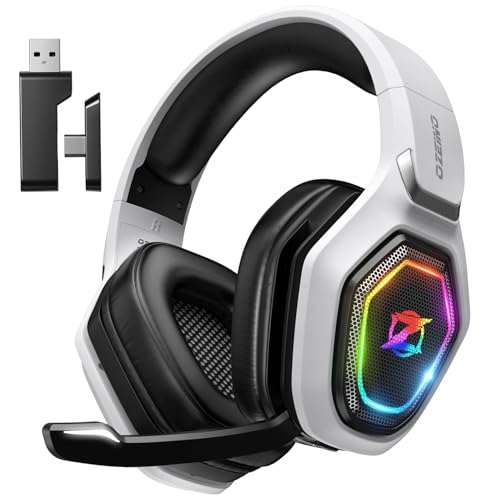
The Ozeino wireless model pairs a 50mm driver with a 2.4GHz USB and Type-C dongle, making it the direct match for this search. It also has a flip microphone and a play-and-charge design. Ozeino claims latency below 30ms and up to 40 hours of battery life. The product name identifies support for PS5, PC, Switch, PS4, Mac, laptops and mobile devices. Its size is large, so shoppers wanting a compact fit should consider another option; verify that the dongle connection suits the specific device.
Bottom line: Choose this if you want the Ozeino wireless model with a 2.4GHz dongle and flip mic.
Black Shark Goblin X8

The Black Shark Goblin X8 is the only option here described with three connection modes: 2.4GHz via USB or Type-C dongle, Bluetooth 6.0, and wired audio. That mix suits someone switching between gaming and other devices, rather than someone set on the named Ozeino model. Black Shark claims under 20ms latency in 2.4GHz mode and under 30ms over Bluetooth; its name also gives 40 hours of battery life. The 40mm driver is smaller than the Ozeino model’s 50mm driver, which matters if driver size is a priority.
Bottom line: Pick this if you value Bluetooth and wired options alongside dongle wireless.
Ozeino 7.1 Gaming Headset, White
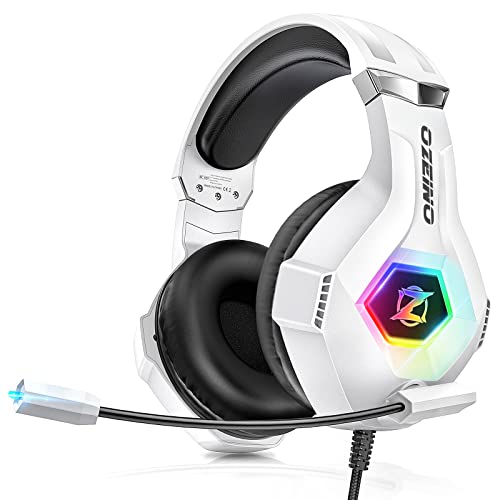
The white Ozeino headset emphasizes 7.1 surround sound, an LED light and a rotatable noise-cancelling microphone rather than a wireless connection. Its breathable protein over-ear pads and adjustable headband are suited to buyers prioritizing comfort features for longer sessions. The product name names PC, PS4, PS5, Xbox, Switch, laptop and mobile, but does not identify a wireless connection method, so it is a less direct match for a wireless-headset search. Choose it only if its connection works for your setup and the lighting and mic features matter more than wireless operation.
Bottom line: Consider this if the comfort and microphone features matter more than wireless.
Acer Wireless Gaming Headset, Xbox

The Acer headset is the option here whose name explicitly targets Xbox Series X|S and Xbox One, while also naming PC, PS5, Switch and Mac. It uses Bluetooth 5.4 and has a noise-cancelling microphone; the product name gives a 40-hour battery life. Acer describes 3D surround sound, but this is an alternative brand rather than the Ozeino headset sought. The fields do not establish a 2.4GHz dongle connection, so buyers who need low-latency dongle audio should confirm the connection method fits their console before choosing it.
Bottom line: Choose this if Xbox compatibility is your main requirement and Bluetooth suits your setup.
How to choose a wireless gaming headset
Choose by connection method first: a 2.4GHz USB dongle is a common gaming option, while Bluetooth is useful for general wireless device pairing. Wireless headsets commonly use either a dedicated radio dongle or Bluetooth, and some models add a wired mode; those modes are not interchangeable across every console. Confirm the console supports the headset’s connection, especially for Xbox, before buying. For games where timing matters, compare the maker’s latency only between the same connection modes. Driver diameter is a specification, not a guarantee of sound quality: tuning, fit and seal also affect what you hear. Prioritize microphone type and adjustability if team chat is central to your setup.
Console compatibility and dongle fit
Console compatibility depends on both the headset and its connection, not just a broad “multi-platform” claim. USB-A and USB-C ports differ, and a dongle may need a compatible port or adapter; a Type-C plug alone does not prove support for every console. Xbox wireless audio has platform-specific requirements, so look for the console generation named directly and verify the connection mode. A practical rule: if your console is the deciding device, choose a headset whose product name explicitly includes that console family, then confirm whether it uses Bluetooth, USB, or a dedicated transmitter. Also check whether the microphone works in the same mode you plan to use for game audio.
Use this connection checklist to narrow the options:
| Need | What to prioritize |
|---|---|
| Low-latency gaming | Dedicated 2.4GHz dongle and stated latency |
| Switching among devices | Bluetooth or multiple connection modes |
| Xbox use | Named Xbox compatibility and confirmed connection mode |
| Wired setup | Explicit wired audio support |
Drivers, microphones and comfort
Driver diameter commonly falls around 40mm to 50mm in gaming headsets, but size alone does not determine volume, bass, or positional accuracy. A larger driver can be a useful comparison point, not a promise of better sound. Microphones vary too: a flip-up or rotatable boom is easier to move out of the way, while noise-cancelling claims concern voice pickup and do not necessarily block room noise for the wearer. Over-ear pads and adjustable headbands affect fit; glasses, head shape and clamp pressure can change comfort during a long session. If you play near others, keep listening volume moderate: prolonged loud headphone use can contribute to hearing damage.
Battery life and everyday use
Battery-life figures are manufacturer claims and can change with volume, lighting and connection mode. A 40-hour claim is a useful comparison point, but do not assume every session will reach that figure. For long play sessions, note whether a headset can be used while charging; the Ozeino model is identified as play-and-charge. Rechargeable transmitters and headset batteries also add separate charging needs, so distinguish a headset’s battery from its dongle’s power. Keep wireless audio within a stable range and avoid placing the dongle behind metal obstructions, which can interfere with radio signals. If you switch devices often, Bluetooth convenience may outweigh a dedicated gaming connection, while latency-sensitive play favors checking the dongle mode.
Frequently Asked Questions
Is a 2.4GHz dongle better than Bluetooth for gaming?
A dedicated 2.4GHz dongle is often the more suitable choice for latency-sensitive gaming, while Bluetooth can be convenient for pairing other devices. Compare the claimed latency only for the same mode; different wireless modes can behave differently.
Will a USB-C headset work with every console?
No; a USB-C connector does not guarantee console compatibility. Check the console family and connection mode explicitly, and confirm an adapter is supported if your device lacks the matching port.
Does a larger headset driver mean better sound?
No; driver diameter alone does not establish sound quality. Drivers commonly measure about 40mm to 50mm in gaming headsets, while tuning, fit and ear-pad seal also affect the result.
How much battery life should a gaming headset have?
A 40-hour battery life can suit several long sessions, but actual runtime changes with volume, lighting and wireless mode. Treat manufacturer runtime as a comparison figure rather than a guaranteed result.
Can loud headset volume damage hearing?
Yes; prolonged exposure to loud sound can contribute to hearing damage. Keep volume moderate and take listening breaks, particularly during extended gaming sessions.