
PS3 AV Cables for Gaming: 5 Options Compared

For most PS3 gaming setups with yellow, red and white RCA inputs, PS2 AV Cable, 8.2 ft is the straightforward choice because it connects PS1, PS2 and PS3 consoles with a composite cable. Choose PS3 Component AV Cable, 6 ft instead if your display has component inputs and you want a component connection; WirelessFinest Power and AV Cable Bundle is a bundle rather than a cable alone.
We earn a commission if you buy through links on this page. As an Amazon Associate I earn from qualifying purchases. Products are compared on manufacturer specifications, not hands-on testing.
- Best overall: PS2 AV Cable, 8.2 ft – Composite RCA connection and compatibility with PS1, PS2 and PS3 make it a practical all-around fit.
- Best for component inputs: PS3 Component AV Cable, 6 ft – Its component AV connection is designed for component inputs and supports video formats including 480p, 720p and 1080i.
- Best for a replacement set: WirelessFinest Power and AV Cable Bundle – Includes both an AV RCA cable and an AC power supply cable for compatible consoles.
| Product | Best for | Connection | Console compatibility | Cable length | Shop |
|---|---|---|---|---|---|
| PS2 AV Cable, 8.2 ft | Composite connections | Composite RCA | PS1, PS2, PS3 | 8.2 ft | Check Price on Amazon |
| PS2 PS3 RCA Composite Cable, 6 ft | Shorter RCA runs | Composite RCA | PS1, PS2, PS2 Slim, PS3 | 6 ft | Check Price on Amazon |
| WirelessFinest Power and AV Cable Bundle | Cable-and-power set | Composite RCA | PS1, PS2, PS3 Fat, PSX | — | Check Price on Amazon |
| TENINYU PS1/PS2/PS3 Composite Cable | Basic RCA hookup | Composite RCA | PS1, PS2, PS2 Slim, PS3 | 6 ft | Check Price on Amazon |
| PS3 Component AV Cable, 6 ft | Component video inputs | Component AV | PS2, PS3, PS3 Slim | 6 ft | Check Price on Amazon |
PS3 AV cables for gaming
Match the cable’s video connector type to your display’s available inputs before choosing.
PS2 AV Cable, 8.2 ft
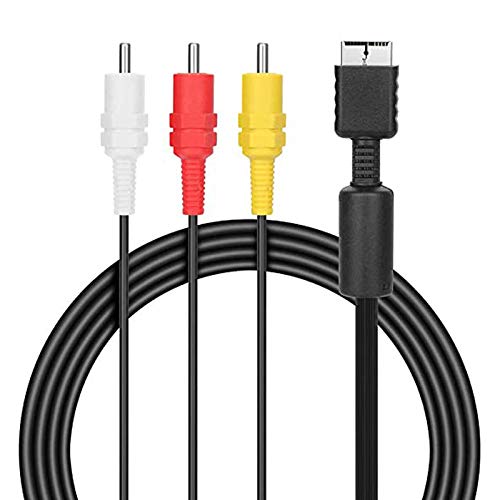
For a composite connection, this cable uses the familiar yellow video plug and red-and-white stereo audio plugs. Its 8.2-foot length gives more reach than the 6-foot options here, and it is compatible with PS1, PS2 and PS3 consoles. The maker says its copper wire is intended to provide signal clarity and its connectors fit securely. Choose it when your TV has composite RCA inputs and you want a single cable. It is not the right match for a display that accepts component video but lacks composite inputs.
Bottom line: Choose this for a longer composite RCA connection across compatible PlayStation consoles.
PS2 PS3 RCA Composite Cable, 6 ft
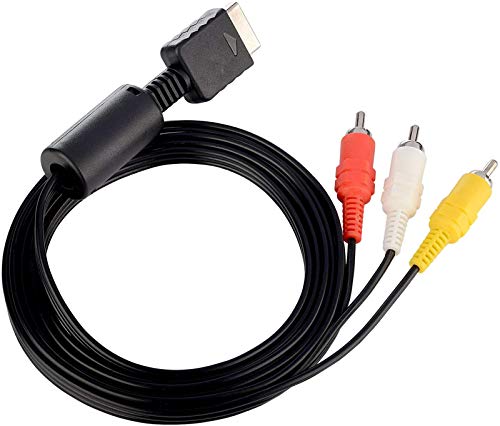
This 6-foot composite cable is a shorter RCA option for a nearby TV or monitor. The yellow connector carries composite video, while red and white carry stereo audio; the cable works with PS1, PS2, PS2 Slim and PS3. It is a replacement-style choice when the display has matching RCA inputs and you do not need component video. The shorter reach can be limiting if the console sits more than 6 feet from the screen, so measure the route before choosing it.
Bottom line: Pick this for a 6-foot composite connection and compatibility that includes PS2 Slim.
WirelessFinest Power and AV Cable Bundle

Unlike the standalone leads, this set pairs an AV RCA cable with an AC power supply cable. It is made for PS1, PS2, PS3 Fat and PSX systems equipped with the original AV Multi Out port, so confirm the console has that port before selecting it. The AV lead connects to a display with RCA composite inputs, while the included power cable is useful when replacing both accessories at once. The cable length is not provided, so this set may not suit a setup where reach is a deciding factor.
Bottom line: Choose this when you need both AV and AC replacement cables for a compatible console.
TENINYU PS1/PS2/PS3 Composite Cable

This is a basic composite RCA lead for connecting compatible PlayStation consoles to a TV or monitor with composite inputs. Its three color-coded connectors carry video and stereo audio, and the size is 6 feet. Compatibility includes PS1, PS2, PS2 Slim and PS3. The cable’s length is described inconsistently in its product text, so verify the physical reach if your setup requires a precise cable run.
Bottom line: Pick this for a straightforward RCA connection when its reach suits your setup.
PS3 Component AV Cable, 6 ft
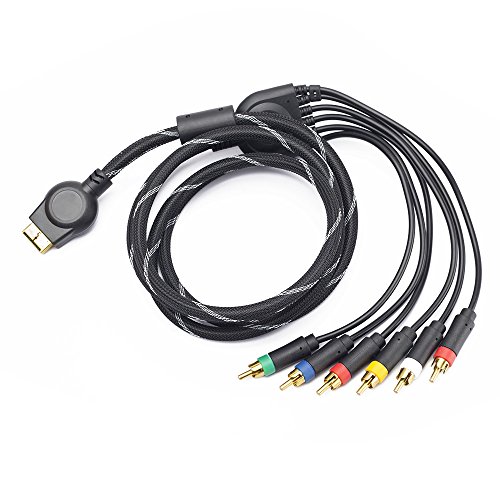
This cable differs from the composite options by connecting the console’s AV Multi Out port to component inputs on an NTSC-compatible TV. It supports 2-channel stereo audio and the maker says it supports 480p, 720p and 1080i video formats. Component video uses separate video signals rather than a single yellow composite plug, so check that the display has component inputs before choosing it. This is not a match for a TV with only composite RCA inputs, and the maker does not include PS1 compatibility.
Bottom line: Choose this when your display has component inputs and you want a component connection.
How to choose a PS3 AV cable
Choose the cable by matching its video connector to an input on the TV or monitor. Composite uses one yellow plug for video and red-and-white plugs for stereo audio; component video separates the picture across green, blue and red plugs, with red and white commonly used for audio. Count the available inputs rather than relying on the connector’s color alone. A composite cable cannot plug into component inputs as a direct substitute, and a component cable will not fit a composite-only display. Measure the route from console to screen and leave slack for bends; a cable that barely reaches can pull loose when the console or TV moves.
Composite and component connections compared
Composite is the simpler match for a display with yellow, red and white RCA inputs, while component is for a display with separate component video inputs. The PS3’s video output settings also need to match the connected display: after changing cable types, configure video output through the console settings. The component cable here supports 480p, 720p and 1080i according to its maker, but the actual available signal depends on the console, game and display. Use this connector guide to identify the type of cable your screen can accept.
| Connection type | Video plugs | Audio plugs | Choose when |
|---|---|---|---|
| Composite | Yellow | Red and white | Display has composite RCA inputs |
| Component | Green, blue and red | Red and white | Display has component video inputs |
Check console and display compatibility
Check both ends of the connection before buying: the console side must fit the PlayStation AV Multi Out port, and the display side must match its video input. PS1, PS2 and PS3 compatibility is common among composite leads here, but the power-and-AV bundle specifies PS3 Fat and original AV Multi Out systems. A cable name that includes PS3 does not guarantee the same compatibility with every other console model. For component output, confirm the screen accepts component video and supports the signal format you plan to use; an input’s shape and labels are more useful than the display’s marketing name.
Set up the cable without losing picture or sound
Turn off the console and display before connecting analog AV plugs, then seat each plug in its matching input and select that input on the TV. Composite video uses yellow, while red and white carry the left and right audio channels; swapping those plugs can leave the picture or sound missing. If changing from HDMI or another output, set the PS3 video output to match the new connection. If there is no picture, verify the selected TV input and cable type first. Keep the connectors accessible and avoid tight bends, which can stress the cable or pull a plug from its socket.
Frequently Asked Questions
Can a PS3 use a composite AV cable?
Yes, a PS3 can connect by composite through a compatible AV Multi Out cable. The yellow plug carries video, and red and white carry stereo audio to matching RCA inputs.
What is the difference between PS3 composite and component?
Composite sends video through one yellow plug, while component separates video across three plugs. Component requires matching display inputs and can support formats such as 480p, 720p or 1080i when the console and display support them.
Do PS3 AV cables work with PS2 consoles?
Some do, but compatibility depends on the cable and console port. Check that the cable names the specific PS2 model or AV Multi Out fit before connecting it.
How long should a PS3 AV cable be?
Measure the console-to-display route and allow extra length for bends and movement. A 6-foot lead suits a short run; choose an 8-foot class cable when the route needs more reach.
Why is there no picture after connecting a PS3 AV cable?
First check that the TV is on the matching composite or component input and that every plug is in the corresponding jack. If switching from another video connection, set the PS3 video output to match the new cable.