
Raspberry Pi Handheld Console Kits Compared by Fit

For a Raspberry Pi handheld console kit, AmpOhm360 GamePi43 Kit is the closest fit because it is designed as a DIY retro gaming console with an 4.3-inch IPS display and battery charge circuitry. Choose a Linux handheld instead if your priority is terminal work, coding, or a keyboard and trackpad rather than game controls.
We earn a commission if you buy through links on this page. As an Amazon Associate I earn from qualifying purchases. Products are compared on manufacturer specifications, not hands-on testing.
- Best overall: AmpOhm360 GamePi43 Kit – It is a DIY portable retro game console kit with an 800 × 480, 4.3-inch IPS display.
- Best for CM5 projects: Hackberry Pi CM5 Handheld Kit – The carrier kit pairs a 4-inch touchscreen with a keyboard, trackpad, and NVMe support.
- Best for Pi 5 terminals: Waveshare PocketTerm35-Pi5 – The PocketTerm35 is designed for Raspberry Pi 4B and Pi 5 and has a 3.5-inch touch display.
| Product | Best for | Screen | Resolution | Compatible board | Shop |
|---|---|---|---|---|---|
| AmpOhm360 GamePi43 Kit | DIY retro gaming | 4.3-inch IPS | 800 × 480 | Raspberry Pi B+ models | Check Price on Amazon |
| Hackberry Pi CM5 Handheld Kit | CM5 Linux projects | 4-inch touchscreen | 720 × 720 | Raspberry Pi CM5 | Check Price on Amazon |
| Waveshare PocketTerm35-Pi5 | Pi 5 Linux work | 3.5-inch touch display | 640 × 480 | Raspberry Pi 4B / Pi 5 | Check Price on Amazon |
| PocketTerm35-RPI-ACCE | Pi 4B terminal use | 3.5-inch touch display | 640 × 480 | Raspberry Pi 4B / Pi 5 | Check Price on Amazon |
Raspberry Pi Handheld Console Kits and Alternatives
Compare the gaming kit with portable Linux computers before choosing a build direction.
AmpOhm360 GamePi43 Kit

Unlike the Linux terminals, this kit is aimed at building a portable retro game console. It includes add-ons for a Raspberry Pi build, an 800 × 480 IPS display, a speaker, an earphone jack, and battery charge circuitry for 18650 lithium batteries. The board, microSD card, and batteries must be supplied separately, so it suits makers who want to assemble their own gaming device. The compatibility covers Raspberry Pi models B+; verify your exact board revision before assembling, since a mismatch can stop the kit from fitting or working.
Bottom line: Pick this if you want a DIY gaming build and have a compatible Raspberry Pi board.
Hackberry Pi CM5 Handheld Kit

For a keyboard-first handheld, this CM5 carrier kit stands apart from the gaming kit and the Pi 4B/5 terminals. It combines a 4-inch 720 × 720 touchscreen with a QWERTY keyboard and trackpad, plus a 2242 M.2 NVMe slot, USB 3.0 ports, full-size HDMI, Stemma QT I2C expansion, audio support, and an RTC battery slot. That mix suits Linux learning, coding practice, and embedded development more than console play. It is built around Compute Module 5 projects, so choose it only if your build uses a compatible CM5 setup.
Bottom line: Choose this for CM5 Linux projects that need direct keyboard and trackpad input.
Waveshare PocketTerm35-Pi5

This handheld focuses on a compact Linux desktop for Raspberry Pi 4B and Pi 5, rather than a dedicated retro-console layout. Its 3.5-inch, 640 × 480 touch display uses optical bonding, and the device supports switching between battery and external power. It can suit command-line work, development tools, graphical browsing, and handheld gaming when the goal is a portable terminal. The smaller screen is a practical tradeoff for display-heavy tasks, and the maker does not identify game controls, so confirm the input arrangement meets your gaming plan.
Bottom line: Pick this for a Pi 4B or Pi 5 handheld terminal with touchscreen input.
PocketTerm35-RPI-ACCE
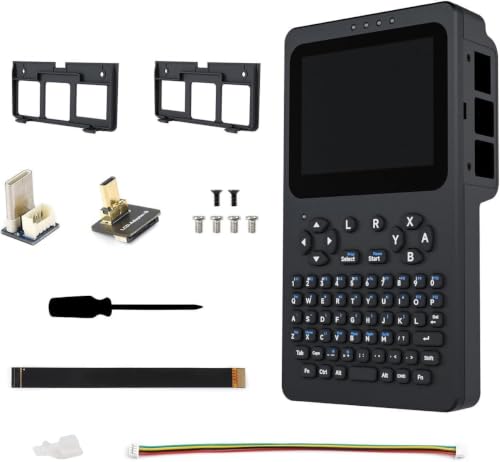
This PocketTerm35 accessory option is explicitly marked as excluding the Pi board, making it a different starting point from a console-oriented build. It is specified for Raspberry Pi 4B and Pi 5 and has a 3.5-inch, 640 × 480 optical-bonded touchscreen for portable development and debugging. It suits someone assembling a Linux handheld around one of those boards, not someone seeking a ready-to-play game-console package. The accessory name is abbreviated, so verify the included hardware and board fit before committing to a build.
Bottom line: Choose this for a Pi 4B or Pi 5 terminal project when you supply the board.
How to Choose a Raspberry Pi Handheld Console Kit
Start with the job: a console build needs game controls and compatible gaming software, while a Linux handheld prioritizes command input, ports, and screen readability. Check the exact Raspberry Pi board family first; Compute Module 5 carrier hardware is not interchangeable with a Pi 4B or Pi 5 terminal. Then compare display resolution and diagonal size: pixel count alone does not determine readability because screen dimensions and software scaling matter. A useful rule is to choose a touchscreen terminal only if touch input suits the games or applications you plan to run; otherwise, confirm that the hardware provides the controls your project needs. Also account for components not included, such as a board, storage card, or batteries.
Raspberry Pi Board Fit and Kit Completeness
Board fit is the first compatibility check: the CM5 carrier, Pi 4B/Pi 5 terminals, and GamePi43 kit describe different board targets. A kit may supply a carrier or display assembly without supplying the Raspberry Pi itself, so make a parts list before building. The GamePi43 calls out a Raspberry Pi board and microSD card as required but not included, and its battery system uses separately supplied 18650 cells. Lithium-ion cells must be the correct type and installed with polarity matched; damaged or mismatched cells can overheat. For a handheld project, check the board revision, physical mounting, power input, storage, and whether your chosen operating system supports the display and input hardware.
Display Size, Resolution, and Controls
Display resolution describes the pixel grid, while diagonal size describes the physical viewing area; both affect how comfortable a handheld is to use. The options here range from 3.5-inch 640 × 480 touch displays to 4.3-inch 800 × 480 and 4-inch 720 × 720 screens. Touchscreens are useful for Linux interfaces, but retro games often depend on physical controls, so do not assume a touch display alone makes a console. For terminal work, a keyboard and trackpad can matter more than a wider screen. For gaming, prioritize the actual control layout and supported software before comparing display figures; verify those elements when they are essential to your build.
| Project need | Choose this type | Check before building |
|---|---|---|
| DIY retro gaming | GamePi43-style console kit | Board fit, controls, storage, and battery cells |
| CM5 coding and Linux | CM5 carrier handheld | CM5 compatibility and required components |
| Pi 4B or Pi 5 portable terminal | PocketTerm35-style device | Exact board fit and game input needs |
Power and Storage for a Portable Build
Portable Raspberry Pi builds need a power source matched to the board and display, plus storage for the operating system and files. The GamePi43 includes charging circuitry intended for 18650 lithium batteries, but the cells are not included; use only compatible cells and handle them carefully. A microSD card is required for that kit, while the CM5 carrier includes a 2242 M.2 NVMe slot for storage expansion. External power support and battery switching are features of the PocketTerm35 design, but the precise runtime depends on the complete setup and workload. Avoid selecting batteries or storage based only on physical size: confirm electrical compatibility, connector fit, and the operating system’s supported installation method.
Frequently Asked Questions
Can a Raspberry Pi handheld kit work without a Raspberry Pi board?
A carrier or console kit may supply the handheld hardware without the Raspberry Pi board itself. The GamePi43 specifically requires a separate Raspberry Pi board and microSD card, so confirm every required component before building.
What does a 720 × 720 handheld display mean?
A 720 × 720 display has 720 pixels across and 720 pixels vertically, giving it a square pixel grid. Physical readability still depends on screen size, viewing distance, and software scaling.
Are 18650 batteries included with the GamePi43 kit?
No, the GamePi43 features battery charge circuitry for 18650 lithium batteries, but the batteries are not included. Use compatible undamaged cells and match the polarity carefully.
Can I use a Pi 5 with every handheld terminal here?
No; board support differs by product. The PocketTerm35 terminals specify Pi 4B and Pi 5, while the CM5 kit is built around Compute Module 5 projects and the GamePi43 calls out Raspberry Pi B+ models.
Do touchscreens replace game controls on a Raspberry Pi console?
Not necessarily; many games rely on physical controls rather than touch input. Before choosing a touchscreen handheld, confirm that its control layout and your intended gaming software support the games you want to play.