
RX 6400 Low Profile Cards Compared by Fit

The XFX Speedster SWFT105 is the clearest fit for most RX 6400 low profile builds because its maker explicitly says low profile ready and include a bracket. Choose Kurojin Shikou RX 6400 4GB LP if compact stated dimensions matter more, or ASRock RX 6400 Challenger ITX only after confirming its unusually large measurements fit your case.
We earn a commission if you buy through links on this page. As an Amazon Associate I earn from qualifying purchases. Products are compared on manufacturer specifications, not hands-on testing.
- Best overall: XFX Speedster SWFT105 RX 6400 – The maker explicitly identifies low-profile readiness and an included bracket.
- Best for compact dimensions: Kurojin Shikou RX 6400 4GB LP – Its length and width are about 5.98 by 2.72 inches.
- Best for display features: ASRock RX 6400 Challenger ITX – Its product name specifies HDMI 2.1 and DisplayPort 1.4.
| Product | Best for | GPU memory | Length × width | Shop |
|---|---|---|---|---|
| XFX Speedster SWFT105 RX 6400 | Low-profile readiness | 4 GB GDDR6 | 6.30 × 2.76 in | Check Price on Amazon |
| Kurojin Shikou RX 6400 4GB LP | Compact measurements | 4 GB | 5.98 × 2.72 in | Check Price on Amazon |
| ASRock RX 6400 Challenger ITX | Display connectivity | 4 GB GDDR6 | 9.89 × 8.55 in | Check Price on Amazon |
RX 6400 Low Profile Graphics Cards
Compare the exact RX 6400 options by physical measurements and stated low-profile fit before choosing one.
XFX Speedster SWFT105 RX 6400
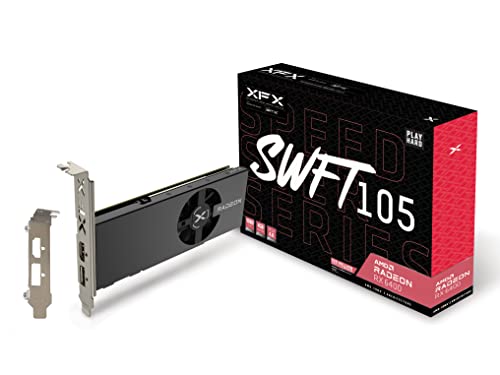
Explicit low-profile readiness is the deciding distinction here: the maker says a bracket is included. The card has an AMD RX 6400 chipset, 4 GB of GDDR6, 16 Gbps memory speed, and a boost clock up to 2321 MHz. Its dimensions are about 6.30 inches long and 2.76 inches wide, which gives a useful starting point for checking case clearance. This is the strongest match for a build that needs a low-profile bracket, but buyers should verify slot thickness and power compatibility against the PC before ordering.
Bottom line: Choose this when you need a card identified as low-profile ready with its bracket included.
Kurojin Shikou RX 6400 4GB LP

The shortest footprint among the RX 6400 options separates this board: its dimensions are about 5.98 inches long and 2.72 inches wide. It is an equipped Radeon RX 6400 board with 4 GB of GDDR6 memory, according to its product name. Those measurements make it worth considering for a compact enclosure, but the maker does not establish bracket inclusion or slot thickness. Confirm the required low-profile bracket and available clearance with the system maker before choosing it for a case that cannot accept a standard-height card.
Bottom line: Choose this for its compact listed footprint, after confirming the bracket and clearance.
ASRock RX 6400 Challenger ITX

Named display connections distinguish this RX 6400: the product name specifies HDMI 2.1 and DisplayPort 1.4. It also identifies 4 GB GDDR6 memory, RDNA 2 architecture, and a single-fan cooler, with a boost clock up to 2321 MHz. However, the measurements—9.89 inches long and 8.55 inches wide—are much larger than the other RX 6400 cards here, despite the low-profile wording in the name. Treat it as a partial fit and confirm the actual card dimensions and bracket arrangement with the system maker before selecting it for a low-profile enclosure.
Bottom line: Choose this only when its connections matter and the reported size is confirmed to fit.
How to choose an RX 6400 low profile card
Measure usable length from the expansion slot toward the drive cage, then check width and neighboring-slot clearance. PCIe cards can use shorter PCIe slots when the slot is physically long enough, but link speed and platform support can affect performance. For a card intended for an OEM small-form-factor desktop, check the system’s power limits and whether the card draws supplemental power; do not assume every low-profile PC can run every board.
Fit checks before selecting
With less than 6.5 inches of card-length clearance, favor a model whose dimensions are around 6.3 inches or less, while leaving room for cables and airflow. A slim one-slot enclosure also requires checking cooler thickness rather than relying on length alone.
Low-profile fit versus compact dimensions
A low-profile designation describes bracket and board height, while “ITX” usually signals a short card format; neither term guarantees the other. Full-height brackets are roughly 4.7 inches tall, while low-profile brackets are about 3.1 inches tall, and some retail packages provide both bracket sizes. Card length is a separate constraint: a low-profile board can still be too long for a tiny chassis. The table separates the practical checks so buyers can match the card to the case rather than assume a label settles fit.
Use the following fit guide as a first pass, then compare the case manufacturer’s maximum card dimensions.
| Need | What to verify | Decision rule |
|---|---|---|
| Low-profile slot | Bracket height and included bracket | Require a low-profile bracket for a slim case |
| Short card | Card length in inches | Choose a card shorter than measured clearance |
| Single-slot space | Cooler thickness and neighboring slots | Check the chassis limit, not just card height |
RX 6400 power and PCIe considerations
RX 6400 boards are compact, low-power-class GPUs, but the exact board and PC determine whether extra power wiring is needed. Check the card’s power connector and the computer’s available supply before installation, especially in office desktops with proprietary power supplies. PCIe 4.0 cards can operate in compatible PCIe slots, while an older PCIe generation may reduce bandwidth; the slot must still be long enough for the card’s connector. Leave ventilation around the fan, since a cramped case can recirculate warm air even when the board itself is small. Secure the card with the correct bracket before powering on.
Display outputs and monitor setup
Match ports to the monitor before buying: HDMI and DisplayPort versions affect supported display modes, and adapters can add compatibility limits. DisplayPort 1.4 and HDMI 2.1 appear on the named ASRock model, while those connections are not established for every option here. Resolution support also depends on the monitor, cable, and display timing, so an “8K” capability claim alone does not guarantee a particular refresh rate. For multi-monitor use, count the physical outputs and confirm whether the PC’s firmware and operating system support the intended display arrangement.
Frequently Asked Questions
How much clearance does a low-profile graphics card need?
A low-profile bracket is about 3.1 inches tall, but card length varies independently. Measure from the expansion slot to the nearest obstruction and leave extra room for cables and airflow.
Can a PCIe 4.0 graphics card work in an older PCIe slot?
A PCIe 4.0 card generally works in a compatible older PCIe slot, but the link runs at the older generation’s speed. Verify the motherboard slot is physically long enough and supports a graphics card.
Does low profile mean a graphics card is single slot?
No; bracket height and cooler thickness are separate measurements. Check the case’s expansion-slot clearance because a low-profile card can still occupy more than one slot.
What should I check before installing a low-profile GPU?
Check bracket height, card length, cooler thickness, and the PC’s power connections before installation. Disconnect power first and secure the card to the chassis with the matching bracket.