
Sharp Atomic Clock Outdoor Sensor: 4 Models Compared

Sharp 4-Inch Atomic Clock is the Sharp atomic clock with an outdoor sensor to choose for its 4-inch-tall time display and indoor/outdoor temperature readings. Choose Sharp 3-Inch Atomic Digital Clock if a 3-inch display and a 100-foot sensor range suit your space better; the WallarGe options are alternatives if you want other sizes or a longer stated sensor range.
Atomic clocks receive a radio time signal to synchronize automatically, while a separate wireless sensor measures outdoor temperature.
We earn a commission if you buy through links on this page. As an Amazon Associate I earn from qualifying purchases. Products are compared on manufacturer specifications, not hands-on testing.
- Best overall: Sharp 4-Inch Atomic Clock – Its 4-inch-tall time display is the largest display among the Sharp models.
- Best for a stated 100-foot range: Sharp 3-Inch Atomic Digital Clock – The included outdoor sensor is specified to work within 100 feet of the clock.
- Best for a longer sensor range: WallarGe 8.5-Inch Atomic Clock – Its outdoor sensor is specified for placement within 330 feet of the clock.
| Product | Best for | Time display | Sensor range | Clock dimensions (L × H) | Shop |
|---|---|---|---|---|---|
| Sharp 4-Inch Atomic Clock | Large time display | 4-inch-tall digits | — | 14.25 × 9.3 in | Check Price on Amazon |
| Sharp 3-Inch Atomic Digital Clock | Known sensor range | 3-inch-tall digits | 100 ft | 8.75 × 7.9 in | Check Price on Amazon |
| WallarGe 12.5-Inch Atomic Clock | Larger wall clock | 2.5-inch-tall digits | 100 ft | 10.6 × 7 in | Check Price on Amazon |
| WallarGe 8.5-Inch Atomic Clock | Longer sensor reach | — | 330 ft | 7 × 5.2 in | Check Price on Amazon |
Sharp atomic clocks with outdoor sensors
Compare the display, sensor range and clock dimensions to match a model to your room and placement needs.
Sharp 4-Inch Atomic Clock
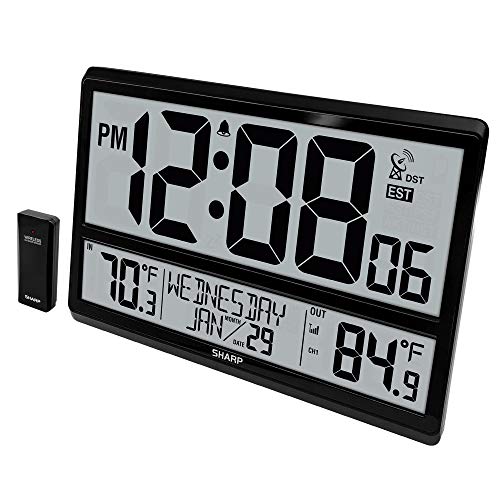
The 4-inch-tall time display sets this Sharp apart from the smaller-display Sharp alternative. The clock shows time, indoor and outdoor temperature, calendar and weekday, and can sit on a desk or hang on a wall. It runs on four AA batteries, and its sensor uses two AAA batteries; batteries are not included. Sharp says the clock receives daily WWVB updates and stays accurate to within one second.
Bottom line: Choose this model when a large time display is the priority.
Sharp 3-Inch Atomic Digital Clock

The 100-foot wireless sensor range is the clearest placement guide among the Sharp models. Its 3-inch-tall display is smaller than Sharp 4-Inch Atomic Clock, and the clock includes a tabletop stand for desk use. The clock receives WWVB time updates; the sensor transmits outdoor temperature without a wire between sensor and clock. Sharp says the time stays accurate to within one second with daily updates. Choose this model when a range matters more than the larger digits of Sharp 4-Inch Atomic Clock; walls and other obstructions can reduce real-world wireless reach, so allow margin rather than placing the sensor at the maximum distance.
Bottom line: Pick it when the 100-foot sensor range helps with placement.
WallarGe 12.5-Inch Atomic Clock

The 12.5-inch overall size makes this WallarGe an alternative for buyers who want a larger clock body, though its time digits are 2.5 inches tall. It displays indoor and outdoor temperatures, and its sensor should be within 100 feet of the clock. The clock runs on batteries and has no backlight, so it is better suited to a lit room than a dark bedroom. WallarGe says the clock synchronizes with WWVB and stays accurate to within one second with daily updates. Compared with the Sharp models, this option trades the Sharp name for a larger stated overall size.
Bottom line: Choose it if you want a larger overall clock without a backlight.
WallarGe 8.5-Inch Atomic Clock

The 330-foot sensor placement limit distinguishes this WallarGe from the models with a 100-foot range. The 8.5-inch clock displays indoor and outdoor temperatures, day and date, and offers four time zones: EST, CST, MST and PST. Both the clock and sensor are battery operated, and the clock has no backlight. WallarGe says its receiver synchronizes with WWVB every midnight. Choose it when a longer stated sensor reach or selectable time zone matters; the time-display digit height is not given, so this is a weaker fit if large readable digits are your main requirement.
Bottom line: Pick it when the longer stated sensor reach suits your layout.
How to choose an atomic clock with an outdoor sensor
Choose by the display size and the distance between the clock and sensor first. A larger time display is easier to read across a room, while the sensor range determines where outdoor temperature can be measured. These models state ranges of 100 feet or 330 feet, but walls and other obstructions can shorten wireless reach, so do not plan around the full maximum distance. Atomic clocks receive the WWVB time signal at 60 kHz from Fort Collins, Colorado; reception is affected by location and nearby interference. If the clock does not synchronize, try positioning it near a window and away from electronics, then allow time for another reception attempt.
Where to place the clock and outdoor sensor
Place the sensor in shade and out of rain or direct sun when the model calls for that protection, since sunlight can heat its reading above ambient air temperature. The 8.5-inch WallarGe specifically says to keep its sensor out of direct sunlight and rain. Keep the sensor within the range, with fewer walls and metal obstructions between it and the clock; a shorter clear path is more dependable than a maximum-distance placement through barriers. Put the clock where its display is visible and where radio reception can reach it. Concrete walls, metal surfaces and electronics can interfere with wireless or radio reception, so adjust placement if readings or time synchronization are unreliable.
What the display and sensor specifications mean
Display measurements refer to different things, so compare only like figures. The Sharp models specify 4-inch-tall and 3-inch-tall time digits, while the 12.5-inch WallarGe gives 2.5-inch-tall digits; an overall clock size is not the same as numeral height. Sensor range is a maximum placement distance, not a guarantee through every wall. Use this table to match a feature to a practical need.
| Need | Specification to prioritize | Trade-off |
|---|---|---|
| Read time across a room | Tall time digits | A larger display can take more wall or desk space |
| Place sensor farther away | Longer stated wireless range | Obstructions may shorten usable reach |
| Use clock in dim conditions | Check whether backlight is included | Two WallarGe models have no backlight |
Battery and radio setup basics
Battery-powered clocks avoid a power cord, but battery type and count differ by component. The 4-inch Sharp takes four AA batteries in the clock and two AAA batteries in its sensor, and these batteries are not included. Install the sensor batteries as well as the clock batteries; without sensor power, outdoor readings cannot be transmitted. WWVB time synchronization is also separate from sensor communication: the clock receives the time signal, while the sensor sends temperature to the clock. If automatic time setting is unreliable, test the clock in a different position with a clearer path to radio reception rather than assuming a sensor-range issue is responsible.
Frequently Asked Questions
How far can an outdoor clock sensor transmit?
The models here specify 100-foot or 330-foot sensor ranges. Walls, metal and other obstructions can reduce practical wireless reach, so allow extra distance margin.
Where should I put an outdoor temperature sensor?
Place it in shade and sheltered from rain, not against a sunlit surface. Direct sun can warm the sensor and make its reading less representative of outdoor air.
Why will an atomic clock not set itself?
WWVB reception can be weaker indoors or near electronics and metal. Move the clock near a window and away from interference, then allow time for another synchronization attempt.
Do atomic clocks need internet access?
No; these clocks synchronize with the WWVB radio time signal rather than an internet connection. Their outdoor sensors use a separate wireless link to send temperature to the clock.
Can a wireless sensor work through walls?
A wireless sensor can transmit through some indoor obstacles, but each wall or metal barrier can reduce range. Keep the sensor closer than the maximum when the path is obstructed.