
Xiaomi Mi Computer Monitor Light Bar Compared by Fit

The Xiaomi Mi Computer Monitor Light Bar is the closest match for shoppers seeking Xiaomi branding, with a 2.4GHz wireless remote and a mount that attaches to the top of a monitor. Choose another model if your monitor is curved or you want a disclosed adjustable brightness range and color temperature.
We earn a commission if you buy through links on this page. As an Amazon Associate I earn from qualifying purchases. Products are compared on manufacturer specifications, not hands-on testing.
- Best overall: Xiaomi Mi Monitor Light Bar, Dark Black – Matches the Xiaomi search directly and includes a 2.4GHz wireless remote.
- Best for Xiaomi alternative: Xiaomi Mi Monitor Light Bar, Black – Offers Xiaomi branding and wireless control with a more compact listed length.
- Best for curved monitors: Quntis Focus 20 Monitor Light Bar – Its clamp is made for most 17–32-inch flat, curved, and irregular monitors.
| Product | Best for | Length | Remote control | Monitor fit | Shop |
|---|---|---|---|---|---|
| Xiaomi Mi Monitor Light Bar, Dark Black | Xiaomi match | 17.6 in | 2.4GHz wireless | Attaches to monitor top | Check Price on Amazon |
| Xiaomi Mi Monitor Light Bar, Black | Alternate Xiaomi | 16 in | 2.4GHz wireless | Attaches to monitor top | Check Price on Amazon |
| Quntis Focus 20 Monitor Light Bar | Curved monitors | 20.08 in | Remote control | 17–32 in monitors | Check Price on Amazon |
| BenQ ScreenBar Halo 2 | Ambient backlight | 19.7 in | Wireless controller | Curved monitor fit | Check Price on Amazon |
| Quntis 40 cm Monitor Lamp | Simple desk light | 15.75 in | — | Monitor-mounted | Check Price on Amazon |
Xiaomi Mi Computer Monitor Light Bars and Alternatives
These monitor-mounted light bars differ most in brand match, controls, and the monitor shapes their clamps are designed to fit.
Xiaomi Mi Monitor Light Bar, Dark Black

The Xiaomi model is the direct match for this search and includes a 2.4GHz wireless remote, unlike the wired-control-free alternatives described here. Its metal body attaches to the monitor top to keep the desk clear, and its asymmetric optical design aims light down onto the work area rather than reflecting it toward the screen. Xiaomi also specifies a Ra95 color rendering index. Choose this bar if Xiaomi branding and wireless adjustment are priorities; buyers who need exact supported monitor thickness should confirm that fit before choosing.
Bottom line: Pick this if you want the Xiaomi model with wireless control.
Xiaomi Mi Monitor Light Bar, Black
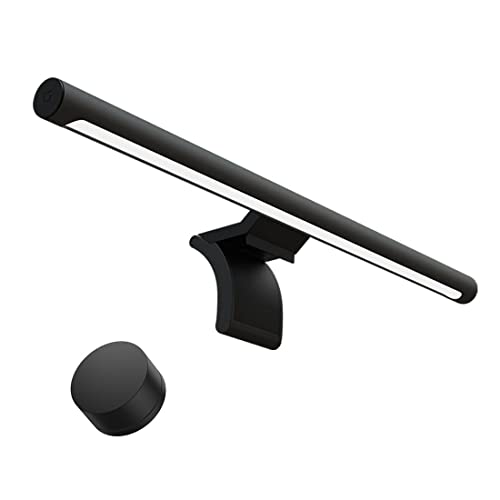
This Xiaomi variant is the shorter option, with a 16-inch listed length rather than the 17.6 inches of the other Xiaomi bar. It retains Xiaomi branding, a 2.4GHz wireless remote, a metal body, and an asymmetric design intended to avoid screen reflection. The compact length may suit a narrower work area, but the measurements do not establish which monitor widths it covers. Choose it when a shorter bar is useful; verify that its mount suits your monitor before buying.
Bottom line: Choose this if the shorter Xiaomi bar better suits your setup.
Quntis Focus 20 Monitor Light Bar

The Quntis Focus 20 is the choice here with a fit for most 17–32-inch flat, curved, and irregular monitors, using a triple-fold weighted clamp. Its remote adjusts brightness and color temperature, with a 3000K–6500K range and CRI95. That makes it more suitable than the Xiaomi bars when curved-screen compatibility and adjustable color temperature are the deciding needs. It is a Quntis alternative, not a Xiaomi product, and its 20.08-inch length makes it longer than either Xiaomi model.
Bottom line: Choose this when curved-monitor fit and adjustable color temperature matter most.
BenQ ScreenBar Halo 2

The BenQ ScreenBar Halo 2 stands apart with both front lighting and an adjustable ambient backlight, while the Xiaomi models emphasize a single monitor-mounted bar. Its wireless dial controls brightness, color temperature, and modes, and it is designed for curved monitors. The front light uses an 18-degree anti-glare angle. Choose this option if backlighting behind the screen and a physical adjustment dial matter more than Xiaomi branding; the available product facts do not establish its supported monitor thickness range.
Bottom line: Pick this if you want front lighting plus adjustable backlight.
Quntis 40 cm Monitor Lamp

The Quntis 40 cm lamp is the shortest option described here, at about 15.75 inches, and uses touch controls with auto-dimming. Its asymmetrical design directs light onto the desk while avoiding reflected screen glare, and the specifications claim flicker-free lighting and cite IEC/TR 62778 and IEC/EN 62471. It is a Quntis alternative rather than a Xiaomi model, and the available facts do not give a monitor-size fit range. Choose it when touch control and auto-dimming are more useful than wireless remote operation.
Bottom line: Choose this for touch controls and auto-dimming in a shorter bar.
How to choose a monitor light bar
A monitor light bar is a lamp that sits above the display and aims illumination toward the desk, saving space compared with a freestanding task lamp. Start with the feature that changes your setup: brand, monitor shape, or controls. A wireless remote or dial lets you adjust light without reaching for the bar; touch controls keep the control on the lamp. Adjustable color temperature is useful when switching between warmer evening light and cooler task lighting. An asymmetrical optical design aims light downward to reduce reflections on the screen. For a monitor with a curved or unusual rear profile, give clamp design and stated compatibility priority over brand or length.
Monitor fit, dimensions, and clamp clearance
Monitor light bars depend on a stable top edge and a clamp that can clear the housing behind it. One product here gives an explicit fit of most 17–32-inch flat, curved, and irregular screens, with thickness from 0.12 to 3.94 inches; the Xiaomi models give no comparable range. Measure screen width and the thickness of the top edge, then check whether a webcam or raised bezel occupies the center mounting spot. A bar’s length is not the same as the screen size it fits. If the monitor is curved or its back slopes sharply, favor a clamp with curved-screen compatibility rather than assuming a standard clip will work.
Wireless remotes, touch controls, and light adjustment
Wireless remotes and dials control the lamp from the desk, while touch controls require access to the bar itself. Xiaomi’s two options use a 2.4GHz wireless remote; the BenQ has a wireless dial, and one Quntis alternative uses touch controls and auto-dimming. The other Quntis remote model gives a 3000K–6500K color-temperature range and stepless dimming. Color temperature describes the warmth or coolness of white light, while brightness controls its intensity. A useful decision rule is to favor a model with explicit adjustable color temperature if you routinely move between focused daytime tasks and warmer evening lighting; prioritize auto-dimming if automatic adjustment matters more than remote control.
Reducing glare and choosing safer desk lighting
Screen glare depends on where the light is aimed and how the display reflects nearby surfaces. An asymmetrical design sends light toward the desk instead of directly onto the screen, but bar placement and screen angle still matter; shift the lamp or tilt the display if a bright reflection appears. Keep light aimed below eye level and avoid staring into exposed LEDs. IEC/EN 62471 is a photobiological safety standard for lamps and lamp systems, and IEC/TR 62778 provides guidance for evaluating blue-light hazard. A certification claim does not mean a lamp treats eye strain or guarantees comfort, so use a comfortable brightness and take regular screen breaks.
Frequently Asked Questions
How high should a monitor light bar sit?
A monitor light bar typically rests on the display’s top edge, with its beam angled down toward the desk rather than into your eyes. Reposition the bar if light reflects visibly on the screen.
Will a monitor light bar fit every curved screen?
No, curved-screen fit depends on the clamp and the shape of the monitor housing. Prefer a bar with an explicit curved-monitor range, and measure the top edge thickness before choosing.
What color temperature is useful for desk work?
A range around 3000K–6500K covers warmer to cooler white light, as specified for one remote-controlled bar here. Choose warmer light for a softer evening feel and cooler light for a crisper task appearance.
Does a monitor light bar replace room lighting?
A monitor light bar mainly illuminates the desk area and is not necessarily a room light. In a dark room, add ambient lighting to avoid a stark contrast between the screen and its surroundings.
How do I avoid glare from a monitor lamp?
Aim the lamp downward and adjust its position until you no longer see a bright reflection on the display. Asymmetrical optics are designed to reduce screen reflection, but monitor angle and placement still affect glare.