
Steering Remote Control Ready: 3 Models Compared

For a steering remote control ready setup, Y-METDRIVING Wireless Steering Wheel Remote is the clearest fit if your Android stereo supports steering wheel-button learning; it has 10 buttons, including a customizable one. Choose 8-Key Wired Steering Wheel Remote if you want a wired 8-button controller, or Tomotato Wireless Steering Wheel Controller if your DVD navigation unit supports direction control.
These remotes put media controls near the steering wheel, but they do not make an incompatible stereo ready. Before choosing, confirm that your head unit supports steering wheel controls or the required learning function.
We earn a commission if you buy through links on this page. As an Amazon Associate I earn from qualifying purchases. Products are compared on manufacturer specifications, not hands-on testing.
- Best overall: Y-METDRIVING Wireless Steering Wheel Remote – Its 10 buttons include call and playback controls, and it supports learning on compatible Android stereos.
- Best for wired control: 8-Key Wired Steering Wheel Remote – The wired 8-button design covers volume, track, call, mode, and mute functions.
- Best for DVD navigation: Tomotato Wireless Steering Wheel Controller – It is intended for DVD navigation units with direction-control function and offers 5- or 10-button choices.
| Product | Best for | Connection | Buttons | Compatibility | Shop |
|---|---|---|---|---|---|
| Y-METDRIVING Wireless Steering Wheel Remote | Android stereos | Wireless | 10 | Android stereos with button learning | Check Price on Amazon |
| 8-Key Wired Steering Wheel Remote | Wired controls | Wired | 8 | Android/Wince multimedia systems | Check Price on Amazon |
| Tomotato Wireless Steering Wheel Controller | DVD navigation | Wireless | 5 or 10 | DVD navigation with direction control | Check Price on Amazon |
Steering Remote Controls
Compare the connection style and head-unit support before choosing a controller for your steering wheel.
Y-METDRIVING Wireless Steering Wheel Remote

Unlike the wired option, this wireless remote has 10 frequently used buttons, including call answer and hang-up, play/pause, playback toggle, and one customizable key. The maker says most Android car stereos work when they support steering wheel-button learning; the maker also says its portable car stereos can be used directly. This is a fit for drivers whose head unit can learn remote commands. It will not suit a stereo without steering wheel-button support, so confirm that capability before choosing.
Bottom line: Pick this if your Android stereo supports steering wheel-button learning.
8-Key Wired Steering Wheel Remote
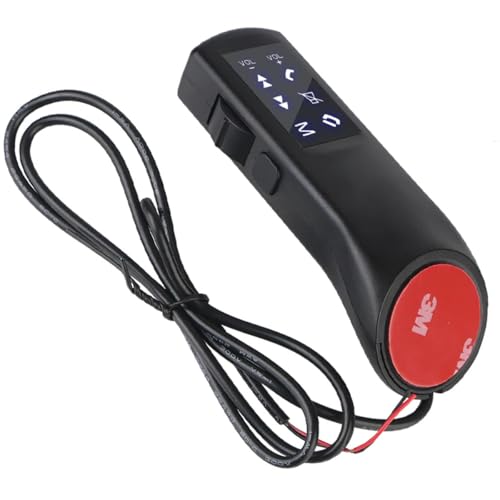
The wired connection and luminous buttons distinguish this remote from the wireless controllers. Its 8 keys cover volume adjustment, song changes, calls, mode switching, and mute, and the translucent buttons are designed to glow in low light. Choose it if you want those functions in a wired control and your multimedia system is an Android or Wince system. The maker describes compatibility broadly, but the specifications do not establish how it connects to a particular head unit; verify the required connection before buying.
Bottom line: Choose this for a wired 8-key controller with illuminated buttons.
Tomotato Wireless Steering Wheel Controller

This wireless controller offers a choice of 5 or 10 buttons, unlike the fixed button counts on the other remotes. Its curved design is intended to fit along different steering wheels, and the maker says installation and removal require no complicated tools. It is aimed at DVD navigation units that have a direction-control function, making head-unit capability the key decision. It is not a general phone media remote, and the specifications do not identify a specific connection method, so confirm compatibility with the intended unit.
Bottom line: Pick this when your DVD navigation unit supports direction control.
How to Choose a Steering Remote Control
Start with the stereo’s steering wheel-control support, then compare connection style and buttons. Some stereos can learn button commands; a remote designed for that feature cannot make a stereo without it compatible. Among these options, Y-METDRIVING Wireless Steering Wheel Remote explicitly calls for learning on compatible Android stereos, while 8-Key Wired Steering Wheel Remote is a wired controller and Tomotato Wireless Steering Wheel Controller is specified for DVD navigation with direction control. Match the remote’s system type to the head unit before weighing convenience features. A useful rule is simple: if the stereo manual or settings do not show steering wheel control or button learning, do not assume an aftermarket remote will work. Button count matters after compatibility: choose only the functions you can recognize and reach without taking attention from driving.
Wired and Wireless Steering Remotes Compared
Wired remotes connect by wire, while wireless models avoid a wire between the button unit and its receiver or head unit. A wired design may involve routing a cable around steering wheel trim, so avoid any installation that interferes with steering movement, airbags, or controls. Wireless does not automatically mean universal: head-unit support and pairing or learning requirements still decide fit. The table compares the options by intended use, not by a claim that one connection works with every vehicle.
| Type | Best match | Check first |
|---|---|---|
| Wired 8-key remote | Android or Wince multimedia system | Required head-unit connection |
| Wireless 10-key remote | Android stereo with button learning | Steering wheel-control learning support |
| Wireless 5- or 10-key remote | DVD navigation with direction control | Direction-control compatibility |
Check Steering Wheel Fit and Safe Placement
Position a steering remote where a hand can reach it without blocking the instrument cluster or covering an airbag area. Steering wheels vary in rim shape and available space, so check the remote’s mounting approach against the wheel before installation; a curved shape alone does not guarantee fit. Keep any cable clear of the wheel’s rotation and moving trim. Never mount an accessory over a steering wheel airbag cover or where it could interfere with deployment. Set up and test controls while parked, not while driving, and remove or reposition any remote that shifts, obstructs your grip, or requires looking away from the road.
What to Check Before Installation
Confirm system compatibility and control learning before attaching a remote permanently. A car stereo may need a steering wheel-control input or a learning menu, while a vehicle’s factory controls can require a compatible interface; do not assume a universal label means every stereo uses the same connection. For a wired controller, check cable routing and connector fit. For a wireless model, establish whether it communicates directly with the head unit or needs a receiver before beginning installation. After setup, test each button with the vehicle safely parked, confirm that calls and audio behave as expected, and make sure the remote does not impede steering. Stop using it if a button triggers an unintended function.
Frequently Asked Questions
Will a steering remote work with any car stereo?
No; the stereo needs a compatible steering wheel-control input or a learning function. Check the head unit’s manual or settings before selecting a remote.
What does steering wheel button learning mean?
Button learning lets a compatible stereo assign remote buttons to audio or call functions. The stereo must support the feature, and setup should be done while parked.
Can I install a remote over the airbag cover?
No; keep accessories off the steering wheel airbag cover and its deployment area. Place the control where it does not obstruct the wheel, instrument cluster, or grip.
Should I choose a wired or wireless steering remote?
Choose wired when you specifically want a wired control and can route its cable safely; choose wireless when the head unit supports its required connection or learning process. In either case, confirm stereo compatibility first.