
Camera Clip on Glasses: 3 Models Compared by Fit

For a clip-on camera for glasses, Clip-on Camera for Glasses, Black is the clearest match because it clips to a glasses temple and includes a 16GB card. Choose RASTKY Glasses Camera, White instead if you want a glasses camera with a built-in display and a 120-minute 1080P runtime; its maker does not identify it as a clip-on.
We earn a commission if you buy through links on this page. As an Amazon Associate I earn from qualifying purchases. Products are compared on manufacturer specifications, not hands-on testing.
- Best overall: Clip-on Camera for Glasses, Black – A clip-on design, 110° lens and included 16GB card make it the closest fit to the search.
- Best for app control: Clip-on Camera for Glasses, Deep Black – It supports Wi-Fi phone preview, snapshots, recording control and playback.
- Best for longer recording: RASTKY Glasses Camera, White – Its maker claims up to 120 minutes of continuous 1080P recording.
| Product | Best for | Video resolution | Shop |
|---|---|---|---|
| Clip-on Camera for Glasses, Black | Clip-on POV | 2.7K | Check Price on Amazon |
| Clip-on Camera for Glasses, Deep Black | Phone operation | 2.7K | Check Price on Amazon |
| RASTKY Glasses Camera, White | Longer sessions | 2.7K; 1080P runtime | Check Price on Amazon |
Camera Clip on Glasses Compared
Compare attachment style, camera angle and recording time to choose a glasses camera for your intended use.
Clip-on Camera for Glasses, Black

Clip-on Camera for Glasses, Black is a clip-on camera supplied with blue-light glasses, making it the most direct match for someone who wants a temple-mounted POV setup. Its 110° lens and 2.7K video suit hands-free footage, while Wi-Fi app control provides live preview, remote angle adjustment, recording controls and clip review. A 16GB card is included. The maker says the clip is compatible with most glasses, but temple thickness and shape can affect how securely an attachment sits; check that fit before relying on it during movement. The glasses may also be unnecessary if you already have a preferred pair.
Bottom line: Choose this if you want an explicitly clip-on camera and an included memory card.
Clip-on Camera for Glasses, Deep Black
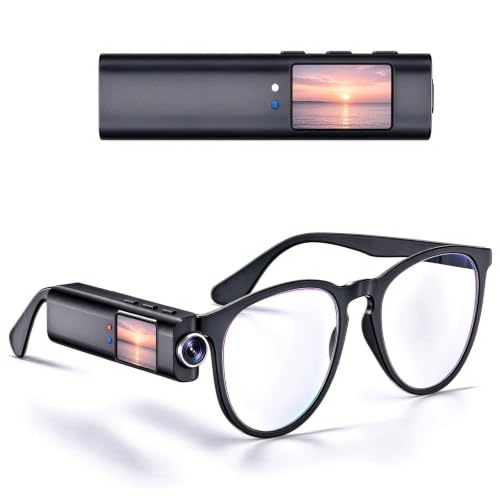
Clip-on Camera for Glasses, Deep Black emphasizes phone-based operation, including Wi-Fi live viewing, snapshots, recording controls and playback. The clip-on camera records 2.7K video through a 110° lens and comes with glasses and a 16GB card, so it fits buyers who want to manage capture from a phone rather than handle a camcorder. The maker describes it for first-person recording indoors and outdoors. App compatibility and setup are practical considerations: confirm your phone can install the current Viipulse app before choosing this model.
Bottom line: Choose this if smartphone preview and capture controls matter more than a runtime.
RASTKY Glasses Camera, White
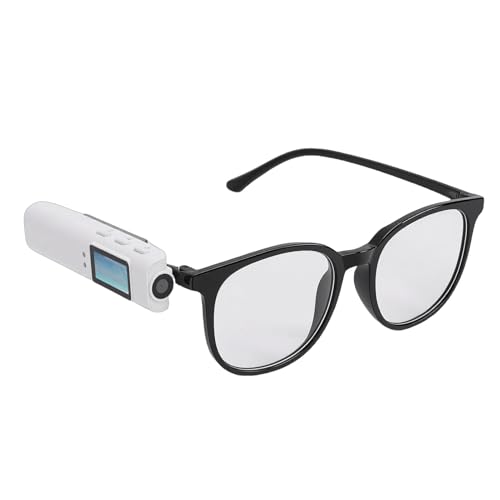
RASTKY Glasses Camera, White differs from the clip-on options by including a 0.96-inch display and a recording runtime. Its maker claims up to 120 minutes of continuous 1080P recording from the 250mAh battery, and says recording while charging is possible. The camera also supports 2.7K video, 12MP photos and Wi-Fi app management for preview and remote control. This is a related glasses-camera option, not an explicitly described clip-on, so choose it only if its mounting style suits your glasses. The 120-minute figure applies to 1080P recording, not necessarily 2.7K use.
Bottom line: Choose this if a display and a 1080P runtime outweigh the need for a specified clip-on mount.
How to choose camera clip on glasses
Start with the mount, then match the camera angle and recording format to the footage you need. A clip-on model attaches at a glasses temple; verify that the clip sits securely without blocking your vision or pressing uncomfortably. A 110° field of view captures more surroundings than a narrower view, but wide-angle lenses can make objects near the edges look stretched. Resolution also affects storage: 2.7K video uses more space than 1080P, so a 16GB card may hold less footage at the higher setting. For rides or long activities, prioritize a runtime and check how it changes between resolutions rather than assuming one duration applies to every mode.
Clip-on mounts and glasses fit
Clip-on cameras work best when the mount is stable on the glasses temple and does not shift as the wearer moves. Temple thickness, curvature and frame material can change how well a clip grips, so test the fit while stationary before recording on a bike or during another active task. Keep the camera aligned with your natural gaze; even a slight tilt changes the recorded horizon. A camera supplied with glasses offers an alternative to fitting the device onto prescription frames, but it may not match a wearer’s prescription or comfort needs. Do not wear unfamiliar frames while cycling until you can see clearly and the camera stays secure.
What 2.7K and 110 degrees mean
2.7K describes a video resolution above standard 1080P HD, while 110° describes the lens’s broad viewing angle. A wider view helps include more of a first-person scene, but it can distort edge shapes and make distant subjects appear smaller. Higher resolution preserves more image detail, yet requires more storage and can use more battery than lower-resolution recording. For hands-free cameras, lens alignment is as important as the number: tilt the camera toward the scene rather than the floor or sky. These specs do not by themselves establish stabilization quality, low-light performance or audio quality, so avoid choosing based on resolution alone.
Recording safely and respectfully
Hands-free recording does not make a camera safe to use in every setting. Keep your attention on traffic and surroundings while cycling, and do not adjust a phone or camera while moving; stop in a safe place before changing settings. A lens near eye level can capture bystanders, so ask permission where appropriate and follow venue rules, especially in classrooms or private spaces. Check local recording and privacy laws before capturing conversations because audio-consent rules differ by state. Before an outing, confirm the camera is secure, the lens is unobstructed and the recording has started as intended.
Frequently Asked Questions
How wide is a 110-degree camera view?
A 110° lens captures a broad scene across the camera’s view, useful for first-person footage. Wide-angle lenses can stretch objects near the frame edges, so position the camera carefully.
Does a 2.7K glasses camera record longer than 1080P?
Not necessarily; higher-resolution recording generally uses more storage and may use more battery. Runtime depends on the specific camera and mode, so compare figures given for the same resolution.
How much video fits on a 16GB card?
The duration depends on bitrate, resolution and file format, so a card capacity alone cannot determine recording time. Higher-resolution 2.7K footage typically fills the same card sooner than 1080P footage.
Can I wear a camera while cycling?
A securely mounted camera can record hands-free, but it must not obstruct vision or distract the rider. Stop somewhere safe before adjusting the camera or phone, and check the mount before riding.
Can a glasses camera record while charging?
Some models support recording while charging; RASTKY Glasses Camera, White’s maker says it can. Confirm the charging setup is secure and does not interfere with the glasses or create a snagging hazard.