
Honeycomb Shell Gaming Mouse: 5 Models Compared

For a wired honeycomb shell gaming mouse with a 41 g weight and up to 10,000 DPI, choose Redragon M617 Honeycomb Wired. Pick another model if you need wireless connectivity, a higher maximum DPI, or a specific configuration feature.
We earn a commission if you buy through links on this page. As an Amazon Associate I earn from qualifying purchases. Products are compared on manufacturer specifications, not hands-on testing.
- Best overall: Redragon M617 Honeycomb Wired – Its 41 g weight and paracord cable suit buyers prioritizing low mouse mass and wired use.
- Best for wireless modes: Redragon M725 Tri-Mode – It supports Bluetooth 5.1, 2.4 GHz wireless, and Type-C wired connections.
- Best for higher DPI: SOLAKAKA SM900 Wired – Its adjustable range reaches 12,800 DPI and its polling rate reaches 1,000 Hz.
| Product | Best for | Connection | Max DPI | Weight | Shop |
|---|---|---|---|---|---|
| Redragon M617 Honeycomb Wired | Low-weight wired use | Wired | 10,000 DPI | 41 g | Check Price on Amazon |
| Redragon M725 Tri-Mode | Flexible connection | Bluetooth, 2.4 GHz, wired | 8,000 DPI | — | Check Price on Amazon |
| SOLAKAKA SM900 Wired | DPI and polling range | Wired | 12,800 DPI | 70 g | Check Price on Amazon |
| TMKB Falcon M1SE White | RGB customization | Wired | 12,800 DPI | 75 g | Check Price on Amazon |
| WolfLawS KM-1 Wireless | Quiet shared spaces | 2.4 GHz wireless | — | — | Check Price on Amazon |
Honeycomb Shell Gaming Mouse Options
Compare these honeycomb-shell mice by connection, sensor range, weight, and programmable controls.
Redragon M617 Honeycomb Wired

At 41 g, this wired model is the lightest option here with a weight, and its paracord cable is designed to reduce cable drag. The sensor offers five customizable DPI settings, with presets from 800 to 10,000 DPI, and the mouse has six programmable buttons, including two side buttons. It suits players who want low mass and button remapping without wireless modes. Its maximum DPI is lower than the 12,800 DPI options, so buyers seeking the highest sensor range should compare those instead.
Bottom line: Choose this for a 41 g wired mouse with programmable buttons.
Redragon M725 Tri-Mode

Three connection choices set this model apart: Bluetooth 5.1, 2.4 GHz wireless, and Type-C wired. Its sensor supports five redefinable DPI levels, with defaults of 400, 800, 1,600, 2,400, and 4,000 DPI and a maximum of 8,000 DPI. Five programmable buttons and five configuration modes add flexibility for work and games. Choose it if switching between wireless and wired connections matters more than a top-end DPI figure. The weight figures conflict, so verify the weight if mouse mass is a deciding factor.
Bottom line: Choose this if you want Bluetooth, 2.4 GHz, and wired connection options.
SOLAKAKA SM900 Wired

This wired mouse combines a maximum 12,800 DPI setting with a polling rate of up to 1,000 Hz, giving it the broadest sensor and polling range among these options. It offers six DPI levels and four modes: one office mode and three gaming modes that require macro software setup. Button functions, modes, DPI, and lighting effects can be customized. The weight converts to about 70 g. Buyers who prefer ready-to-use gaming modes may favor a simpler setup, since the gaming modes here involve software configuration.
Bottom line: Choose this for a wired model with 12,800 DPI and up to 1,000 Hz polling.
TMKB Falcon M1SE White

The Falcon M1SE pairs a 75 g weight with a 200–12,800 DPI range and a polling-rate range of 125–1,000 Hz. Its six programmable buttons support remapping and macro functions, while the RGB strip offers 16.8 million adjustable colors. The paracord cable and PTFE skates distinguish its hardware configuration from simpler wired choices. It suits buyers who want lighting and adjustable controls in a white mouse. At 75 g, it weighs more than the 41 g wired option, which matters to players who prioritize minimizing mouse mass.
Bottom line: Choose this for adjustable RGB, programmable controls, and a white finish.
WolfLawS KM-1 Wireless
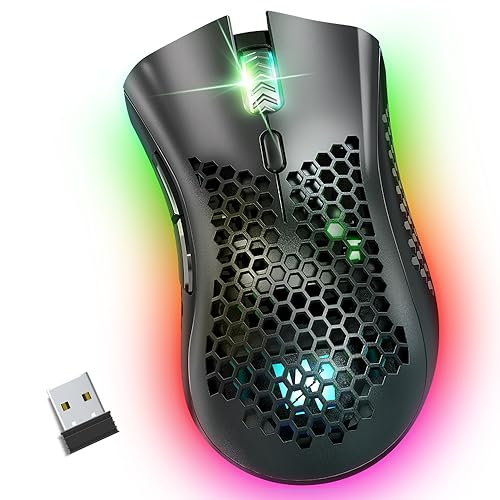
Quiet clicks and rechargeable 2.4 GHz wireless operation make this model distinct from the wired alternatives. It has six buttons, three adjustable DPI settings, RGB lighting, and a power-saving sleep mode; a charging cable is included. The maker rates the buttons for up to 5 million clicks. This is a practical match for shared workspaces where click noise and a cable are concerns. Its three DPI settings offer less adjustment than the models with five or six levels, so it may not suit buyers who want finer sensitivity choices.
Bottom line: Choose this for quiet clicks and rechargeable 2.4 GHz use.
How to Choose a Honeycomb Shell Gaming Mouse
Start with connection and weight, then compare DPI range and controls. Wired models avoid battery charging; wireless models can reduce cable drag, but they need a battery or charging plan. Among these options, wired weights span 41 g to 75 g where weights are given; a lighter mouse generally takes less effort to accelerate, while preference and grip still matter. DPI is cursor sensitivity, not a direct measure of sensor quality: many players begin around 800–1,600 DPI and adjust in small steps. If you want wireless play, choose a model that names your preferred connection, such as 2.4 GHz or Bluetooth. If you need the lightest wired option here, select the 41 g model.
What DPI and Polling Rate Mean
DPI describes how far the pointer moves for a given mouse movement; a higher number is not automatically more accurate. Typical gaming settings often fall around 400–1,600 DPI, though screen resolution, game sensitivity, and personal control change the useful setting. Polling rate is how often the mouse reports input: 1,000 Hz corresponds to a nominal 1 ms interval, compared with 125 Hz at 8 ms. Higher polling can increase system workload, and the difference may matter less than consistent control. Change one setting at a time and test it in the same game or desktop task rather than switching several settings together.
Wired and Wireless Honeycomb Mice Compared
Wired mice draw power through a cable, while wireless mice need charging or batteries; the connection affects setup more than shell shape. The options here include basic wired models, a tri-mode mouse, and a rechargeable 2.4 GHz mouse. Use the table to match the connection to your setup, then check whether programmable modes and DPI levels fit how you use the mouse. A wireless connection can still use a receiver, so reserve an available USB port for receiver-based 2.4 GHz models.
| Need | Connection to consider | Trade-off |
|---|---|---|
| No battery charging | Wired | Cable remains on the desk |
| Wireless through a receiver | 2.4 GHz | Receiver uses a port |
| Pairing without a receiver | Bluetooth | Device must support Bluetooth |
Honeycomb Shell Care and Setup
Open shell cutouts can collect dust, so power off or disconnect a mouse before cleaning and use a dry, soft brush around openings. Avoid pouring liquid into the shell or spraying cleaner directly onto the mouse; moisture can reach electronics through the holes. Keep the cable from sharp bends and heavy objects, especially near the connector, where repeated strain can damage a wired mouse. For wireless models, recharge when needed and avoid storing them fully depleted for long periods. Set DPI and button macros only after the mouse works reliably with default settings, so a custom binding does not interfere with basic navigation.
Frequently Asked Questions
Is a honeycomb shell mouse always lighter?
No; shell cutouts alone do not determine the finished weight. These options with weights range from 41 g to 75 g, so compare the actual weight rather than assuming every honeycomb design is ultralight.
What DPI should I start with for gaming?
A useful starting range is 800–1,600 DPI for many players. Adjust in small increments, since game sensitivity and screen resolution also affect pointer or aim movement.
Does a 1,000 Hz polling rate mean 1 ms?
A 1,000 Hz polling rate corresponds to a nominal 1 ms reporting interval. Actual input-to-screen response also depends on the computer, game, display, and other components.
Can I use a wireless gaming mouse while charging?
Only a model with a wired operating mode can be assumed to support use over its cable; the tri-mode option names Type-C wired operation. Check that a wireless model supports wired use before relying on it during charging.
How should I clean a mouse with shell cutouts?
Disconnect or power off the mouse and brush dust away with a dry, soft brush. Keep liquid away from the cutouts because it can reach internal electronics.