
Older Samsung Tablet Charger: 3 Options Compared

30-Pin USB Cable, 6.6 ft is the strongest match for older Samsung tablets because its compatibility list covers several legacy Galaxy Tab models and it uses a 30-pin connector. Choose 30-Pin Galaxy Tab Charger Cable for one of its Tab models; choose Samsung Tablet Wall Charger Set only if your tablet has a compatible micro-USB port.
We earn a commission if you buy through links on this page. As an Amazon Associate I earn from qualifying purchases. Products are compared on manufacturer specifications, not hands-on testing.
- Best overall: 30-Pin USB Cable, 6.6 ft – Its compatibility list spans multiple older Galaxy Tab models and the cable is 6.6 feet long.
- Best for listed Tab models: 30-Pin Galaxy Tab Charger Cable – It is a 30-pin replacement for the Galaxy Tab 2 family and several specified Tab models.
- Best for micro-USB models: Samsung Tablet Wall Charger Set – It includes a wall charger and 3-foot micro-USB cable for compatible tablet models.
| Product | Best for | Connector | Cable length | Compatibility examples | Shop |
|---|---|---|---|---|---|
| 30-Pin USB Cable, 6.6 ft | Broad legacy fit | 30-pin to USB | 6.6 ft | GT-P5113, GT-P7510, SGH-I497 | Check Price on Amazon |
| 30-Pin Galaxy Tab Charger Cable | Specified Tab models | 30-pin USB | — | GT-P3113, GT-N8013, GT-P5113 | Check Price on Amazon |
| Samsung Tablet Wall Charger Set | Micro-USB tablets | Micro-USB or USB-C | 3 ft | Tab A, Tab E, Tab S2 | Check Price on Amazon |
Older Samsung Tablet Chargers
Match the tablet’s model number and physical charging port before choosing a cable or charger.
30-Pin USB Cable, 6.6 ft
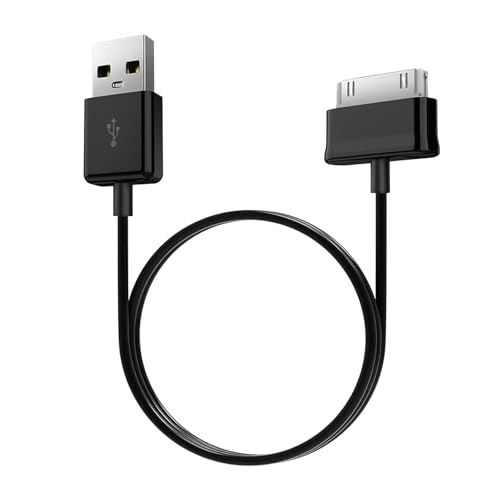
30-Pin USB Cable, 6.6 ft covers the widest set of listed legacy Samsung tablets, including several Galaxy Tab 2, Tab 10.1, and Tab 7.7 models. The cable connects a 30-pin tablet port to USB, supports charging and data transfer, and measures 6.6 feet. Its USB plug is intended for a 10W-or-higher power adapter, so check the adapter’s output before pairing them. The long reach can help when an outlet is not close to the tablet, but the compatibility list is model-specific; confirm the exact model number rather than relying on screen size or the Galaxy Tab name alone.
Bottom line: Choose this if your model number appears in its compatibility list and you want a longer 30-pin cable.
30-Pin Galaxy Tab Charger Cable

30-Pin Galaxy Tab Charger Cable is a focused 30-pin replacement for the Galaxy Tab 2 range and the named GT-P3113, GT-N8013, GT-P5113, and GT-P7510 models. The cable supports charging and sync, which makes it a direct option when the tablet’s original connector is the wide 30-pin type. Unlike 30-Pin USB Cable, 6.6 ft, its compatibility list is shorter and does not establish a cable length, so it is less useful if you need a specific reach. Choose by the full model code printed on the tablet or in its settings, not by a general label such as 10-inch tablet.
Bottom line: Choose this when your exact Tab model is among the 30-pin devices.
Samsung Tablet Wall Charger Set

Samsung Tablet Wall Charger Set is a newer-style alternative rather than a 30-pin charger: the set includes a wall adapter, a 3-foot micro-USB cable, and a 3-foot USB-C cable. Its tablet compatibility includes selected Tab A, Tab E, and Tab S2 model codes, so it may suit an older Samsung tablet only when that tablet has the matching port. The adapter supports 9V or 5V output, while the maker says fast charging applies only to supported models. The main limitation is connector fit: it will not directly plug into a 30-pin Galaxy Tab.
Bottom line: Choose this only for a tablet model with a micro-USB or USB-C port.
How to identify an older Samsung tablet charging port
Check the tablet’s model code and connector shape before selecting a charger. Older Galaxy Tab models such as GT-P5113 and GT-P7510 use a wide 30-pin connector, while later Samsung tablets commonly use micro-USB or USB-C. Screen size alone cannot identify the port: Samsung sold different generations and connector types at similar sizes. Read the model number in Settings or from the label on the device, then match the full code to the charger’s compatibility list. If the port is wide and flat, compare it physically with a 30-pin cable; micro-USB is much smaller and asymmetrical. Do not force a connector that does not seat easily, since a mismatched plug can damage the tablet’s port.
Choosing between 30-pin and micro-USB chargers
A 30-pin cable is the right starting point for legacy Galaxy Tab models with that proprietary connector; micro-USB cables fit only tablets with the smaller micro-USB port. USB-A wall adapters provide 5 volts, while higher-output adapters can support more charging power when the device and cable allow it. A charging cable’s connector determines physical fit, but the adapter also needs an appropriate USB output. Use the model number rather than relying on a broad “Samsung tablet” label. As a practical rule, if the tablet has a wide 30-pin port, select a 30-pin cable; if it has micro-USB, select the matching micro-USB cable and adapter. Never try to adapt a plug by force.
| Tablet port | Charger type | Example model family |
|---|---|---|
| 30-pin | 30-pin to USB cable | Older Galaxy Tab models |
| Micro-USB | Micro-USB charging cable | Selected Tab A, Tab E, Tab S2 |
| USB-C | USB-C charging cable | Models with a USB-C port |
Checking cable length and adapter output
Cable length affects where you can use a tablet while it charges: a 6.6-foot cable reaches farther than a 3-foot cable, but either must match the tablet port. The 30-pin cable option calls for a 10W-or-higher adapter, while the multi-cable wall set offers 5V or 9V output. Output ratings do not override device compatibility, and a fast-charge mode works only when the tablet supports it. Before connecting a replacement, compare the adapter’s output label with the tablet’s requirements and use a cable intended for charging. Stop using a cable with exposed conductors, a loose connector, or damaged insulation, especially while the device is plugged into power.
Common mistakes when replacing a tablet charger
The most common mismatch is buying by the phrase “Samsung tablet” without checking the model code or connector. Many tablets look similar from the front but use different charging ports, and connector shape is not interchangeable. A second mistake is assuming fast charging applies to every model because an adapter advertises 9V output; the tablet must support the mode. Keep charging away from liquids, and unplug a damaged cable rather than continuing to use it. For a tablet that will not charge, first check that the connector is fully seated and the adapter is powered; if the plug feels loose or the port is bent, stop and have the hardware inspected rather than pushing harder.
Frequently Asked Questions
How do I tell whether my Samsung tablet uses 30-pin?
Look at the physical port and confirm the model number in Settings or on the device label. Older models such as GT-P5113 and GT-P7510 use the wide 30-pin connector, unlike the much smaller micro-USB port.
Can a micro-USB cable charge a 30-pin Galaxy Tab?
No, the plugs have different shapes and do not fit the same port. Use a 30-pin cable for a tablet with a 30-pin connector; never force a mismatched plug.
Does a higher-watt adapter make an old tablet charge faster?
Not necessarily; charging speed depends on what the tablet and cable support. The 30-pin cable option calls for a 10W-or-higher adapter, but that does not mean every compatible tablet accepts faster charging.
Can I use a Samsung tablet charger for data transfer too?
A cable must support data, not only power, to sync files. The 30-pin cable option explicitly supports charging and data transfer, while the specific capability depends on the cable you choose.
What should I do if the charger plug feels loose?
Stop using it if the connector will not seat securely or the tablet’s port appears damaged. Do not force the plug; a loose or bent charging port can worsen with pressure.