
AV to HDMI Adapter: 3 RCA Converters Compared

For most composite devices, Tengchi RCA to HDMI Converter is the direct fit because it accepts yellow, white and red RCA input and outputs 1080p HDMI. Choose Mini RCA to HDMI Converter if you want a 720p output option, or Wenter RCA to HDMI Converter with Cables if you need RCA and HDMI cables included.
An AV to HDMI adapter is an active converter that changes analog composite video and audio into an HDMI signal; it does not work in the reverse direction.
We earn a commission if you buy through links on this page. As an Amazon Associate I earn from qualifying purchases. Products are compared on manufacturer specifications, not hands-on testing.
- Best overall: Tengchi RCA to HDMI Converter – Converts composite RCA input to 1080p HDMI and supports multiple analog TV formats.
- Best for output choice: Mini RCA to HDMI Converter – Offers a choice of 720p or 1080p HDMI output.
- Best for included cables: Wenter RCA to HDMI Converter with Cables – Includes separate RCA, HDMI and Micro USB cables.
| Product | Best for | HDMI output | TV formats | Cables included | Shop |
|---|---|---|---|---|---|
| Tengchi RCA to HDMI Converter | 1080p output | 1080p | PAL, NTSC, SECAM variants | USB cable | Check Price on Amazon |
| Mini RCA to HDMI Converter | 720p or 1080p | 720p or 1080p | PAL, NTSC, SECAM variants | USB cable | Check Price on Amazon |
| Wenter RCA to HDMI Converter with Cables | Cable bundle | 720p or 1080p at 60Hz | — | RCA, HDMI, Micro USB | Check Price on Amazon |
AV to HDMI Adapters
Compare each converter’s output options, supported formats and cable setup against your source device and display.
Tengchi RCA to HDMI Converter
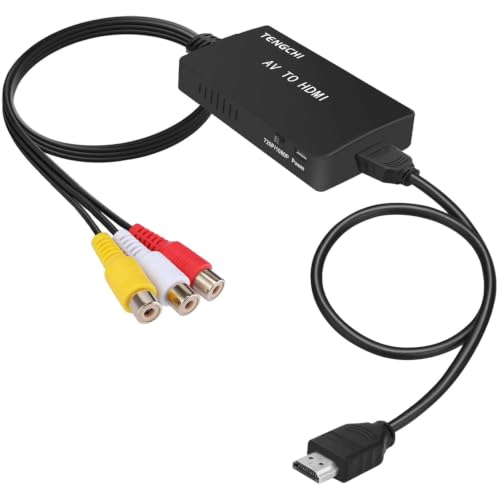
Tengchi RCA to HDMI Converter is the only option here with a single stated 1080p output resolution. It takes yellow, white and red composite RCA input and sends video to an HDMI 1.3 output, with support for PAL, NTSC, SECAM, PAL/M and PAL/N formats. The converter requires USB power from a 5V, 1A source, which is not included. This suits a setup where the display accepts HDMI and the source has composite AV output. It does not support 3D or 4K, so it is not the right choice for a 4K conversion need.
Bottom line: Choose this when your priority is a 1080p output from a composite source.
Mini RCA to HDMI Converter

Mini RCA to HDMI Converter gives you a choice between 720p and 1080p output, unlike the converter with a single stated output resolution. Its yellow, white and red composite input converts to HDMI, and it supports PAL, NTSC, SECAM, PAL/M and PAL/N formats. USB power is required; connect the included cable to a 5V power adapter. The choice of output suits displays or setups where you want to try a lower output mode as well as 1080p. This adapter only converts RCA to HDMI, so it cannot serve a source that sends HDMI to an older RCA display.
Bottom line: Pick this if you want to select between 720p and 1080p output.
Wenter RCA to HDMI Converter with Cables

It converts yellow, white and red composite signals to HDMI and offers 720p or 1080p output at 60Hz. USB power is needed for operation. The detachable RCA and HDMI cables allow more flexible placement with compatible equipment. This is a useful fit when you need the connection cables in the package; format compatibility beyond the named composite signal is not established here.
Bottom line: Choose this when the included RCA and HDMI cables suit your setup.
How AV to HDMI conversion works
An AV to HDMI converter digitizes composite video and combines it with analog audio for an HDMI display. The yellow RCA plug carries composite video, while red and white carry the right and left audio channels; connect each color to its matching input. Composite signals commonly use 480i for NTSC or 576i for PAL, and a converter’s 720p or 1080p output is a scaled HDMI signal, not added detail from the source. These adapters need active electronics and USB power, unlike a passive cable. Confirm that the source has RCA outputs and the display has an HDMI input before choosing a converter; an HDMI-to-RCA direction requires different equipment.
Choosing 720p or 1080p output
Choose the output mode the display accepts, then consider the source’s original quality. A 720p or 1080p setting changes the HDMI signal format, but VHS tapes and older game consoles remain limited by their analog source resolution and condition. Tengchi RCA to HDMI Converter offers a single 1080p output, while Mini RCA to HDMI Converter and Wenter RCA to HDMI Converter with Cables offer 720p or 1080p; Wenter RCA to HDMI Converter with Cables specifies 60Hz. Use the lower mode if a display or source setup has trouble with the higher mode, and check the display manual for supported HDMI timings. Avoid expecting sharper original footage simply because the converter outputs a higher-resolution signal.
Matching RCA formats and cables
Match the converter input to the source’s actual output: standard composite uses three RCA plugs—yellow for video and red and white for stereo audio. PAL and NTSC describe analog television formats, and multi-format support matters when the playback device uses a different region format than the display setup. The first two converters list PAL, NTSC variants, SECAM, PAL/M and PAL/N support; Wenter RCA to HDMI Converter with Cables identifies composite input but does not specify those formats. Use this quick connection guide before setup.
| Connection | Use | Check |
|---|---|---|
| Yellow RCA | Composite video | Video input port |
| Red and white RCA | Stereo audio | Matching audio ports |
| HDMI | Converter to display | Display HDMI input |
| USB | Converter power | Required 5V supply |
Setup and common connection mistakes
Connect the RCA source, HDMI display and USB power before selecting the display’s matching HDMI input. A frequent mistake is leaving USB power disconnected: these active converters require power, even though the video and audio travel over RCA and HDMI. Another is plugging the HDMI cable into an output on a display or expecting an HDMI source to feed an RCA television; conversion direction is RCA-to-HDMI only. If the screen remains blank, check that the source is playing, all three RCA plugs are seated, the display is on the correct input and the source format is compatible. Keep the USB power lead connected during use.
Frequently Asked Questions
Can an AV to HDMI adapter convert HDMI to RCA?
No, these converters send composite RCA signals to an HDMI display, not HDMI signals to an RCA television. For the reverse direction, use a converter specifically made for HDMI-to-composite output.
Do RCA to HDMI converters need USB power?
Yes, the converters here require USB power because they actively convert the analog signal. Tengchi RCA to HDMI Converter specifies a 5V, 1A supply, while the other two also require a 5V power adapter or USB power.
Will a 1080p converter make VHS look like HD?
No, 1080p output does not restore detail absent from a VHS recording. VHS playback is a composite analog source, so the converter scales its signal to an HDMI output format rather than creating new source detail.
What do the three RCA colors mean?
Yellow carries composite video, while red and white carry the right and left audio channels. Match the colors to the corresponding RCA input ports to avoid losing video or one audio channel.
Should I choose 720p or 1080p output?
Choose a mode accepted by your HDMI display; Mini RCA to HDMI Converter and Wenter RCA to HDMI Converter with Cables offer both 720p and 1080p, while Tengchi RCA to HDMI Converter outputs 1080p. If the display has trouble with 1080p, try the supported 720p mode on a converter that provides it.