
Bose AV35 Control Console: Models Compared by Fit

The replacement control console for Lifestyle V25 and V35 systems is the closest match for a Bose AV35 control console because its compatibility includes V35. Choose a different option only if you need the complete entertainment system, a console for a different Lifestyle generation, or a remote rather than the console.
A control console is the component used to select sources, adjust volume, and manage system settings; it is not the handheld remote.
We earn a commission if you buy through links on this page. As an Amazon Associate I earn from qualifying purchases. Products are compared on manufacturer specifications, not hands-on testing.
- Best overall: Replacement Bose Console for Lifestyle V25/V35 – The replacement console is designed for Lifestyle V25 and V35 systems.
- Best for SoundTouch systems: Replacement Console for Lifestyle SoundTouch – Its compatibility is directed at Lifestyle SoundTouch 535/525/235/135 Series I/II/III systems.
- Best for remote replacement: PZL RC35S2-27 Replacement Remote – This is a handheld remote compatible with AV35 and several Lifestyle models, not a console.
| Product | Best for | Type | Compatible systems | Connection / power | Shop |
|---|---|---|---|---|---|
| Replacement Bose Console for Lifestyle V25/V35 | V35 console replacement | Control console | Lifestyle V25, V35, 135 | Cable to receiver; cable not included | Check Price on Amazon |
| Replacement Console for Lifestyle SoundTouch | SoundTouch console replacement | Control console | SoundTouch 535/525/235/135 Series I/II/III | Multiple input/output ports | Check Price on Amazon |
| Bose Lifestyle V35 Home Entertainment System | Complete V35 system | Home entertainment system | Lifestyle V35 | Guided setup; speaker system | Check Price on Amazon |
| PZL RC35S2-27 Replacement Remote | AV35 remote replacement | Infrared remote | AV35; Lifestyle 525/235/135/V35/V25/535 | 2 AA batteries | Check Price on Amazon |
Bose AV35 control console options
Check the system model and component type before choosing a replacement.
Replacement Bose Console for Lifestyle V25/V35

This is the only console here whose compatibility explicitly includes Lifestyle V35, making it the closest fit for an AV35 console replacement. The console handles volume, source selection, and system settings, and connects to the main receiver with a cable that must be supplied separately. Its button layout is labeled for direct operation. Match the model printed on your existing system before ordering: a V35-family match is the deciding factor, while a console intended for another Lifestyle generation may not integrate. The separate cable matters if you do not already have a working one.
Bottom line: Choose this if your system is a Lifestyle V35 and you need the console itself.
Replacement Console for Lifestyle SoundTouch
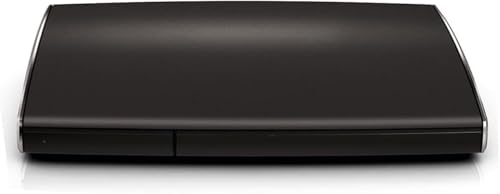
This replacement console targets the Lifestyle SoundTouch 535, 525, 235, and 135 Series I/II/III families rather than the V25/V35 family. It is a console, not a handheld controller, and its input/output ports are intended to connect audio sources and existing system components. That distinction makes it relevant only when the system belongs to one of the named SoundTouch series; the shared 135 name alone does not establish a match. Confirm the exact series designation on the system before choosing it, especially if the system is labeled V35 or AV35.
Bottom line: Pick this only for a matching Lifestyle SoundTouch series.
Bose Lifestyle V35 Home Entertainment System

This is a complete Lifestyle V35 home entertainment system, not a standalone replacement console. It includes a five-speaker surround setup, premium Jewel Cube speakers, an AM/FM tuner, an iPod/iPhone dock, and a remote with LCD display. Guided setup and onscreen messages are part of the system experience. It may be relevant if you are replacing or assembling a whole V35 setup, but it is the wrong component for someone who only needs the control console. Verify that a complete system is what you need rather than a single console.
Bottom line: Choose this only when you need the full V35 system, not just its console.
PZL RC35S2-27 Replacement Remote

This is a handheld infrared remote that names AV35 and V35 among its compatible models, but it does not replace the control console. It is also listed for Lifestyle 525, 235, 135, V25, and 535 systems. The maker says it works without programming or pairing after batteries are inserted and gives a control distance of up to 40 feet. It uses two AA batteries, which are not included. Choose it when the missing part is the handheld remote; console functions and connections require the console itself.
Bottom line: Pick this when you need an AV35-compatible handheld remote.
How to choose a Bose AV35 control console
Start with the system model, not the similar-looking console shape: replacement parts are built for specific Bose Lifestyle families. The V25/V35 console is the closest match in this group because its compatibility includes V35, while the SoundTouch console names a separate set of series. Read the model marking on the receiver or original console and match the full family name. A console and a remote are different components: the console connects to the main receiver, while the remote is handheld. If the label says V35 or AV35, choose a console explicitly naming V35; do not assume that a shared 135 model number makes two generations interchangeable.
Console versus remote versus full system
A control console is the hub for source selection, volume, and system settings; a remote sends commands without replacing that hub. The V35 home entertainment system is a complete collection of components, not a console-only part. Use this quick distinction before comparing model compatibility.
| Need | Choose this type | Check first |
|---|---|---|
| Replace the central controls | Control console | Exact Lifestyle family |
| Replace handheld commands | Infrared remote | Remote model compatibility |
| Replace a full setup | Home entertainment system | Included components |
For an AV35 console problem, a remote may help only if the console still powers and responds; it cannot substitute for a failed console.
Check cable and system fit before installation
The V25/V35 replacement console connects to the main receiver with a cable, and the cable is not included. Keep the existing cable if it is intact and correctly reaches the receiver; otherwise confirm you have the correct connection cable before beginning replacement. Unplug electronic equipment before disconnecting or reconnecting components, and avoid forcing a plug into a port. Bose Lifestyle systems use model-specific component connections, so a similarly sized plug or a console from another family is not proof of compatibility. Check the model label and cable route before removing the original console, then keep the system powered off until connections are secure.
Frequently Asked Questions
Is a Bose AV35 remote the same as its control console?
No. A remote is a handheld controller, while the console connects to the receiver and manages system functions. A remote cannot replace a missing or failed console.
Does the V35 replacement console include its cable?
No, the V25/V35 replacement console connects to the main receiver by cable, and that cable is not included. Check that you have the required cable before starting the replacement.
Can a SoundTouch 135 console work with a V35 system?
Do not assume so from the shared 135 number. The SoundTouch console is specified for SoundTouch 535/525/235/135 Series I/II/III, while the other console names V25 and V35; match the complete system family.
What batteries does the replacement AV35 remote use?
The RC35S2-27 remote uses two AA alkaline batteries, which are not included. The console itself is a separate receiver-connected component.